Bookman
Keeps track of your manga, anime, and light novel progress. Shows anime wallpapers on new tabs.
Bookman란 무엇입니까?
Bookman은(는) Kenny에 의해 개발된 Chrome 확장 프로그램으로, 주요 기능은 "Keeps track of your manga, anime, and light novel progress. Shows anime wallpapers on new tabs."입니다.
확장 프로그램 스크린샷


Bookman 확장 프로그램 CRX 파일 다운로드
크롬 확장 프로그램을 crx 형식으로 다운로드하여 브라우저에 수동으로 설치하거나 crx 파일을 친구들과 공유하여 쉽게 크롬 확장 프로그램을 설치하세요.
확장 프로그램 사용 설명서
                        Start reading manga, watching anime, or reading web novels at your favorite sites. Bookman will keep track of your progress across sites and may notify you when a new chapter or episode is out.

Clicking on the Bookman icon will show you your progress. Clicking on a title takes you back to where you left off. You can also take a look at the currently airing anime on that page.

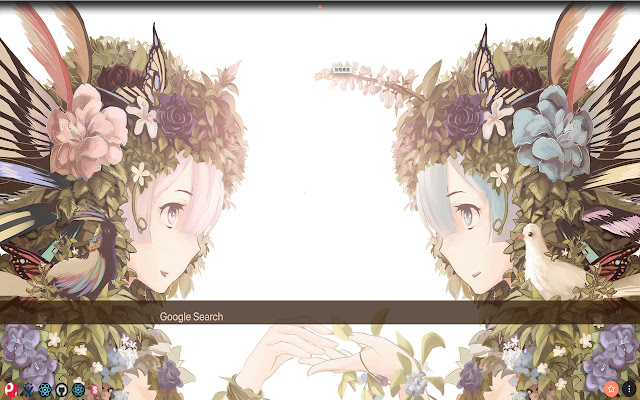
Opening new tab displays an anime wallpaper. Favorite and keep your own collection of anime wallpapers.

Supported Sites:

Anime:
- AnimeFreak
- AnimeSeason
- GoGoAnime
- NW Anime

Manga:
- FunManga
- GogoManga
- KissManga
- MangaFox
- MangaHere
- MangaLife
- MangaPanda
- MangaPark
- MangaReader
- MangaRock
- Webtoons

Light Novel:
- GravityTales
- WuxiaWorld
- Webnovel
확장 프로그램 기본 정보
| 이름 |  Bookman Bookman |
| ID | kfcbhblkokdgpfpnjinjjdaieelkdjdg |
| 공식 URL | https://chrome.google.com/webstore/detail/bookman/kfcbhblkokdgpfpnjinjjdaieelkdjdg |
| 설명 | Keeps track of your manga, anime, and light novel progress. Shows anime wallpapers on new tabs. |
| 파일 크기 | 859 KB |
| 설치 횟수 | 58 |
| 현재 버전 | 0.0.0.47 |
| 최근 업데이트 | 2019-01-14 |
| 출시 날짜 | 2019-01-14 |
| 평점 | 5.00/5 총 2 개의 평점 |
| 개발자 | Kenny |
| 이메일 | [email protected] |
| 결제 유형 | free |
| 지원되는 언어 | en |
| manifest.json | |
{
    "update_url": "https:\/\/clients2.google.com\/service\/update2\/crx",
    "manifest_version": 2,
    "name": "Bookman",
    "short_name": "Bookman",
    "version": "0.0.0.47",
    "description": "Keeps track of your manga, anime, and light novel progress. Shows anime wallpapers on new tabs.",
    "browser_action": {
        "default_title": "Bookman",
        "default_icon": {
            "32": ".\/images\/lavi-128x128.png"
        }
    },
    "icons": {
        "16": ".\/images\/lavi-16.png",
        "32": ".\/images\/lavi-32.png",
        "48": ".\/images\/lavi-48.png",
        "128": ".\/images\/lavi-128x128.png"
    },
    "key": "MIIBIjANBgkqhkiG9w0BAQEFAAOCAQ8AMIIBCgKCAQEAxay+40t4SMk1FSgCfVObiD\/ShqQ4RwptzJ7fSg0VzmPFcJoRKJMnTaWk5qwFykOrMSf8xOfFC8c7tbzqmsahseOSuuH7V1NGmmz56BGHrtE9\/w\/5GRh7hZ9CpBqHbLb5h4C9\/dUAJCC9LDxK4fDPr3zw0Xyo5HFlTMDttwA8J1bZprQ0H3EHhJnf2Bxy\/gm83YAB6wFPBe755qQcL\/9KHibYJdjqWZp+BIC23YZRilbv8qTKDGmhVjREwGhikZvxyv2cK3gi3L+U8oLRhaA0Yuwf5X6E5cWrmsgYEx5weXoSF4q4IqGiQGzB65j41SxszVA4Ygn4F5aGp8ldSxzJIQIDAQAB",
    "background": {
        "scripts": [
            ".\/assets\/commons.js",
            ".\/assets\/background.js"
        ],
        "persistent": false
    },
    "chrome_url_overrides": {
        "newtab": "new_tab.html"
    },
    "permissions": [
        "background",
        "downloads",
        "storage",
        "tabs",
        "topSites",
        "unlimitedStorage",
        "chrome:\/\/favicon\/*",
        "http:\/\/*\/*",
        "https:\/\/*\/*"
    ]
} | |