Colorify (Grab ANY color and get the name!)
Color tool for assistance with colors when browsing!
Colorify (Grab ANY color and get the name!)란 무엇입니까?
Colorify (Grab ANY color and get the name!)은(는) Manzey에 의해 개발된 Chrome 확장 프로그램으로, 주요 기능은 "Color tool for assistance with colors when browsing!"입니다.
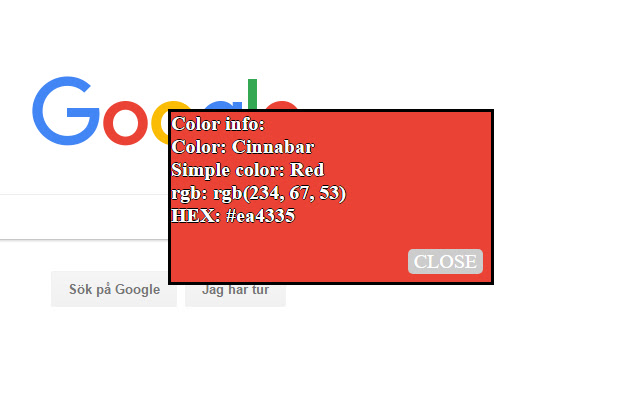
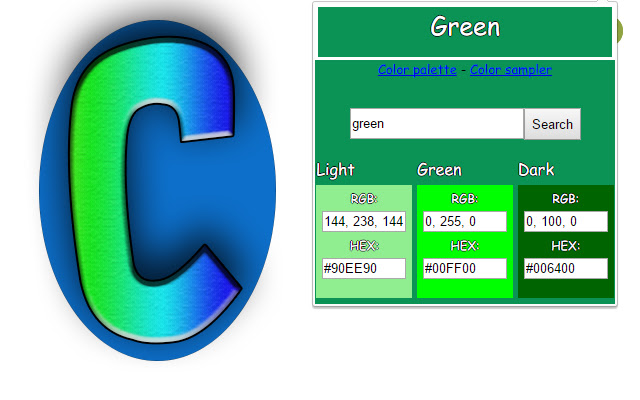
확장 프로그램 스크린샷


Colorify (Grab ANY color and get the name!) 확장 프로그램 CRX 파일 다운로드
크롬 확장 프로그램을 crx 형식으로 다운로드하여 브라우저에 수동으로 설치하거나 crx 파일을 친구들과 공유하여 쉽게 크롬 확장 프로그램을 설치하세요.
확장 프로그램 사용 설명서
                        Welcome to Colorify!

Colorify is a color assistance tool, primarily created to help with people that have some form of colorblindness.

With the help of Colorify you can:
* Select a pixel on any page and get the colors name, RGB & HEX-values
* Easily access and utilize a color palette directly in your browser
* Search for a basic color and get one or two variations of it, with RGB & HEX.

--

Version: 1.0.2

The extension will gradually be improved with new features and color support for searching!

Upcoming:
- Improve color naming system.
- More futuristic layout.

UPDATES:

09/07/2017:
Added support for dynamically scrolling whilst picking a color and overall quality improvements.
확장 프로그램 기본 정보
| 이름 |  Colorify (Grab ANY color and get the name!) Colorify (Grab ANY color and get the name!) |
| ID | khmkbmhcijchhbnbaadifbfjljkgfhhc |
| 공식 URL | https://chrome.google.com/webstore/detail/khmkbmhcijchhbnbaadifbfjljkgfhhc |
| 설명 | Color tool for assistance with colors when browsing! |
| 파일 크기 | 80.61 KB |
| 설치 횟수 | 69 |
| 현재 버전 | 1.0.3 |
| 최근 업데이트 | 2017-11-29 |
| 출시 날짜 | 2017-11-29 |
| 평점 | 3.67/5 총 3 개의 평점 |
| 개발자 | Manzey |
| 이메일 | [email protected] |
| 결제 유형 | free |
| 지원되는 언어 | en-US |
| manifest.json | |
{
    "update_url": "https:\/\/clients2.google.com\/service\/update2\/crx",
    "manifest_version": 2,
    "name": "Colorify (Grab ANY color and get the name!)",
    "description": "Color tool for assistance with colors when browsing!",
    "version": "1.0.3",
    "icons": {
        "16": "icon16.png",
        "48": "icon48.png",
        "128": "icon128.png"
    },
    "browser_action": {
        "default_icon": "icon.png",
        "default_popup": "subpages\/sampler.html"
    },
    "permissions": [
        "activeTab",
        "tabs",
        "storage",
        "notifications"
    ],
    "content_scripts": [
        {
            "matches": [
                "http:\/\/*\/*",
                "https:\/\/*\/*"
            ],
            "js": [
                "tools\/color_classifier.js",
                "tools\/html2canvas.js",
                "js\/samplerDOM.js"
            ]
        }
    ]
} | |