Myles
Compare rewards across various affiliate programs
Myles란 무엇입니까?
Myles은(는) Harsh Gosar에 의해 개발된 Chrome 확장 프로그램으로, 주요 기능은 "Compare rewards across various affiliate programs"입니다.
확장 프로그램 스크린샷

Myles 확장 프로그램 CRX 파일 다운로드
크롬 확장 프로그램을 crx 형식으로 다운로드하여 브라우저에 수동으로 설치하거나 crx 파일을 친구들과 공유하여 쉽게 크롬 확장 프로그램을 설치하세요.
확장 프로그램 사용 설명서
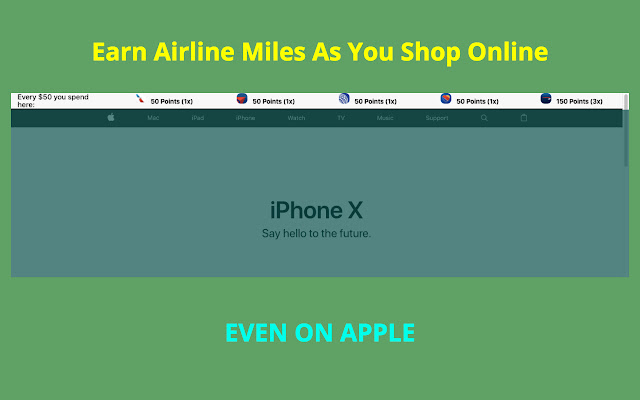
                        Compare your rewards earnings for Ebates, American Airlines, Delta Airlines, United Ailrines, Southwest Airlines shopping portal

[Points updated for Feb 2018]

Disclaimer:
1) This chrome extension is not perfect and I don't guarantee the accuracy of the points depicted.
2) I am not liable for any of your shopping decisions and points received.
3) The airline decides their own policy and it's up to you to read that.
4) Points may not be exact and you agree to confirm them yourself.

You agree to these terms by downloading the extension.

Email your suggestions to [email protected] .
확장 프로그램 기본 정보
| 이름 |  Myles Myles |
| ID | knjgohecfkkdfmhknimolilgfcgmephf |
| 공식 URL | https://chrome.google.com/webstore/detail/myles/knjgohecfkkdfmhknimolilgfcgmephf |
| 설명 | Compare rewards across various affiliate programs |
| 파일 크기 | 1.01 MB |
| 설치 횟수 | 51 |
| 현재 버전 | 1.0.5 |
| 최근 업데이트 | 2018-02-27 |
| 출시 날짜 | 2018-02-27 |
| 평점 | 5.00/5 총 6 개의 평점 |
| 개발자 | Harsh Gosar |
| 이메일 | [email protected] |
| 결제 유형 | free |
| 확장 프로그램 웹 사이트 | http://thatmilesapp.com |
| 개인정보 보호 정책 페이지 URL | http://gosar.us/privacy.html |
| 지원되는 언어 | en-US |
| manifest.json | |
{
    "update_url": "https:\/\/clients2.google.com\/service\/update2\/crx",
    "manifest_version": 2,
    "name": "Myles",
    "description": "Compare rewards across various affiliate programs",
    "version": "1.0.5",
    "icons": {
        "16": "icons\/16.png",
        "48": "icons\/64.png",
        "128": "icons\/128.png"
    },
    "background": {
        "persistent": false,
        "scripts": [
            "background\/location.js",
            "background\/main.js"
        ]
    },
    "browser_action": {
        "default_popup": "popup\/popup.html"
    },
    "permissions": [
        "activeTab",
        "identity",
        "tabs",
        "geolocation",
        "storage"
    ],
    "content_scripts": [
        {
            "matches": [
                "http:\/\/www.amazon.com\/",
                "https:\/\/www.amazon.com\/"
            ],
            "css": [
                "lib\/font.css",
                "content\/amazon-home\/style.css"
            ],
            "js": [
                "lib\/jquery.js",
                "lib\/tether.js",
                "lib\/bootstrap.min.js",
                "content\/amazon-home\/script.js"
            ]
        },
        {
            "matches": [
                "http:\/\/*\/*",
                "https:\/\/*\/*"
            ],
            "exclude_globs": [
                "http:\/\/www.amazon.com\/*",
                "https:\/\/www.amazon.com\/*"
            ],
            "css": [
                "lib\/font.css",
                "header\/style.css"
            ],
            "js": [
                "lib\/jquery.js",
                "lib\/tether.js",
                "lib\/bootstrap.min.js",
                "content\/db\/db_us.js",
                "content\/db\/db_in.js",
                "content\/helper\/domain_extract.js",
                "content\/header\/header_us.js",
                "content\/header\/header_in.js",
                "content\/script.js"
            ]
        },
        {
            "matches": [
                "https:\/\/shop.jetprivilege.com\/",
                "http:\/\/shop.jetprivilege.com\/"
            ],
            "css": [],
            "js": [
                "lib\/jquery.js",
                "content\/jet\/script.js"
            ]
        }
    ],
    "content_security_policy": "script-src 'self' https:\/\/ssl.google-analytics.com; object-src 'self'"
} | |