Sitecore Straight to Datasource
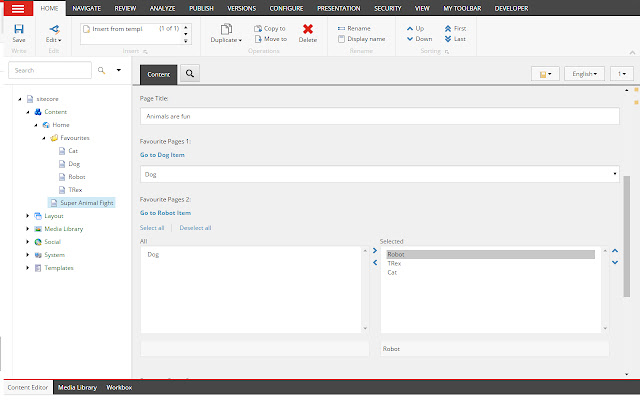
S2D will add a link to the data source of all items in Multilist, Treelist and drop link fields.
Sitecore Straight to Datasource란 무엇입니까?
Sitecore Straight to Datasource은(는) daveleigh에 의해 개발된 Chrome 확장 프로그램으로, 주요 기능은 "S2D will add a link to the data source of all items in Multilist, Treelist and drop link fields."입니다.
확장 프로그램 스크린샷
Sitecore Straight to Datasource 확장 프로그램 CRX 파일 다운로드
크롬 확장 프로그램을 crx 형식으로 다운로드하여 브라우저에 수동으로 설치하거나 crx 파일을 친구들과 공유하여 쉽게 크롬 확장 프로그램을 설치하세요.
확장 프로그램 사용 설명서
                        Sitecore straight to datasource adds new links against TreeList, MultiList and DropLinks allowing you to navigate to the datasource of any option item without having to go to raw values, copy, search etc...!

Click an option to display the link to the datasource.

Sitecore Straight to Datasource is still in beta so please send me any feedback.
확장 프로그램 기본 정보
| 이름 |  Sitecore Straight to Datasource Sitecore Straight to Datasource |
| ID | lecpobmpcnpdhpljfebldoegfonlgjjj |
| 공식 URL | https://chrome.google.com/webstore/detail/sitecore-straight-to-data/lecpobmpcnpdhpljfebldoegfonlgjjj |
| 설명 | S2D will add a link to the data source of all items in Multilist, Treelist and drop link fields. |
| 파일 크기 | 443 KB |
| 설치 횟수 | 45 |
| 현재 버전 | 1.0.0.2 |
| 최근 업데이트 | 2016-07-26 |
| 출시 날짜 | 2016-07-26 |
| 개발자 | daveleigh |
| 결제 유형 | free |
| 지원되는 언어 | en-GB |
| manifest.json | |
{
    "update_url": "https:\/\/clients2.google.com\/service\/update2\/crx",
    "manifest_version": 2,
    "name": "Sitecore Straight to Datasource",
    "short_name": "Sitecore Straight to Datasource",
    "description": "S2D will add a link to the data source of all items in Multilist, Treelist and drop link fields.",
    "version": "1.0.0.2",
    "icons": {
        "16": "images\/icons\/icon-16.png",
        "48": "images\/icons\/icon-48.png",
        "128": "images\/icons\/icon-128.png"
    },
    "background": {
        "persistent": false,
        "page": "views\/background.html"
    },
    "content_scripts": [
        {
            "matches": [
                "*:\/\/*\/sitecore*"
            ],
            "js": [
                "scripts\/inject.js"
            ],
            "runat_at": "document_idle",
            "all_frames": true,
            "css": [
                "styles\/main.css"
            ]
        }
    ],
    "page_action": {
        "default_icon": {
            "19": "images\/icons\/icon-19.png"
        },
        "default_title": "Sitecore S2D"
    },
    "content_security_policy": "script-src 'self' 'unsafe-eval'; object-src 'self'",
    "options_page": "views\/options.html",
    "permissions": [
        "activeTab",
        "contextMenus",
        "storage",
        "tabs",
        "notifications"
    ]
} | |