QR Code Scanner for Google Chrome™
Unlock the QR code world! Scan with ease using files, USB or built-in camera, or screenshots.
QR Code Scanner for Google Chrome™란 무엇입니까?
QR Code Scanner for Google Chrome™은(는) chat.gpt에 의해 개발된 Chrome 확장 프로그램으로, 주요 기능은 "Unlock the QR code world! Scan with ease using files, USB or built-in camera, or screenshots."입니다.
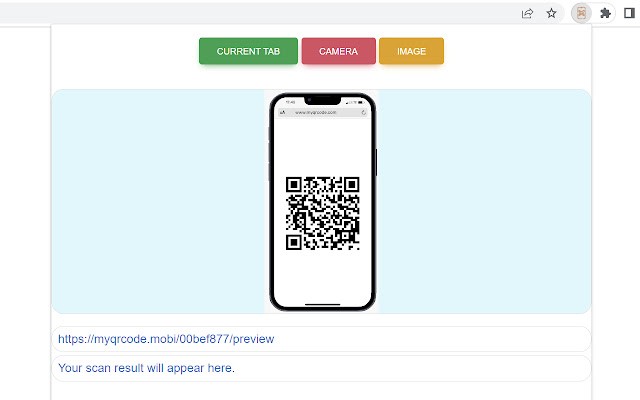
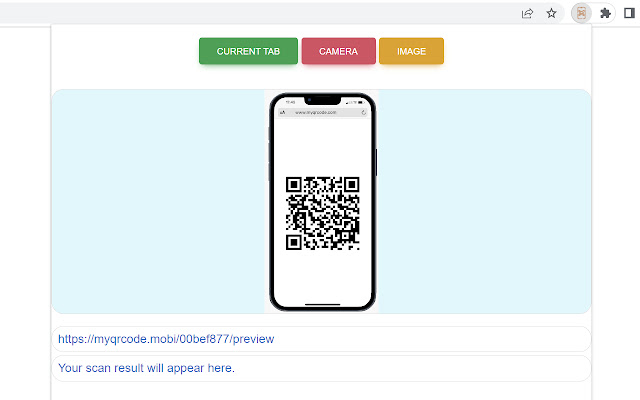
확장 프로그램 스크린샷
QR Code Scanner for Google Chrome™ 확장 프로그램 CRX 파일 다운로드
크롬 확장 프로그램을 crx 형식으로 다운로드하여 브라우저에 수동으로 설치하거나 crx 파일을 친구들과 공유하여 쉽게 크롬 확장 프로그램을 설치하세요.
확장 프로그램 사용 설명서
                        Discover a new way of connecting with the digital world through our QR Code Reader Chrome Extension. This efficient and user-friendly tool unlocks the potential of QR codes in numerous ways, including:

1. File Scanning: No need to print or display QR codes on a separate device. You can conveniently scan QR codes directly from files saved on your computer.

2. Camera Scanning: Whether it's your USB or built-in camera, our extension can read QR codes in real-time. It's quick, easy, and perfect for on-the-go scanning needs.

3. Screen Scanning: If you see a QR code on your screen, you can scan it directly without needing to take a screenshot or save the image. It's efficient, saving you valuable time.

With our QR Code Reader, you have the ability to interact with a world of information in the most convenient way possible. This extension transforms your browser into a versatile QR code scanner, allowing for an immediate connection between the physical and digital worlds. Install now to experience the benefits and revolutionize your browsing experience.
확장 프로그램 기본 정보
| 이름 |  QR Code Scanner for Google Chrome™ QR Code Scanner for Google Chrome™ |
| ID | mcgfkahjhghbjdgiibjfkgpenehdldpg |
| 공식 URL | https://chrome.google.com/webstore/detail/qr-code-scanner-for-googl/mcgfkahjhghbjdgiibjfkgpenehdldpg |
| 설명 | Unlock the QR code world! Scan with ease using files, USB or built-in camera, or screenshots. |
| 파일 크기 | 241 KB |
| 설치 횟수 | 14,264 |
| 현재 버전 | 4.1.3 |
| 최근 업데이트 | 2023-09-20 |
| 출시 날짜 | 2023-06-24 |
| 평점 | 4.56/5 총 9 개의 평점 |
| 개발자 | chat.gpt |
| 이메일 | [email protected] |
| 지원되는 언어 | id,ms,de,en,en-GB,en-US,fil,fr,sw,nl,no,vi,tr,ca,da,et,es,es-419,hr,it,lv,lt,hu,pl,pt-BR,pt-PT,ro,sk,sl,fi,sv,cs,el,sr,bg,ru,uk,iw,fa,mr,hi,bn,gu,ta,te,kn-IN,ml,th,am-ET,ar,zh-CN,zh-TW,ja,ko |
| manifest.json | |
{
    "update_url": "https:\/\/clients2.google.com\/service\/update2\/crx",
    "name": "__MSG_appName__",
    "description": "__MSG_appDesc__",
    "manifest_version": 3,
    "version": "4.1.3",
    "icons": {
        "512": "icons\/qr-code-1.png",
        "256": "icons\/qr-code-2.png",
        "128": "icons\/qr-code-3.png",
        "64": "icons\/qr-code-4.png",
        "32": "icons\/qr-code-5.png",
        "24": "icons\/qr-code-6.png",
        "16": "icons\/qr-code-7.png"
    },
    "action": {
        "default_icon": "icons\/qr-code-1.png",
        "default_popup": "html2\/go-popup.html"
    },
    "background": {
        "service_worker": "js\/worker.js"
    },
    "default_locale": "en",
    "web_accessible_resources": [
        {
            "resources": [
                "*"
            ],
            "matches": [
                "*:\/\/*\/*"
            ]
        }
    ],
    "host_permissions": [
        "*:\/\/*\/*"
    ],
    "content_scripts": [
        {
            "matches": [
                "http:\/\/*\/*",
                "https:\/\/*\/*"
            ],
            "js": [
                "js\/content.js"
            ],
            "run_at": "document_end",
            "match_about_blank": true
        }
    ],
    "permissions": [
        "storage",
        "webRequest",
        "activeTab"
    ]
} | |