Loadzen Recorder
Create scenarios in your browser for load tests at http://www.loadzen.com.
Loadzen Recorder란 무엇입니까?
Loadzen Recorder은(는) http://loadzen.com에 의해 개발된 Chrome 확장 프로그램으로, 주요 기능은 "Create scenarios in your browser for load tests at http://www.loadzen.com."입니다.
확장 프로그램 스크린샷
Loadzen Recorder 확장 프로그램 CRX 파일 다운로드
크롬 확장 프로그램을 crx 형식으로 다운로드하여 브라우저에 수동으로 설치하거나 crx 파일을 친구들과 공유하여 쉽게 크롬 확장 프로그램을 설치하세요.
확장 프로그램 사용 설명서
                        The Loadzen Recorder will allow you to record your browser session into a scenario that can be included in load tests that you run on http://www.Loadzen.com

** Changes for v2.6 **
- App is now fully compatible with the new Loadzen platform and API
- App now ensures user is logged in to save scenarios

** Changes for v2.5 **
- Fixed minor bug with POST tracking with arbitrary port numbers

** Changes for v2.4 **
- Bug fixes
- Tracks multi-domain scenarios better for greater flexibility


Key features include:
1. Complete journey recording
2. Form entry and capture
3. AJAX POST and GET tracking
4. Dynamic data submission (in XHR, POST and GET actions)
5. Scenario tweaking post-recording
6. *NEW* Random dynamic data submission

*Complete Journey Recording*

The new Loadzen Recorder will track your entire user journey from start to finish, including any data that is passed along the journey through GET and POST requests. We’ve improved the recording system to be more accurate and collect the most detailed breakdown of your user journey, ensuring that our testing system can emulate your user journeys as effectively as possible.

*Form Entry and Capture*

Our new form entry and capture system improves on previous versions by fully supporting forms that are submitted via JavaScript instead of tradition form submissions, with full support for both GET and POST form data capture.

*Ajax POST and GET tracking*

To make our recorder even better, it now fully support dynamic web applications and AJAX-enabled sites. Our new and improved recorder will automatically track XHR Requests (Ajax) while you browse and interact with your app, both GET and POST Ajax traffic is fully tracked.

*Dynamic Data Submission*

To build on the capability of being able to test dynamic web apps, we’ve broadened the entire Loadzen Load Testing service to allow you to upload random sample data that will be passed along and used within your scenario. Need to test an order form? Want to see how your site search responds to complex queries? You can attach sample data to your scenario actions right from inside the plug-in with just a few clicks.

*Random Data Generation*
If you require unique data for your scenario actions that can't be duplicated in any way (which can occur with a CSV Dynamic Test) then our new Dynamic Random Data generation feature is for you.

Loadzen now allows you to generate strings, paragraphs, sentences, integers and floats as part of your scenario actions. This random data is generated on-the-fly to guarantee randomness so you can really put your dynamic site elements to the test.

*Scenario tweaking post-record*

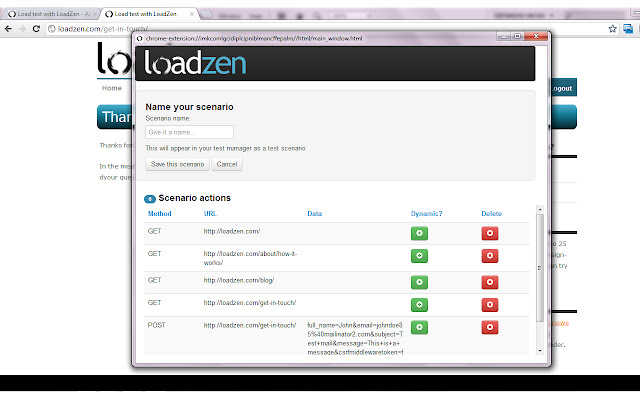
Instead of just submitting your scenario to our servers for testing, the plug-in will show the full record log, allowing to remove items from the list and to attach dynamic data sets to recorded actions before you send it through to our servers for testing.
확장 프로그램 기본 정보
| 이름 |  Loadzen Recorder Loadzen Recorder |
| ID | mgbkjhjjjiffgggjegpajnfikoeajeej |
| 공식 URL | https://chrome.google.com/webstore/detail/loadzen-recorder/mgbkjhjjjiffgggjegpajnfikoeajeej |
| 설명 | Create scenarios in your browser for load tests at http://www.loadzen.com. |
| 파일 크기 | 177 KB |
| 설치 횟수 | 198 |
| 현재 버전 | 2.6.1 |
| 최근 업데이트 | 2014-03-10 |
| 출시 날짜 | 2014-03-10 |
| 평점 | 2.60/5 총 10 개의 평점 |
| 개발자 | http://loadzen.com |
| 결제 유형 | free |
| 확장 프로그램 웹 사이트 | http://loadzen.com/plugin/loadzen-recorder/ |
| 도움말 페이지 URL | http://localhost:8000/plugin/loadzen-recorder/ |
| 지원되는 언어 | en-GB |
| manifest.json | |
{
    "update_url": "https:\/\/clients2.google.com\/service\/update2\/crx",
    "name": "Loadzen Recorder",
    "version": "2.6.1",
    "manifest_version": 2,
    "description": "Create scenarios in your browser for load tests at http:\/\/www.loadzen.com.",
    "browser_action": {
        "default_icon": "icons\/icon48.png",
        "default_popup": "html\/popup.html"
    },
    "icons": {
        "16": "icons\/icon16.png",
        "48": "icons\/icon48.png",
        "128": "icons\/icon128.png"
    },
    "permissions": [
        "*:\/\/*\/*",
        "webRequest",
        "tabs",
        "storage"
    ],
    "content_scripts": [
        {
            "matches": [
                "*:\/\/*\/*"
            ],
            "run_at": "document_start",
            "js": [
                "js\/libs\/jquery.min.js",
                "js\/content.js"
            ]
        }
    ],
    "background": {
        "scripts": [
            "js\/libs\/underscore-min.js",
            "js\/libs\/backbone-min.js",
            "js\/libs\/backbone-localstorage.js",
            "js\/lz-models.js",
            "js\/background.js"
        ]
    },
    "sandbox": {
        "pages": [
            "main_window.html",
            "popup.html",
            "background.html"
        ]
    },
    "web_accessible_resources": [
        "js\/track_xhr.js"
    ]
} | |