ServePHP
Get your PHP on
ServePHP란 무엇입니까?
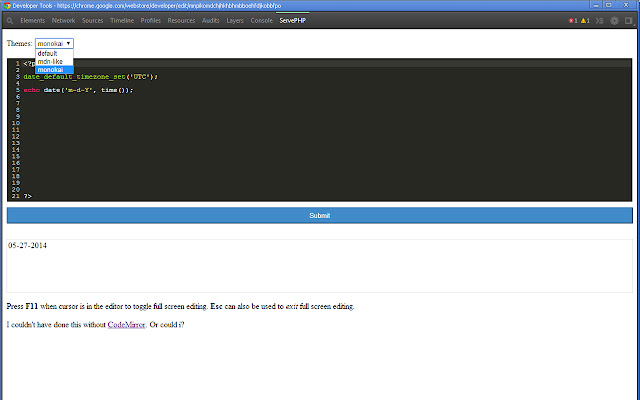
ServePHP은(는) http://123easywebsites.com에 의해 개발된 Chrome 확장 프로그램으로, 주요 기능은 "Get your PHP on"입니다.
확장 프로그램 스크린샷


ServePHP 확장 프로그램 CRX 파일 다운로드
크롬 확장 프로그램을 crx 형식으로 다운로드하여 브라우저에 수동으로 설치하거나 crx 파일을 친구들과 공유하여 쉽게 크롬 확장 프로그램을 설치하세요.
확장 프로그램 사용 설명서
                        ServePHP is a PHP code tester right in your Chrome DevTools.

HOW TO
  Right click on a webpage and select "Inspect Element" menu option
  Inside the DevTools Click on the "ServePHP" menu item
  Write your php code and click Submit
  Use F11 to toggle full screen mode

FEATURES
  Multiple editor themes to choose from
  Full screen editing
  PHP version up to date
  Matching Brackets
  Code highlight

DISCLAIMER
  I made this extension for my own needs, so there will be bugs.
  I an NOT responsible for any damages
  This app is under MIT licence

FOR DEVELOPERS
  The code for this app can be found https://github.com/patrioticcow/ServePHP

Let me know how this extension works for you.

v 0.1.4 on 12-17-2015
  -- PHP 7 release

v 0.1.4
  -- Bug Fix

v 0.1.3
  -- Initial release
  -- PHP version 5.5.11

CREDIT to http://codemirror.net

other good online PHP testers are:
 -- http://writecodeonline.com/php
 -- http://sandbox.onlinephpfunctions.com
확장 프로그램 기본 정보
| 이름 |  ServePHP ServePHP |
| ID | mnpikomdchjhkhbhmbboehfdjkobbfpo |
| 공식 URL | https://chrome.google.com/webstore/detail/servephp/mnpikomdchjhkhbhmbboehfdjkobbfpo |
| 설명 | Get your PHP on |
| 파일 크기 | 641 KB |
| 설치 횟수 | 682 |
| 현재 버전 | 0.1.4 |
| 최근 업데이트 | 2019-03-08 |
| 출시 날짜 | 2019-03-08 |
| 평점 | 4.00/5 총 3 개의 평점 |
| 개발자 | http://123easywebsites.com |
| 이메일 | [email protected] |
| 결제 유형 | free |
| 개인정보 보호 정책 페이지 URL | http://massinflux.com |
| 지원되는 언어 | en |
| manifest.json | |
{
    "update_url": "https:\/\/clients2.google.com\/service\/update2\/crx",
    "name": "ServePHP",
    "version": "0.1.4",
    "manifest_version": 2,
    "description": "Get your PHP on",
    "icons": {
        "16": "images\/icon-16.png",
        "19": "images\/icon-19.png",
        "38": "images\/icon-38.png",
        "128": "images\/icon-128.png"
    },
    "default_locale": "en",
    "background": {
        "scripts": [
            "scripts\/chromereload.js",
            "scripts\/background.js"
        ]
    },
    "devtools_page": "devtools.html",
    "content_scripts": [
        {
            "matches": [
                "http:\/\/*\/*",
                "https:\/\/*\/*"
            ],
            "css": [
                "styles\/main.css"
            ],
            "js": [
                "scripts\/contentscript.js"
            ],
            "run_at": "document_end",
            "all_frames": false
        }
    ],
    "permissions": [
        "tabs",
        "history",
        "management",
        "http:\/\/*\/*",
        "https:\/\/*\/*"
    ]
} | |