Register invitation code assistant
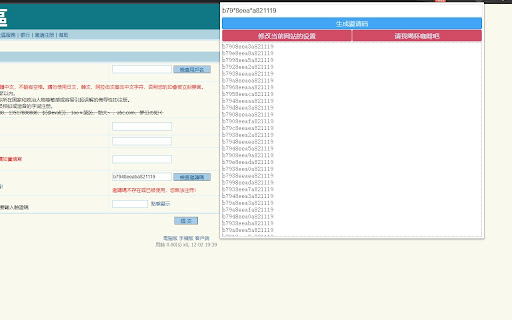
Automatically detect the invitation code in the page, and generate a list based on the mask to assist detection
Register invitation code assistant란 무엇입니까?
Register invitation code assistant은(는) Hoothin에 의해 개발된 Chrome 확장 프로그램으로, 주요 기능은 "Automatically detect the invitation code in the page, and generate a list based on the mask to assist detection"입니다.
확장 프로그램 스크린샷

Register invitation code assistant 확장 프로그램 CRX 파일 다운로드
크롬 확장 프로그램을 crx 형식으로 다운로드하여 브라우저에 수동으로 설치하거나 crx 파일을 친구들과 공유하여 쉽게 크롬 확장 프로그램을 설치하세요.
확장 프로그램 사용 설명서
                        Extract the invitation code on the web page(as most bbs which need invitation code to register) automatically, detect the invitation code list manually filled in and check the validity automatically.

* Optional: The image verification code needs to be filled with the identification interface, which can be replaced by a local server below. If you don’t set the interface, you need to manually enter the image verification code.
github.com/hoothin/imgCodeCheck

Custom mask rules for bullet boxes:
*: The asterisk will be replaced with 0-9 and a-f 16 characters
[abcd]: will be replaced with a, b, c, d respectively
[x-y]: will be replaced with all characters between x and y
Multiple masks are supported

Sample invitation code:
12*d means 121d 122d...12fd
ec[1-3]f means ec1f ec2f ec3f
f9[1a-cf]0a means f910a f9a0a f9b0a f9c0a f9f0a
확장 프로그램 기본 정보
| 이름 |  Register invitation code assistant Register invitation code assistant |
| ID | ndmlflmkmohjoechiepcpflbljadmemp |
| 공식 URL | https://chromewebstore.google.com/detail/register-invitation-code/ndmlflmkmohjoechiepcpflbljadmemp |
| 설명 | Automatically detect the invitation code in the page, and generate a list based on the mask to assist detection |
| 파일 크기 | 137 KB |
| 설치 횟수 | 810 |
| 현재 버전 | 1.0.14 |
| 최근 업데이트 | 2023-12-24 |
| 출시 날짜 | 2021-12-02 |
| 평점 | 4.20/5 총 5 개의 평점 |
| 개발자 | Hoothin |
| 이메일 | [email protected] |
| 결제 유형 | free |
| 지원되는 언어 | en,zh-CN |
| manifest.json | |
{
    "update_url": "https:\/\/clients2.google.com\/service\/update2\/crx",
    "name": "__MSG_extName__",
    "version": "1.0.14",
    "default_locale": "en",
    "manifest_version": 3,
    "description": "__MSG_extDescription__",
    "icons": {
        "128": "icon\/icon128.png",
        "16": "icon\/icon16.png",
        "48": "icon\/icon48.png"
    },
    "action": {
        "default_icon": "favicon.png",
        "default_title": "__MSG_extName__",
        "default_popup": "popup.html"
    },
    "content_scripts": [
        {
            "js": [
                "js\/geneCode.js",
                "js\/content.js"
            ],
            "matches": [
                "*:\/\/*\/*"
            ]
        }
    ],
    "permissions": [
        "tabs",
        "storage",
        "notifications"
    ],
    "host_permissions": [
        "*:\/\/*\/*"
    ],
    "background": {
        "service_worker": "js\/background.js"
    }
} | |