New Tab
speed dial with websites catalog, that helps people to bookmark desired websites and also find popular.
New Tab란 무엇입니까?
New Tab은(는) http://oho.ge에 의해 개발된 Chrome 확장 프로그램으로, 주요 기능은 "speed dial with websites catalog, that helps people to bookmark desired websites and also find popular."입니다.
확장 프로그램 스크린샷
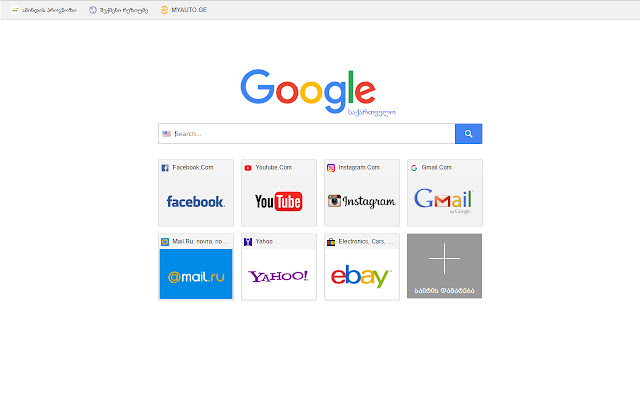

New Tab 확장 프로그램 CRX 파일 다운로드
크롬 확장 프로그램을 crx 형식으로 다운로드하여 브라우저에 수동으로 설치하거나 crx 파일을 친구들과 공유하여 쉽게 크롬 확장 프로그램을 설치하세요.
확장 프로그램 사용 설명서
                        The Speed Dial expansion changes standard browser tab to beautiful new tab page with Visual Bookmarks.

The main advantage of Speed Dial in comparison with the standard page is that you can add the links to the websites of your choice so you always have direct access to them. And also you can sort the icons of already added links.

Our expansion also adds the search bar. The page layout can be changed in the expansion settings, you can also change the search engine used for the search bar.

Thanks to "import and export" function your visual bookmarks will not be lost after browser or system reinstallation. This function also allows you to transfer your saved bookmarks to other computers with New Tab Page installed instead of standard page.
확장 프로그램 기본 정보
| 이름 |  New Tab New Tab |
| ID | nfgknffehbeogamfmkjbmhiifppdljoa |
| 공식 URL | https://chrome.google.com/webstore/detail/new-tab/nfgknffehbeogamfmkjbmhiifppdljoa |
| 설명 | speed dial with websites catalog, that helps people to bookmark desired websites and also find popular. |
| 파일 크기 | 14.73 KB |
| 설치 횟수 | 570 |
| 현재 버전 | 0.1 |
| 최근 업데이트 | 2018-01-17 |
| 출시 날짜 | 2018-01-17 |
| 평점 | 3.67/5 총 3 개의 평점 |
| 개발자 | http://oho.ge |
| 이메일 | [email protected] |
| 결제 유형 | free |
| 확장 프로그램 웹 사이트 | http://tab.oho.ge |
| 도움말 페이지 URL | http://tab.oho.ge/faq |
| 지원되는 언어 | en |
| manifest.json | |
{
    "update_url": "https:\/\/clients2.google.com\/service\/update2\/crx",
    "chrome_url_overrides": {
        "newtab": "tab.html"
    },
    "description": "speed dial with websites catalog, that helps people to bookmark desired websites and also find popular.",
    "icons": {
        "128": "i\/icon128.png",
        "16": "i\/icon16.png",
        "19": "i\/icon19.png",
        "32": "i\/icon32.png",
        "48": "i\/icon48.png"
    },
    "manifest_version": 2,
    "name": "New Tab",
    "short_name": "New Tab - Speed Deals",
    "version": "0.1",
    "web_accessible_resources": [
        "icon48.png"
    ]
} | |