Wobbly Button
What Wobbly can do? Wobbly helps boost the productivity of your IT team and cut expenses! Main features of https://time.wobbly.me/:…
Wobbly Button란 무엇입니까?
Wobbly Button은(는) lazy-ants에 의해 개발된 Chrome 확장 프로그램으로, 주요 기능은 "What Wobbly can do? Wobbly helps boost the productivity of your IT team and cut expenses! Main features of https://time.wobbly.me/:…"입니다.
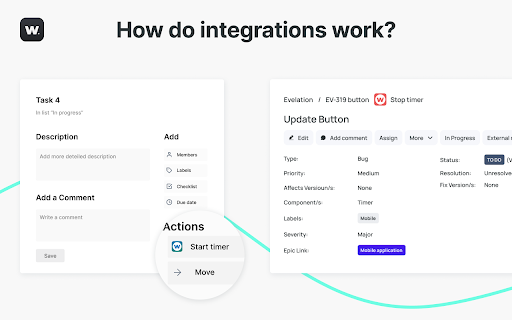
확장 프로그램 스크린샷




Wobbly Button 확장 프로그램 CRX 파일 다운로드
크롬 확장 프로그램을 crx 형식으로 다운로드하여 브라우저에 수동으로 설치하거나 crx 파일을 친구들과 공유하여 쉽게 크롬 확장 프로그램을 설치하세요.
확장 프로그램 사용 설명서
                        What Wobbly can do?
Wobbly helps boost the productivity of your IT team and cut expenses!
Main features of https://time.wobbly.me/:
◦ resources planning
◦ time tracking
◦ integration Jira & GitLab
◦ invoicing
◦ reporting


How do I set up the Wobbly button? (Guide with images – cсылка на новую документацию)
1. Click "Add to Chrome".
2. Log in to Wobbly from the extension menu or https://time.wobbly.me/timer  (tab can be closed)
3. Under settings give the extension permissions to inject itself into the services you desire
4. Tracking time by:
- clicking the integration button on supported web tools
- highlight the text on any tool/website, click the right mouse, and choose “Begin timer with the highlight description.” (work with any website/app)

The list of supported tools:
◦ Atlassian.com / Jira
◦ Atlassian.net / Jira
◦ Github
◦ Trello
◦ Gitlab
◦ Asana
◦ Redmine
◦ Basecamp
◦ Google Docs
◦ Salesforce Lightning
확장 프로그램 기본 정보
| 이름 |  Wobbly Button Wobbly Button |
| ID | nmnmeepomkgoejdjmgegdpaafhafjkkg |
| 공식 URL | https://chromewebstore.google.com/detail/wobbly-button/nmnmeepomkgoejdjmgegdpaafhafjkkg |
| 설명 | What Wobbly can do? Wobbly helps boost the productivity of your IT team and cut expenses! Main features of https://time.wobbly.me/:… |
| 파일 크기 | 429 KB |
| 설치 횟수 | 103 |
| 현재 버전 | 1.2.5 |
| 최근 업데이트 | 2023-12-02 |
| 출시 날짜 | 2020-05-05 |
| 평점 | 4.86/5 총 7 개의 평점 |
| 개발자 | lazy-ants |
| 이메일 | [email protected] |
| 결제 유형 | free |
| 확장 프로그램 웹 사이트 | https://wobbly.me/ |
| 지원되는 언어 | en |
| manifest.json | |
{
    "update_url": "https:\/\/clients2.google.com\/service\/update2\/crx",
    "name": "Wobbly Button",
    "version": "1.2.5",
    "manifest_version": 2,
    "permissions": [
        "tabs",
        "notifications",
        "*:\/\/*.wobbly.me\/*",
        "storage",
        "contextMenus"
    ],
    "optional_permissions": [
        "*:\/\/*\/"
    ],
    "background": {
        "scripts": [
            "background.js"
        ]
    },
    "web_accessible_resources": [
        "images\/*.svg",
        "images\/*.png"
    ],
    "icons": {
        "16": "images\/favicon.png",
        "48": "images\/Wobbly_logo_48.png",
        "128": "images\/Wobbly_logo_128.png"
    },
    "browser_action": {
        "default_popup": "index.html"
    },
    "options_ui": {
        "page": "settings.html",
        "open_in_tab": true
    },
    "content_security_policy": "script-src 'self' 'sha256-GgRxrVOKNdB4LrRsVPDSbzvfdV4UqglmviH9GoBJ5jk='; object-src 'self'"
} | |