Blueticks
Be in the know what happens to your emails after you press send with real-time feedback when any of the recipient opens your email.
Blueticks란 무엇입니까?
Blueticks은(는) https://blueticks.io에 의해 개발된 Chrome 확장 프로그램으로, 주요 기능은 "Be in the know what happens to your emails after you press send with real-time feedback when any of the recipient opens your email."입니다.
확장 프로그램 스크린샷
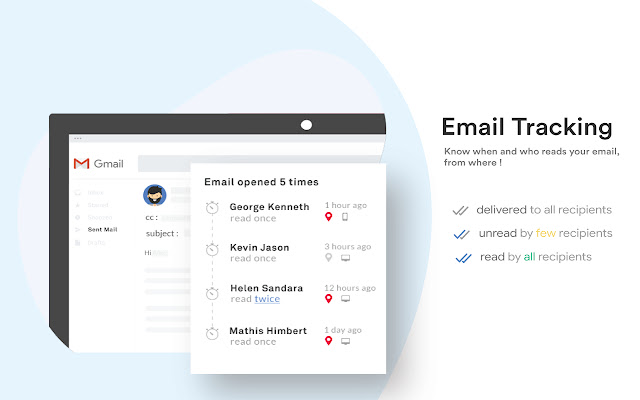

Blueticks 확장 프로그램 CRX 파일 다운로드
크롬 확장 프로그램을 crx 형식으로 다운로드하여 브라우저에 수동으로 설치하거나 crx 파일을 친구들과 공유하여 쉽게 크롬 확장 프로그램을 설치하세요.
확장 프로그램 사용 설명서
                        Blueticks is the best free e-Mail tracking tool for both Gmail & GSuite.

Key features :
  - Per recipient Free Email tracking in Gmail
  - Attachment tracking
  - Link tracking
  - e-Mail Templates
  - Real-time alert notifications
  - e-Mail Performance dashboard

Who would need this ?
Anybody who wants to know when their e-Mails are read by recipients.

What per recipient tracking means ?
Blueticks tracks all individual recipients and notifies the sender in real time whenever the mail is read, attachements downloaded, links clicked.

What is send later mean ?
You can schedule your email to be sent on future date and time.
확장 프로그램 기본 정보
| 이름 |  Blueticks Blueticks |
| ID | nohebfplolhpgcgkkhokcfbgnnbdlaaf |
| 공식 URL | https://chrome.google.com/webstore/detail/blueticks/nohebfplolhpgcgkkhokcfbgnnbdlaaf |
| 설명 | Be in the know what happens to your emails after you press send with real-time feedback when any of the recipient opens your email. |
| 파일 크기 | 976 KB |
| 설치 횟수 | 445 |
| 현재 버전 | 1.0.7 |
| 최근 업데이트 | 2019-04-03 |
| 출시 날짜 | 2019-03-30 |
| 평점 | 4.00/5 총 4 개의 평점 |
| 개발자 | https://blueticks.io |
| 이메일 | [email protected] |
| 결제 유형 | free |
| 확장 프로그램 웹 사이트 | https://blueticks.io |
| 개인정보 보호 정책 페이지 URL | https://adyog.com/privacy-policy |
| 지원되는 언어 | en-US |
| manifest.json | |
{
"update_url": "https:\/\/clients2.google.com\/service\/update2\/crx",
"manifest_version": 2,
"icons": {
"16": "images\/icon16.png",
"48": "images\/icon48.png",
"128": "images\/icon.png"
},
"browser_action": {
"default_icon": "images\/icon.png"
},
"background": {
"scripts": [
"js\/config.js",
"js\/background.js"
]
},
"content_scripts": [
{
"matches": [
"https:\/\/mail.google.com\/*",
"https:\/\/inbox.google.com\/*",
"https:\/\/us-central1-blueticks-v2.cloudfunctions.net\/*",
"https:\/\/maps.googleapis.com\/",
"https:\/\/blueticks.io\/*",
"https:\/\/sm.blueticks.io\/*",
"https:\/\/app.blueticks.io\/*",
"https:\/\/maps.googleapis.com\/*"
],
"js": [
"js\/inboxsdk.js",
"js\/config.js",
"js\/blueticks.js"
],
"css": [
"css\/flatpickr.min.css",
"css\/common.css"
],
"run_at": "document_start"
}
],
"permissions": [
"background",
"notifications",
"tabs",
"https:\/\/mail.google.com\/",
"https:\/\/www.inboxsdk.com\/",
"https:\/\/inbox.google.com\/",
"https:\/\/blueticks.io\/*",
"https:\/\/app.blueticks.io\/*",
"https:\/\/sm.blueticks.io\/*",
"*:\/\/us-central1-blueticks-v2.cloudfunctions.net\/*",
"https:\/\/maps.googleapis.com\/",
"https:\/\/fcm.googleapis.com\/*",
"*:\/\/*.google.com\/",
" | |