d.tech Canvas Login Fixer
Remembers if you're a parent or a student when logging into d.tech Canvas.
d.tech Canvas Login Fixer란 무엇입니까?
d.tech Canvas Login Fixer은(는) https://canvascbl.com에 의해 개발된 Chrome 확장 프로그램으로, 주요 기능은 "Remembers if you're a parent or a student when logging into d.tech Canvas."입니다.
확장 프로그램 스크린샷
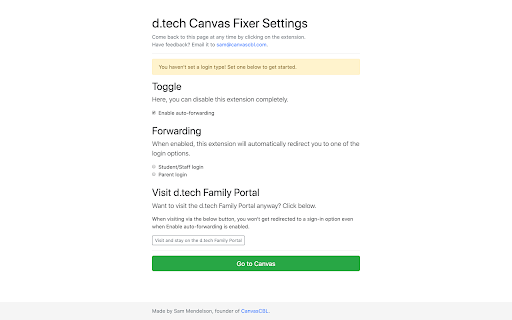
d.tech Canvas Login Fixer 확장 프로그램 CRX 파일 다운로드
크롬 확장 프로그램을 crx 형식으로 다운로드하여 브라우저에 수동으로 설치하거나 crx 파일을 친구들과 공유하여 쉽게 크롬 확장 프로그램을 설치하세요.
확장 프로그램 사용 설명서
                        d.tech Canvas Login Fixer skips the "d.tech Family Portal" when signing into Canvas.

Once you tell it if you're a parent or a student, it will remember that and forward you to the proper sign-in automatically. No more new tabs.

If you decide that you want to visit the d.tech Family Portal once in a while, there's an option to make a one-off visit in the settings. You don't need to remove the extension just for that.

This extension, while built by the CanvasCBL team (Sam Mendelson), sends no information to CanvasCBL. This extension is open-source, too-- check out the code at go.canvascbl.com/canvas-fixer/repo.
확장 프로그램 기본 정보
| 이름 |  d.tech Canvas Login Fixer d.tech Canvas Login Fixer |
| ID | npjdknakkabpjbnfibjhbmfpaenkbdcd |
| 공식 URL | https://chromewebstore.google.com/detail/dtech-canvas-login-fixer/npjdknakkabpjbnfibjhbmfpaenkbdcd |
| 설명 | Remembers if you're a parent or a student when logging into d.tech Canvas. |
| 파일 크기 | 81.03 KB |
| 설치 횟수 | 196 |
| 현재 버전 | 0.3 |
| 최근 업데이트 | 2020-11-23 |
| 출시 날짜 | 2020-05-25 |
| 개발자 | https://canvascbl.com |
| 이메일 | [email protected] |
| 결제 유형 | free |
| 확장 프로그램 웹 사이트 | https://canvascbl.com/canvas-fixer/ |
| 도움말 페이지 URL | https://go.canvascbl.com/help/contact |
| 개인정보 보호 정책 페이지 URL | https://docs.google.com/document/d/1zDNkYl15A6Rgmn0eDMqwFopXGLAazSQmsS17Jo0TNX8/pub |
| 지원되는 언어 | en-US |
| manifest.json | |
{
    "update_url": "https:\/\/clients2.google.com\/service\/update2\/crx",
    "manifest_version": 2,
    "name": "d.tech Canvas Login Fixer",
    "version": "0.3",
    "description": "Remembers if you're a parent or a student when logging into d.tech Canvas.",
    "author": "iamtheyammer",
    "background": {
        "scripts": [
            "background.bundle.js"
        ],
        "persistent": true
    },
    "permissions": [
        "storage",
        "tabs",
        "webRequest",
        "*:\/\/sites.google.com\/dtechhs.org\/dtechfamilyportal\/*",
        "https:\/\/go.canvascbl.com\/",
        "https:\/\/canvascbl.com\/",
        "https:\/\/canvascbl.github.io\/"
    ],
    "browser_action": [],
    "icons": {
        "16": "img\/16px.png",
        "48": "img\/48px.png",
        "128": "img\/128px.png",
        "256": "img\/256px.png"
    }
} | |