Manilla - Auto Login
Manilla Auto Login
Manilla - Auto Login란 무엇입니까?
Manilla - Auto Login은(는) https://manilla.com에 의해 개발된 Chrome 확장 프로그램으로, 주요 기능은 "Manilla Auto Login"입니다.
확장 프로그램 스크린샷


Manilla - Auto Login 확장 프로그램 CRX 파일 다운로드
크롬 확장 프로그램을 crx 형식으로 다운로드하여 브라우저에 수동으로 설치하거나 crx 파일을 친구들과 공유하여 쉽게 크롬 확장 프로그램을 설치하세요.
확장 프로그램 사용 설명서
                        Overview
To use the Auto Login extension, you will need to have a Manilla account. Sign up at http://www.manilla.com.

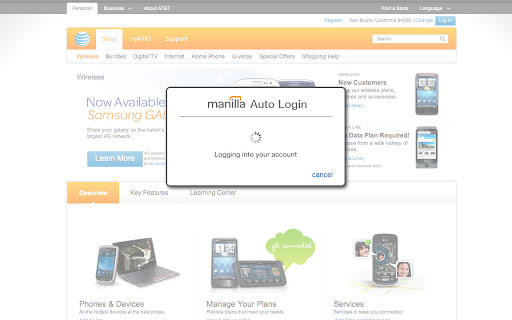
The Manilla Auto Login extension allows you to seamlessly access some linked accounts without entering a password, making it even faster and easier to manage all of your accounts. Once you've installed it, just click the "pay bill" or "go to site" button from an account page.

The Auto Login extension is available for the Chrome, Firefox, Internet Explorer, and Safari browsers. Mobile browsers such as iOS and Android are not supported. The extension must be installed separately for each browser and computer on which you use Manilla.

Security
Your login information is communicated securely to the Auto Login extension using AES 256-bit encryption (the strongest version of a standard endorsed by the National Institute of Standards and Technology). None of your information is stored in the Auto Login extension itself. The Auto Login extension is not recommended for use with public computers.
확장 프로그램 기본 정보
| 이름 |  Manilla - Auto Login Manilla - Auto Login |
| ID | ofnmjkalkfignhmkhohdaipkbcchbmca |
| 공식 URL | https://chromewebstore.google.com/detail/manilla-auto-login/ofnmjkalkfignhmkhohdaipkbcchbmca |
| 설명 | Manilla Auto Login |
| 파일 크기 | 2.4 MB |
| 설치 횟수 | 3,779 |
| 현재 버전 | 2.0.28 |
| 최근 업데이트 | 2013-09-12 |
| 출시 날짜 | 2013-09-11 |
| 평점 | 3.45/5 총 11 개의 평점 |
| 개발자 | https://manilla.com |
| 결제 유형 | free |
| 확장 프로그램 웹 사이트 | http://www.manilla.com/ |
| 도움말 페이지 URL | https://www.manilla.com/what-is-manilla/faq/ |
| 지원되는 언어 | id,ms,de,en-GB,en-US,fr,nl,vi,tr,ca,da,et,es,es-419,hr,it,lv,lt,hu,pl,pt-BR,pt-PT,ro,sk,sl,fi,sv,cs,el,sr,bg,ru,uk,iw,mr,hi,bn,gu,ta,kn-IN,ml,th,ar,zh-CN,zh-TW,ja,ko |
| manifest.json | |
{
    "update_url": "https:\/\/clients2.google.com\/service\/update2\/crx",
    "background": {
        "page": "background.html"
    },
    "manifest_version": 2,
    "name": "Manilla - Auto Login ",
    "version": "2.0.28",
    "description": "Manilla Auto Login",
    "icons": {
        "16": "images\/icon16.png",
        "32": "images\/icon32.png",
        "48": "images\/icon48.png",
        "128": "images\/icon128.png"
    },
    "default_locale": "en_US",
    "permissions": [
        "tabs",
        "http:\/\/*.manilla.com\/*",
        "https:\/\/*.manilla.com\/*",
        "http:\/\/*.lastpass.com\/*",
        "https:\/\/*.lastpass.com\/*"
    ],
    "content_scripts": [
        {
            "matches": [
                "http:\/\/*\/*",
                "https:\/\/*\/*",
                "file:\/\/\/*"
            ],
            "js": [
                "onloadwff.js"
            ],
            "all_frames": true,
            "run_at": "document_start"
        },
        {
            "matches": [
                "http:\/\/*\/*",
                "https:\/\/*\/*"
            ],
            "js": [
                "csp.js"
            ],
            "all_frames": true,
            "run_at": "document_start"
        }
    ]
} | |