Multiple File Download
This extension enables the user to select all the documents present in the web page for download.
Multiple File Download란 무엇입니까?
Multiple File Download은(는) prabhushan에 의해 개발된 Chrome 확장 프로그램으로, 주요 기능은 "This extension enables the user to select all the documents present in the web page for download."입니다.
확장 프로그램 스크린샷

Multiple File Download 확장 프로그램 CRX 파일 다운로드
크롬 확장 프로그램을 crx 형식으로 다운로드하여 브라우저에 수동으로 설치하거나 crx 파일을 친구들과 공유하여 쉽게 크롬 확장 프로그램을 설치하세요.
확장 프로그램 사용 설명서
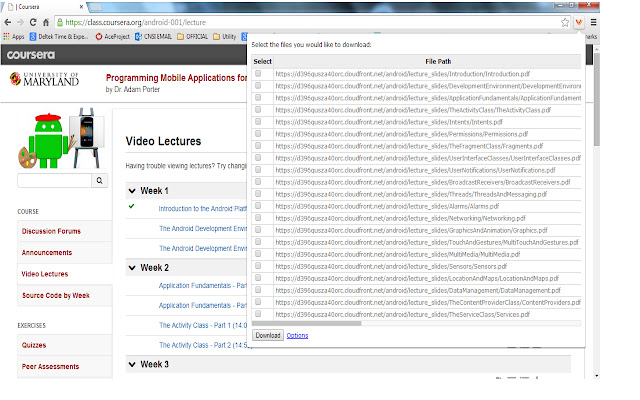
                        Many times we encounter situations where multiple files need to be downloaded from a web page. For example, user can download all the files in Coursera lessons in one shot. This would save lot of time.

Multiple file downloader facilitates the same. It scans through the web page and displays all the files, which user can download. User can select multiple files and click download.
It allows user to customize what file extensions should be downloaded in the web page.The user can also add custom extensions using the options page. User can also decide whether files need to be downloaded to default folder set in Chrome browser or prompt for each file.
BENEFITS FOR END USERS
1) Multi Select files in one go
2) Customise and also add your own extensions to download
KNOWN ISSUE
The extension scans for hyperlink across the web page. As per the design of the page, the hyperlink can be a button or image or both. So there are chances that duplicate links can appear on the extension.
확장 프로그램 기본 정보
| 이름 |  Multiple File Download Multiple File Download |
| ID | opncjdadngnekakilfcgjlgbmekljdbm |
| 공식 URL | https://chrome.google.com/webstore/detail/multiple-file-download/opncjdadngnekakilfcgjlgbmekljdbm |
| 설명 | This extension enables the user to select all the documents present in the web page for download. |
| 파일 크기 | 154 KB |
| 설치 횟수 | 10,000 |
| 현재 버전 | 1.3 |
| 최근 업데이트 | 2014-09-09 |
| 출시 날짜 | 2014-09-09 |
| 평점 | 2.56/5 총 55 개의 평점 |
| 개발자 | prabhushan |
| 결제 유형 | free |
| 지원되는 언어 | en-US |
| manifest.json | |
{
"update_url": "https:\/\/clients2.google.com\/service\/update2\/crx",
"manifest_version": 2,
"name": "Multiple File Download",
"description": "This extension enables the user to select all the documents present in the web page for download. ",
"short_name": "File download",
"version": "1.3",
"background": {
"page": "popup.html"
},
"icons": {
"16": "sonicdownload.png",
"48": "sonicdownload.png",
"128": "sonicdownload.png"
},
"permissions": [
"tabs",
" | |