Add to Bookmax
Add Bookmarks to your Bookmax Account.
Wat is Add to Bookmax?
Add to Bookmax is een Chrome-extensie ontwikkeld door http://my.bookmax.net, en de belangrijkste functie is "Add Bookmarks to your Bookmax Account.".
Extensie Screenshots
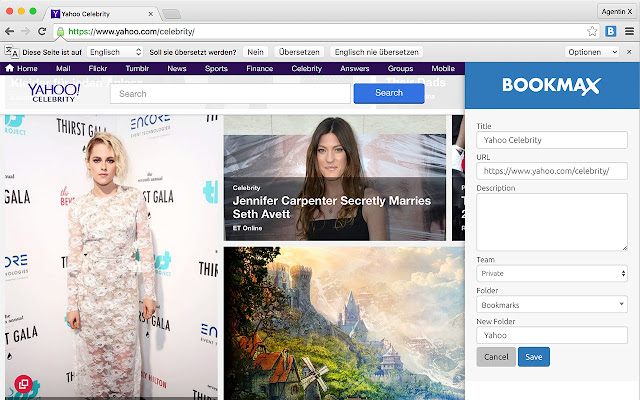

Download het CRX-bestand van de extensie Add to Bookmax
Download Add to Bookmax-extensiebestanden in crx-indeling, installeer Chrome-extensies handmatig in de browser of deel de crx-bestanden met vrienden om Chrome-extensies eenvoudig te installeren.
Instructies voor het Gebruik van de Extensie
                        Add Bookmarks to your Bookmax Account.

Bookmax.net is an online bookmark manager to store bookmarks, lists, contacts, memos, notes and more online.

Share all your bookmarks and data in teams!

Features:
Hierarchical Folders
Easy drag and drop handling
Search function for all your entries
Search bookmarks
Favorites
3 kind of bookmarks views with thumbshots or favicons

There is also an App for your Bookmax bookmark list, right here on the Chrome App Store.

Datenschutzerklärung: https://www.bookmax.net/datenschutzerklaerung
Privacy Policy: https://www.bookmax.net/privacy-policy
Basisinformatie over de Extensie
| Naam |  Add to Bookmax Add to Bookmax |
| ID | aebecfmhkadmehbpadebjabkhidmcdcm |
| Officiële URL | https://chrome.google.com/webstore/detail/add-to-bookmax/aebecfmhkadmehbpadebjabkhidmcdcm |
| Beschrijving | Add Bookmarks to your Bookmax Account. |
| Bestandsgrootte | 777 KB |
| Aantal Installaties | 922 |
| Huidige Versie | 3.2 |
| Laatst Bijgewerkt | 2020-02-29 |
| Publicatiedatum | 2020-02-29 |
| Beoordeling | 4.76/5 Totaal 17 Beoordelingen |
| Ontwikkelaar | http://my.bookmax.net |
| [email protected] | |
| Betalingswijze | free |
| Extensiewebsite | http://www.bookmax.net |
| URL van de Privacybeleid Pagina | https://www.bookmax.net/datenschutzerklaerung |
| Ondersteunde Talen | en |
| manifest.json | |
{
"update_url": "https:\/\/clients2.google.com\/service\/update2\/crx",
"manifest_version": 2,
"name": "Add to Bookmax",
"description": "Add Bookmarks to your Bookmax Account.",
"version": "3.2",
"browser_action": {
"default_icon": "icon-32.png"
},
"icons": {
"32": "icon-32.png",
"128": "icon-128.png"
},
"background": {
"scripts": [
"background.js"
]
},
"content_scripts": [
{
"matches": [
" | |