ApiRequest.io Ajax Capture Debugging Tool
Capture API Requests and Responses in browser and share via a link. Makes collaborative debugging and issue solving easier.
Wat is ApiRequest.io Ajax Capture Debugging Tool?
ApiRequest.io Ajax Capture Debugging Tool is een Chrome-extensie ontwikkeld door https://www.moesif.com, en de belangrijkste functie is "Capture API Requests and Responses in browser and share via a link. Makes collaborative debugging and issue solving easier.".
Extensie Screenshots
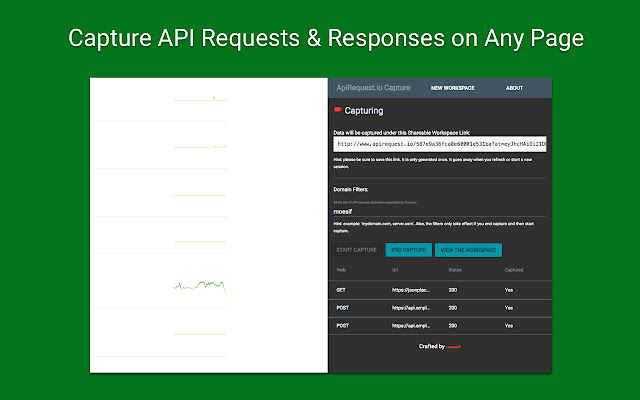

Download het CRX-bestand van de extensie ApiRequest.io Ajax Capture Debugging Tool
Download ApiRequest.io Ajax Capture Debugging Tool-extensiebestanden in crx-indeling, installeer Chrome-extensies handmatig in de browser of deel de crx-bestanden met vrienden om Chrome-extensies eenvoudig te installeren.
Instructies voor het Gebruik van de Extensie
ApiRequest.io Capture This extension allows you to capture AJAX HTTP requests and responses made to an API from any websites such as from a React single-page app. View the REST API traffic in a workspace which is saved for 30-days. The workspace URL is shareable like a Google Doc link and protected by a time-limited signed URL. Background: When debugging single-page apps by inspecting API network traffic, often developers need to manually copy/paste the JSON payload to share with others for help on API behavior. The ApiRequest.io capture tool allows you to do that much easier. What makes this tool different? Compared to other API request captures tools like Postman Interceptor, we actually captures the entire API call (i.e. both request and response and full headers and body) and make it easily sharable. About the latest update: now this chrome extension works with some website that had stricter policy. Note: If you are a developer for the website that you want to capture all API calls (aka Ajax calls), the most robust solutions is to use our free browser SDK: https://github.com/Moesif/moesif-browser-js You will need a free Moesif account, but the features and queries are much more advanced. You only need the below code snippet ```
```
About Moesif:
Moesif (https://www.moesif.com) enables API teams at UPS, Radar, Deloitte, and others to deeply understand customer API usage and ship better API products with user-centric API analytics and monitoring, which enables you to:
- Understand customer API usage with user behavior analytics.
- Debug issues quickly with high-cardinality API logs and metrics.
- Get alerted of problems that impact customers.
- Track API KPIs with custom dashboards.
- Trigger behavioral emails that keep customers informed.
- Detect and Block API threats and abuse including OWASP Top 10 API threats. Basisinformatie over de Extensie
| Naam |  ApiRequest.io Ajax Capture Debugging Tool ApiRequest.io Ajax Capture Debugging Tool |
| ID | aeojbjinmmhjenohjehcidmappiodhjm |
| Officiële URL | https://chrome.google.com/webstore/detail/apirequestio-ajax-capture/aeojbjinmmhjenohjehcidmappiodhjm |
| Beschrijving | Capture API Requests and Responses in browser and share via a link. Makes collaborative debugging and issue solving easier. |
| Bestandsgrootte | 943 KB |
| Aantal Installaties | 2,000 |
| Huidige Versie | 0.0.5 |
| Laatst Bijgewerkt | 2020-10-16 |
| Publicatiedatum | 2017-04-30 |
| Beoordeling | 4.67/5 Totaal 12 Beoordelingen |
| Ontwikkelaar | https://www.moesif.com |
| [email protected] | |
| Betalingswijze | free |
| Extensiewebsite | https://www.apirequest.io/debugging-tools |
| Ondersteunde Talen | en-US |
| manifest.json | |
{
"update_url": "https:\/\/clients2.google.com\/service\/update2\/crx",
"version": "0.0.5",
"name": "ApiRequest.io Ajax Capture Debugging Tool",
"short_name": "Api Capture",
"manifest_version": 2,
"description": "Capture API Requests and Responses in browser and share via a link. Makes collaborative debugging and issue solving easier.",
"browser_action": {
"default_title": "ApiRequest.io Capture",
"default_popup": "popup.html"
},
"icons": {
"16": "img\/icon-16.png",
"48": "img\/icon-48.png",
"128": "img\/icon-128.png"
},
"web_accessible_resources": [
"inject.html",
"js\/inject.bundle.js",
"js\/contentscript.bundle.js"
],
"background": {
"page": "background.html"
},
"permissions": [
"storage",
"tabs",
"activeTab",
"webRequest",
" | |