Top Visited Websites
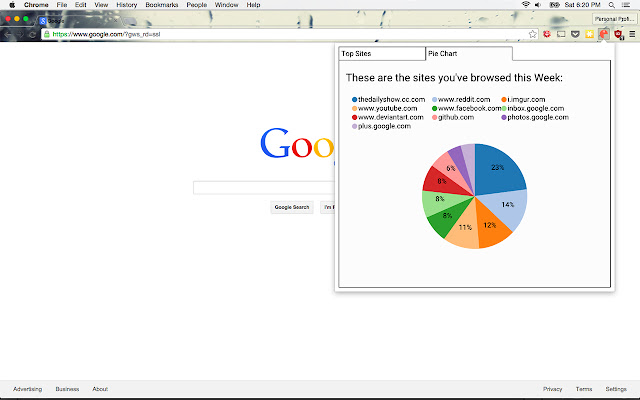
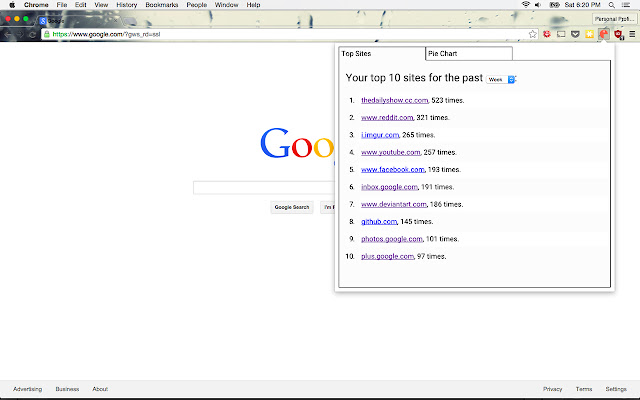
This extension shows your top 10 most visited websites for the past week, month, or year.
Wat is Top Visited Websites?
Top Visited Websites is een Chrome-extensie ontwikkeld door phelan.vendeville, en de belangrijkste functie is "This extension shows your top 10 most visited websites for the past week, month, or year.".
Extensie Screenshots
Download het CRX-bestand van de extensie Top Visited Websites
Download Top Visited Websites-extensiebestanden in crx-indeling, installeer Chrome-extensies handmatig in de browser of deel de crx-bestanden met vrienden om Chrome-extensies eenvoudig te installeren.
Instructies voor het Gebruik van de Extensie
                        This project creates a chrome extension that uses the Chrome History API to pull out websites you've visited during a time-slice. It groups these websites together by domain, and displays the count numbers in tabular and graph format.

The main point of this project is to learn something while making a useful thing. Thanks to Ethan for the codereviews and Jon for the sweet icon.
Basisinformatie over de Extensie
| Naam |  Top Visited Websites Top Visited Websites |
| ID | biiandepjhmnifgimjpoadmmmfblgogb |
| Officiële URL | https://chrome.google.com/webstore/detail/top-visited-websites/biiandepjhmnifgimjpoadmmmfblgogb |
| Beschrijving | This extension shows your top 10 most visited websites for the past week, month, or year. |
| Bestandsgrootte | 108 KB |
| Aantal Installaties | 153 |
| Huidige Versie | 1.0 |
| Laatst Bijgewerkt | 2015-08-01 |
| Publicatiedatum | 2015-08-01 |
| Beoordeling | 4.00/5 Totaal 2 Beoordelingen |
| Ontwikkelaar | phelan.vendeville |
| Betalingswijze | free |
| Ondersteunde Talen | en |
| manifest.json | |
{
    "update_url": "https:\/\/clients2.google.com\/service\/update2\/crx",
    "manifest_version": 2,
    "name": "Top Visited Websites",
    "description": "This extension shows your top 10 most visited websites for the past week, month, or year.",
    "version": "1.0",
    "browser_action": {
        "default_icon": "img\/icon128.png",
        "default_popup": "popup.html"
    },
    "icons": {
        "16": "img\/icon16.png",
        "48": "img\/icon48.png",
        "128": "img\/icon128.png"
    },
    "content_security_policy": "script-src 'self' https:\/\/www.google-analytics.com; object-src 'self'",
    "permissions": [
        "activeTab",
        "history"
    ]
} | |