Keyspace
Keyspace wallet browser add-on
Wat is Keyspace?
Keyspace is een Chrome-extensie ontwikkeld door Keyspace, en de belangrijkste functie is "Keyspace wallet browser add-on".
Extensie Screenshots


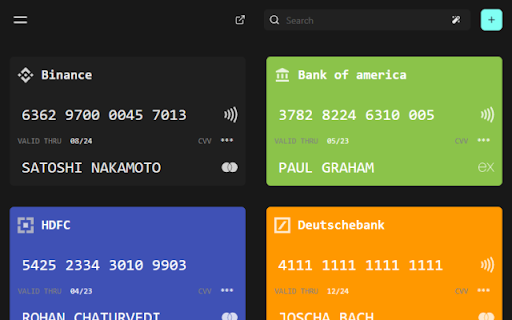


Download het CRX-bestand van de extensie Keyspace
Download Keyspace-extensiebestanden in crx-indeling, installeer Chrome-extensies handmatig in de browser of deel de crx-bestanden met vrienden om Chrome-extensies eenvoudig te installeren.
Instructies voor het Gebruik van de Extensie
                        A secure self-custodial cryptographic wallet for your digital life.

Backup and save passwords & two-factor authentication codes, take notes with Markdown support and store your credit & debit cards for later use. Seamlessly login from the Keyspace mobile app with just a QR code scan — all of this is backed by secure end-to-end encryption, accessible via a 12 word recovery phrase that only you possess.

· Zero-knowledge encryption: your vault is encrypted with a key that never leaves your device.

· Strong and fast cryptography: XChaCha20-Poly1305 with 192-bit nonce for encryption and Ed25519 to authenticate with servers.

· Privacy: No third-party analytics, crashlytics or information-leaking API calls are made. Even the icons are fetched locally.
Basisinformatie over de Extensie
| Naam |  Keyspace Keyspace |
| ID | bjfjelfighjlolhfmpamnfgkkdeeihdn |
| Officiële URL | https://chromewebstore.google.com/detail/keyspace/bjfjelfighjlolhfmpamnfgkkdeeihdn |
| Beschrijving | Keyspace wallet browser add-on |
| Bestandsgrootte | 6.32 MB |
| Aantal Installaties | 28 |
| Huidige Versie | 1.0.5 |
| Laatst Bijgewerkt | 2023-01-20 |
| Publicatiedatum | 2023-01-15 |
| Ontwikkelaar | Keyspace |
| [email protected] | |
| Betalingswijze | free |
| Extensiewebsite | https://keyspace.cloud |
| Help Pagina-URL | https://keyspace.cloud |
| URL van de Privacybeleid Pagina | https://keyspace.cloud/privacy |
| Ondersteunde Talen | en-US |
| manifest.json | |
{
    "update_url": "https:\/\/clients2.google.com\/service\/update2\/crx",
    "name": "Keyspace",
    "description": "Keyspace wallet browser add-on",
    "version": "1.0.5",
    "manifest_version": 3,
    "icons": {
        "16": ".\/images\/favicon-16x16.png",
        "32": ".\/images\/favicon-32x32.png",
        "192": ".\/images\/favicon-192x192.png",
        "512": ".\/images\/favicon-512x512.png"
    },
    "action": {
        "default_popup": "index.html",
        "default_icon": {
            "16": ".\/images\/favicon-16x16.png",
            "32": ".\/images\/favicon-32x32.png",
            "192": ".\/images\/favicon-192x192.png",
            "512": ".\/images\/favicon-512x512.png"
        }
    },
    "background": {
        "service_worker": "background.js"
    },
    "permissions": [
        "tabs",
        "activeTab",
        "storage",
        "unlimitedStorage",
        "clipboardRead",
        "clipboardWrite",
        "http:\/\/*\/*",
        "https:\/\/*\/*"
    ],
    "commands": {
        "_execute_browser_action": {
            "suggested_key": {
                "default": "Ctrl+Period"
            },
            "description": "keyboard call"
        }
    }
} | |