Map Marklet
Bookmarklet for Google Maps
Wat is Map Marklet?
Map Marklet is een Chrome-extensie ontwikkeld door isachenx, en de belangrijkste functie is "Bookmarklet for Google Maps".
Extensie Screenshots

Download het CRX-bestand van de extensie Map Marklet
Download Map Marklet-extensiebestanden in crx-indeling, installeer Chrome-extensies handmatig in de browser of deel de crx-bestanden met vrienden om Chrome-extensies eenvoudig te installeren.
Instructies voor het Gebruik van de Extensie
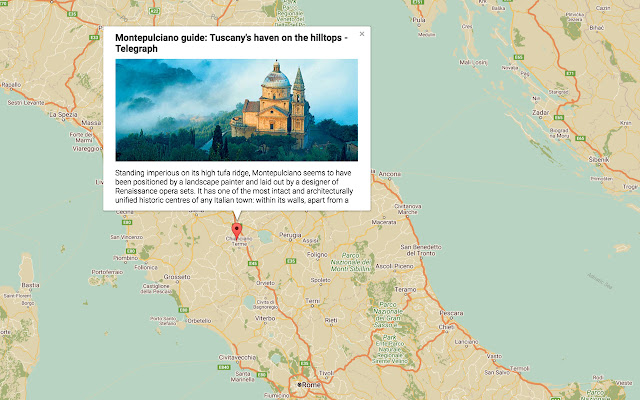
                        Ever find yourself bookmarking hundreds of pages while planning for a holiday, only to realise you have no idea what location on a map these pages refer to? Map Marklet lets you bookmark links to a map.

To focus the map:
The default is set to Iceland, to focus the map, type the place you want to visit into the autocomplete field and select from the drop down menu.

To add a marker:
Navigate to the page you want to bookmark. Open the popup and add a marker to the map either via the autocomplete field or directly clicking on the map.

To delete a marker:
Click on the marker in the popup to delete it.
Basisinformatie over de Extensie
| Naam |  Map Marklet Map Marklet |
| ID | ceehjgibajdnifanffaekamboianchbp |
| Officiële URL | https://chrome.google.com/webstore/detail/map-marklet/ceehjgibajdnifanffaekamboianchbp |
| Beschrijving | Bookmarklet for Google Maps |
| Bestandsgrootte | 641 KB |
| Aantal Installaties | 61 |
| Huidige Versie | 0.0.0.1 |
| Laatst Bijgewerkt | 2017-12-05 |
| Publicatiedatum | 2017-12-05 |
| Beoordeling | 5.00/5 Totaal 3 Beoordelingen |
| Ontwikkelaar | isachenx |
| [email protected] | |
| Betalingswijze | free |
| Ondersteunde Talen | en |
| manifest.json | |
{
    "update_url": "https:\/\/clients2.google.com\/service\/update2\/crx",
    "manifest_version": 2,
    "name": "Map Marklet",
    "description": "Bookmarklet for Google Maps",
    "version": "0.0.0.1",
    "background": {
        "scripts": [
            "event.js"
        ],
        "persistent": true
    },
    "browser_action": {
        "default_icon": {
            "19": "images\/19.png",
            "38": "images\/38.png"
        },
        "default_title": "Map Marklet",
        "default_popup": "popup.html"
    },
    "icons": {
        "16": "images\/16.png",
        "48": "images\/48.png",
        "128": "images\/128.png"
    },
    "content_security_policy": "script-src 'self' https:\/\/maps.googleapis.com https:\/\/connect.facebook.net\/en_US\/all.js; object-src 'self'",
    "content_scripts": [
        {
            "matches": [
                "*:\/\/*\/*"
            ],
            "css": [],
            "js": [
                "content.js"
            ]
        }
    ],
    "web_accessible_resources": [
        ".\/main.html"
    ],
    "permissions": [
        "tabs",
        "identity",
        "*:\/\/*.google.com\/*",
        "storage"
    ],
    "oauth2": {
        "client_id": "658325221633-v2aurmcset7hj6ajq803cv438k7cf5ti.apps.googleusercontent.com",
        "scopes": [
            "profile"
        ]
    }
} | |