Wariz - Whatsapp™ Automation Assistant
Whatsapp™ Automation Assistant
Wat is Wariz - Whatsapp™ Automation Assistant?
Wariz - Whatsapp™ Automation Assistant is een Chrome-extensie ontwikkeld door http://geniusapes.co, en de belangrijkste functie is "Whatsapp™ Automation Assistant".
Extensie Screenshots
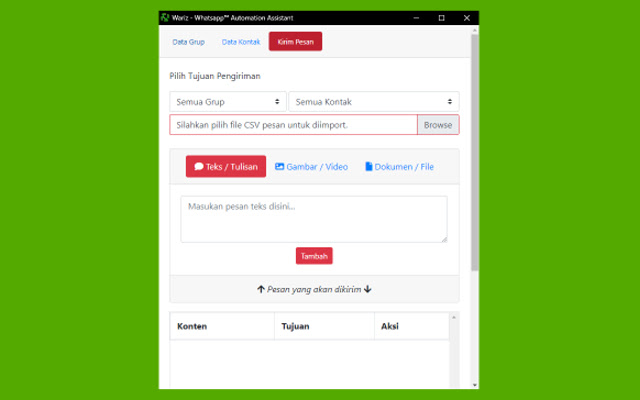
Download het CRX-bestand van de extensie Wariz - Whatsapp™ Automation Assistant
Download Wariz - Whatsapp™ Automation Assistant-extensiebestanden in crx-indeling, installeer Chrome-extensies handmatig in de browser of deel de crx-bestanden met vrienden om Chrome-extensies eenvoudig te installeren.
Instructies voor het Gebruik van de Extensie
                        Automating your whatsapp by sending bulk message and manage contacts

1. Open web.whatsapp.com and extension
2. Add some contacts
3. Plan some messages
4. Click start process
5. Wait until done

- THIS IS A DEMO FOR CODE CANYON PRODUCT -
Basisinformatie over de Extensie
| Naam |  Wariz - Whatsapp™ Automation Assistant Wariz - Whatsapp™ Automation Assistant |
| ID | cppchfdjfagoinajnloekmjjocgmkobm |
| Officiële URL | https://chrome.google.com/webstore/detail/wariz-whatsapp-automation/cppchfdjfagoinajnloekmjjocgmkobm |
| Beschrijving | Whatsapp™ Automation Assistant |
| Bestandsgrootte | 242 KB |
| Aantal Installaties | 52 |
| Huidige Versie | 1.0.0 |
| Laatst Bijgewerkt | 2019-11-02 |
| Publicatiedatum | 2019-11-02 |
| Beoordeling | 3.33/5 Totaal 3 Beoordelingen |
| Ontwikkelaar | http://geniusapes.co |
| [email protected] | |
| Betalingswijze | free |
| Help Pagina-URL | https://www.facebook.com/groups/2286393421682620/?ref=bookmarks |
| URL van de Privacybeleid Pagina | https://bionicprogram.com/m/agreement/tos |
| Ondersteunde Talen | id |
| manifest.json | |
{
    "update_url": "https:\/\/clients2.google.com\/service\/update2\/crx",
    "name": "Wariz - Whatsapp\u2122 Automation Assistant",
    "description": "Whatsapp\u2122 Automation Assistant",
    "version": "1.0.0",
    "manifest_version": 2,
    "icons": {
        "16": "icons\/icon_16.png",
        "32": "icons\/icon_32.png",
        "48": "icons\/icon_48.png",
        "128": "icons\/icon_128.png"
    },
    "browser_action": {
        "default_title": "Whatsapp\u2122 Automation Assistant"
    },
    "permissions": [
        "unlimitedStorage",
        "storage",
        "tabs",
        "activeTab",
        "webNavigation",
        "webRequest",
        "webRequestBlocking",
        "*:\/\/web.whatsapp.com\/*",
        "identity",
        "identity.email"
    ],
    "background": {
        "scripts": [
            "background.js"
        ],
        "persistent": true
    }
} | |