百科跳转助手
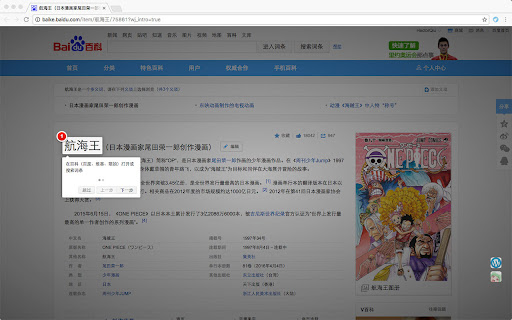
快速跳转百科词条(支持百度百科、萌娘百科、维基百科)。
Wat is 百科跳转助手?
百科跳转助手 is een Chrome-extensie ontwikkeld door hectorqiu, en de belangrijkste functie is "快速跳转百科词条(支持百度百科、萌娘百科、维基百科)。".
Extensie Screenshots


Download het CRX-bestand van de extensie 百科跳转助手
Download 百科跳转助手-extensiebestanden in crx-indeling, installeer Chrome-extensies handmatig in de browser of deel de crx-bestanden met vrienden om Chrome-extensies eenvoudig te installeren.
Instructies voor het Gebruik van de Extensie
                        「百科跳转助手」一个帮你快速切换百科词条的插件。

在中文百科世界,由于不同使用人群、内容管理策略、政策监管等差异,同一词条的内容无法在同一站点完整收录。

要得到完整内容,需要在多个百科站点间来回查阅,每次切换都要经历:
“搜索引擎-词条输入-选择其他百科的结果”… 这种过程往往需要重复多次... (งᵒ̌皿ᵒ̌)ง⁼³₌₃

「百科跳转助手」将为你解决这种缓慢、无趣的操作 !(ෆ ͒•∘̬• ͒)◞

功能:
在百度百科、维基百科(中文)、萌娘百科(中文)任意一个网站内,提供:
自动匹配,直接打开新标签进入其他百科相同词条。

改动:
### v1.2.7(2021-07-15)
- 优化逻辑
- 去除不必要权限

### v1.2.6(2021-05-16)
- 适配萌娘百科新域名

### v1.2.4 (2021-03-12)
- 修复一些不影响功能的 BUG
Basisinformatie over de Extensie
| Naam |  百科跳转助手 百科跳转助手 |
| ID | djhjkmggfgidpiinahpiappbahdfgmfo |
| Officiële URL | https://chromewebstore.google.com/detail/%E7%99%BE%E7%A7%91%E8%B7%B3%E8%BD%AC%E5%8A%A9%E6%89%8B/djhjkmggfgidpiinahpiappbahdfgmfo |
| Beschrijving | 快速跳转百科词条(支持百度百科、萌娘百科、维基百科)。 |
| Bestandsgrootte | 173 KB |
| Aantal Installaties | 234 |
| Huidige Versie | 1.2.7 |
| Laatst Bijgewerkt | 2021-07-15 |
| Publicatiedatum | 2019-04-06 |
| Beoordeling | 5.00/5 Totaal 4 Beoordelingen |
| Ontwikkelaar | hectorqiu |
| [email protected] | |
| Betalingswijze | free |
| Ondersteunde Talen | zh-CN |
| manifest.json | |
{
    "update_url": "https:\/\/clients2.google.com\/service\/update2\/crx",
    "manifest_version": 2,
    "name": "\u767e\u79d1\u8df3\u8f6c\u52a9\u624b",
    "description": "\u5feb\u901f\u8df3\u8f6c\u767e\u79d1\u8bcd\u6761\uff08\u652f\u6301\u767e\u5ea6\u767e\u79d1\u3001\u840c\u5a18\u767e\u79d1\u3001\u7ef4\u57fa\u767e\u79d1\uff09\u3002",
    "version": "1.2.7",
    "icons": {
        "16": "static\/img\/icon_16.png",
        "48": "static\/img\/icon_48.png",
        "128": "static\/img\/icon_128.png"
    },
    "background": {
        "persistent": false,
        "scripts": [
            "static\/vendors\/jquery\/jquery-3.1.1.js",
            "static\/js\/utils.js",
            "static\/js\/bg.js"
        ]
    },
    "content_scripts": [
        {
            "matches": [
                "http:\/\/baike.baidu.com\/*",
                "https:\/\/baike.baidu.com\/*",
                "http:\/\/*.wikipedia.org\/*",
                "https:\/\/*.wikipedia.org\/*",
                "http:\/\/*.moegirl.org.cn\/*",
                "https:\/\/*.moegirl.org.cn\/*"
            ],
            "js": [
                "static\/vendors\/jquery\/jquery-3.1.1.js",
                "static\/vendors\/intro.js\/intro.js",
                "static\/js\/utils.js",
                "static\/js\/content.js"
            ],
            "css": [
                "static\/vendors\/intro.js\/introjs.min.css",
                "static\/css\/content.css"
            ]
        }
    ],
    "browser_action": {
        "default_icon": "static\/img\/icon.png",
        "default_popup": "popup.html",
        "default_title": "\u767e\u79d1\u8df3\u8f6c\u52a9\u624b"
    },
    "permissions": [
        "https:\/\/hm.baidu.com\/",
        "http:\/\/hm.baidu.com\/",
        "http:\/\/*.baidu.com\/",
        "https:\/\/*.baidu.com\/",
        "http:\/\/*.wikipedia.org\/",
        "https:\/\/*.wikipedia.org\/",
        "http:\/\/*.moegirl.org\/",
        "https:\/\/*.moegirl.org\/",
        "http:\/\/*.moegirl.org.cn\/",
        "https:\/\/*.moegirl.org.cn\/"
    ],
    "web_accessible_resources": [
        "static\/img\/*.jpg",
        "static\/img\/*.png"
    ]
} | |