Twitter Anonymizer
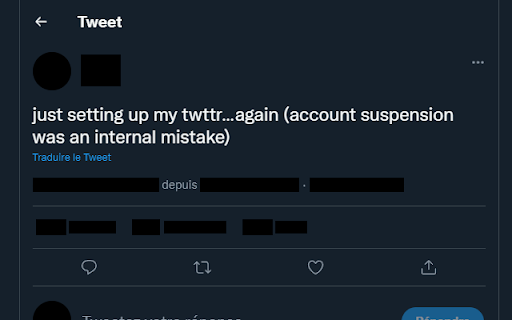
One-click anonymizer of tweets before sharing a screenshot.
Wat is Twitter Anonymizer?
Twitter Anonymizer is een Chrome-extensie ontwikkeld door Marc Brillault, en de belangrijkste functie is "One-click anonymizer of tweets before sharing a screenshot.".
Extensie Screenshots
Download het CRX-bestand van de extensie Twitter Anonymizer
Download Twitter Anonymizer-extensiebestanden in crx-indeling, installeer Chrome-extensies handmatig in de browser of deel de crx-bestanden met vrienden om Chrome-extensies eenvoudig te installeren.
Instructies voor het Gebruik van de Extensie
                        Want to share a content from Twitter, but you don't want to risk the harassment of the user ?
With Twitter Anonymizer, the solution is just a click away !

Right click anywhere on a twitter page, select "Toggle anonymization", and see that every user name and icon in the thread is now unidentifiable. You can now take a screenshot of the page.

Repeat the process to revert the page to its original state.
Basisinformatie over de Extensie
| Naam |  Twitter Anonymizer Twitter Anonymizer |
| ID | dliaabmcomhfhpibgbljmcjfgfkjbalf |
| Officiële URL | https://chromewebstore.google.com/detail/twitter-anonymizer/dliaabmcomhfhpibgbljmcjfgfkjbalf |
| Beschrijving | One-click anonymizer of tweets before sharing a screenshot. |
| Bestandsgrootte | 33.64 KB |
| Aantal Installaties | 40 |
| Huidige Versie | 1.3.1 |
| Laatst Bijgewerkt | 2023-07-20 |
| Publicatiedatum | 2022-07-07 |
| Ontwikkelaar | Marc Brillault |
| [email protected] | |
| Betalingswijze | free |
| Extensiewebsite | https://github.com/MarcBrillault/twitter-anonymizer |
| Help Pagina-URL | https://github.com/MarcBrillault/twitter-anonymizer/issues |
| Ondersteunde Talen | en |
| manifest.json | |
{
    "update_url": "https:\/\/clients2.google.com\/service\/update2\/crx",
    "name": "Twitter Anonymizer",
    "description": "One-click anonymizer of tweets before sharing a screenshot.",
    "version": "1.3.1",
    "manifest_version": 3,
    "background": {
        "service_worker": "background.js"
    },
    "content_scripts": [
        {
            "run_at": "document_idle",
            "all_frames": true,
            "matches": [
                "https:\/\/twitter.com\/*",
                "https:\/\/mobile.twitter.com\/*",
                "https:\/\/tweetdeck.twitter.com\/*"
            ],
            "css": [
                "styles.css"
            ],
            "js": [
                "script.js"
            ]
        }
    ],
    "icons": {
        "128": "icon-128.png",
        "64": "icon-64.png",
        "32": "icon-32.png"
    },
    "permissions": [
        "contextMenus",
        "scripting"
    ]
} | |