LoL Stream Browser
Browse and watch League of Legends livestreams. Mark streams as favorites and receive alerts when they're live.
Wat is LoL Stream Browser?
LoL Stream Browser is een Chrome-extensie ontwikkeld door Kyle Schouviller, en de belangrijkste functie is "Browse and watch League of Legends livestreams. Mark streams as favorites and receive alerts when they're live.".
Extensie Screenshots
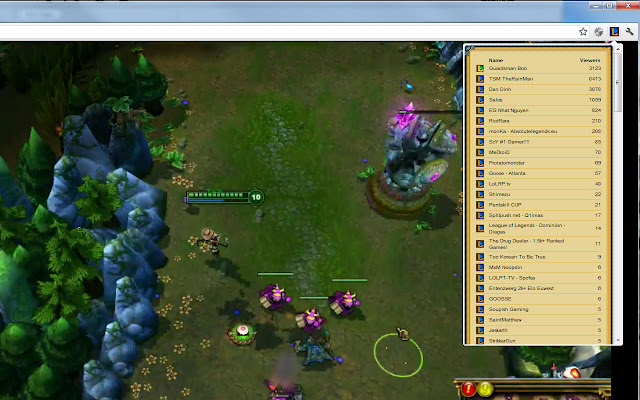

Download het CRX-bestand van de extensie LoL Stream Browser
Download LoL Stream Browser-extensiebestanden in crx-indeling, installeer Chrome-extensies handmatig in de browser of deel de crx-bestanden met vrienden om Chrome-extensies eenvoudig te installeren.
Instructies voor het Gebruik van de Extensie
Always know when your favorite League of Legends streamers are online! LoL Stream Browser displays the currently live streams in a handy drop down within Chrome. Like a particular streamer? Click on the icon next to their stream to mark it as a favorite stream and receive notifications when they're online and streaming! Basisinformatie over de Extensie
| Naam |  LoL Stream Browser LoL Stream Browser |
| ID | edidfaijmhpefkbnobdcepampbncgejp |
| Officiële URL | https://chrome.google.com/webstore/detail/lol-stream-browser/edidfaijmhpefkbnobdcepampbncgejp |
| Beschrijving | Browse and watch League of Legends livestreams. Mark streams as favorites and receive alerts when they're live. |
| Bestandsgrootte | 276 KB |
| Aantal Installaties | 10,000 |
| Huidige Versie | 1.4.0.3 |
| Laatst Bijgewerkt | 2019-08-29 |
| Publicatiedatum | 2019-08-29 |
| Beoordeling | 4.61/5 Totaal 1237 Beoordelingen |
| Ontwikkelaar | Kyle Schouviller |
| [email protected] | |
| Betalingswijze | free |
| Ondersteunde Talen | en |
| manifest.json | |
{
    "update_url": "https:\/\/clients2.google.com\/service\/update2\/crx",
    "manifest_version": 2,
    "name": "LoL Stream Browser",
    "version": "1.4.0.3",
    "description": "Browse and watch League of Legends livestreams. Mark streams as favorites and receive alerts when they're live.",
    "icons": {
        "16": "pages\/foreground\/image\/icon_16.png",
        "19": "pages\/foreground\/image\/icon_19.png",
        "32": "pages\/foreground\/image\/icon_32.png",
        "48": "pages\/foreground\/image\/icon_48.png",
        "64": "pages\/foreground\/image\/icon_64.png",
        "96": "pages\/foreground\/image\/icon_96.png",
        "128": "pages\/foreground\/image\/icon_128.png"
    },
    "browser_action": {
        "default_icon": "\/pages\/foreground\/image\/icon_19.png",
        "default_title": "LoL Stream Browser",
        "default_popup": ".\/pages\/foreground\/streams_popup.html"
    },
    "background": {
        "scripts": [
            "\/pages\/background\/js\/jquery.min.js",
            "\/pages\/background\/js\/utility.js",
            "\/pages\/background\/js\/analytics.js",
            "\/pages\/background\/js\/host_chrome.js",
            "\/pages\/background\/js\/storage.js",
            "\/pages\/background\/js\/settings.js",
            "\/pages\/background\/js\/favorites.js",
            "\/pages\/background\/js\/stream_base.js",
            "\/pages\/background\/js\/game_base.js",
            "\/pages\/background\/js\/service_twitch_auth.js",
            "\/pages\/background\/js\/service_base.js",
            "\/pages\/background\/js\/service_twitch.js",
            "\/pages\/background\/js\/service_beam.js",
            "\/pages\/background\/js\/game_lol.js",
            "\/pages\/background\/js\/streambg.js"
        ]
    },
    "permissions": [
        "tabs",
        "notifications",
        "storage",
        "identity",
        "https:\/\/id.twitch.tv\/",
        "https:\/\/api.twitch.tv\/",
        "https:\/\/beam.pro\/",
        "http:\/\/www.livestreambrowser.com\/"
    ],
    "web_accessible_resources": [
        "\/pages\/foreground\/image\/icon_48.png"
    ],
    "content_security_policy": "script-src 'self' https:\/\/ssl.google-analytics.com; object-src 'self'"
} | |