History Button
Provides quick icon access to your browser history.
Wat is History Button?
History Button is een Chrome-extensie ontwikkeld door Dan Barnett, en de belangrijkste functie is "Provides quick icon access to your browser history.".
Extensie Screenshots
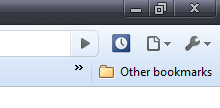
Download het CRX-bestand van de extensie History Button
Download History Button-extensiebestanden in crx-indeling, installeer Chrome-extensies handmatig in de browser of deel de crx-bestanden met vrienden om Chrome-extensies eenvoudig te installeren.
Instructies voor het Gebruik van de Extensie
                        This is a simple lightweight extension that adds a shortcut button to your browser for quick access to your history. It either opens a new tab, or switches to the history tab if you already have it open in another tab.

You could nearly accomplish the same thing if you made a bookmark, but this assures you won't open multiple tabs.

See also "Chrome Downloads Button" and "Chrome Extensions Button" from the link below.
Basisinformatie over de Extensie
| Naam |  History Button History Button |
| ID | ejbmfhgfpejndimejlfghaddkphononj |
| Officiële URL | https://chromewebstore.google.com/detail/history-button/ejbmfhgfpejndimejlfghaddkphononj |
| Beschrijving | Provides quick icon access to your browser history. |
| Bestandsgrootte | 25.31 KB |
| Aantal Installaties | 5,208 |
| Huidige Versie | 0.2 |
| Laatst Bijgewerkt | 2013-06-18 |
| Publicatiedatum | 2013-06-17 |
| Beoordeling | 4.26/5 Totaal 19 Beoordelingen |
| Ontwikkelaar | Dan Barnett |
| Betalingswijze | free |
| Extensiewebsite | http://danbarnett.net/chrome-extensions-history-button-extensions-button-downloads-button-131.html |
| Ondersteunde Talen | en |
| manifest.json | |
{
    "background": {
        "scripts": [
            "background.js"
        ]
    },
    "browser_action": {
        "default_icon": "images\/icon_19x19.png"
    },
    "description": "Provides quick icon access to your browser history.",
    "icons": {
        "128": "images\/icon_128x128.png",
        "32": "images\/icon_32x32.png",
        "48": "images\/icon_48x48.png"
    },
    "name": "History Button",
    "permissions": [
        "tabs"
    ],
    "update_url": "http:\/\/clients2.google.com\/service\/update2\/crx",
    "manifest_version": 2,
    "version": "0.2"
} | |