PenCheck
This extension allows the user to create a work checklist for their browser
Wat is PenCheck?
PenCheck is een Chrome-extensie ontwikkeld door meepitschree, en de belangrijkste functie is "This extension allows the user to create a work checklist for their browser".
Extensie Screenshots

Download het CRX-bestand van de extensie PenCheck
Download PenCheck-extensiebestanden in crx-indeling, installeer Chrome-extensies handmatig in de browser of deel de crx-bestanden met vrienden om Chrome-extensies eenvoudig te installeren.
Instructies voor het Gebruik van de Extensie
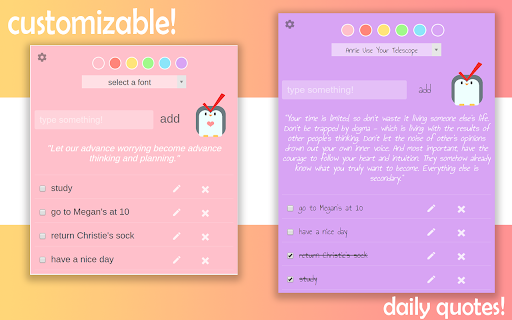
                        simple pop-up task list with customizable fonts+colors and a little interactive penguin buddy!

tools used:
chrome.storage, FontSelect plugin & google font, TheySaidSo quotes


a project made with love by megan & christie
//minor bugs rn:
-checkbox status resets
-reorders tasks alphabetically
Basisinformatie over de Extensie
| Naam |  PenCheck PenCheck |
| ID | elmbhpmlnkpjgpndmggiapconpfepcfp |
| Officiële URL | https://chromewebstore.google.com/detail/pencheck/elmbhpmlnkpjgpndmggiapconpfepcfp |
| Beschrijving | This extension allows the user to create a work checklist for their browser |
| Bestandsgrootte | 452 KB |
| Aantal Installaties | 16 |
| Huidige Versie | 0.0.0.1 |
| Laatst Bijgewerkt | 2017-11-18 |
| Publicatiedatum | 2017-11-17 |
| Beoordeling | 5.00/5 Totaal 8 Beoordelingen |
| Ontwikkelaar | meepitschree |
| Betalingswijze | free |
| Ondersteunde Talen | en |
| manifest.json | |
{
    "update_url": "https:\/\/clients2.google.com\/service\/update2\/crx",
    "manifest_version": 2,
    "name": "PenCheck",
    "description": "This extension allows the user to create a work checklist for their browser",
    "version": "0.0.0.1",
    "browser_action": {
        "default_icon": "img\/pencheck.png",
        "default_popup": "popup.html",
        "default_title": "PenCheck your tasks!"
    },
    "permissions": [
        "https:\/\/ajax.googleapis.com\/",
        "storage",
        "https:\/\/fonts.googleapis.com\/css?family="
    ],
    "background": {
        "scripts": [
            "jquery.fontselect.js"
        ]
    },
    "content_security_policy": "script-src 'self' https:\/\/apis.google.com; object-src 'self'"
} | |