Grade Calculator for Blackboard Learn
Find out what your grade would be with certain assignments added.
Wat is Grade Calculator for Blackboard Learn?
Grade Calculator for Blackboard Learn is een Chrome-extensie ontwikkeld door Rohan Mathur, en de belangrijkste functie is "Find out what your grade would be with certain assignments added.".
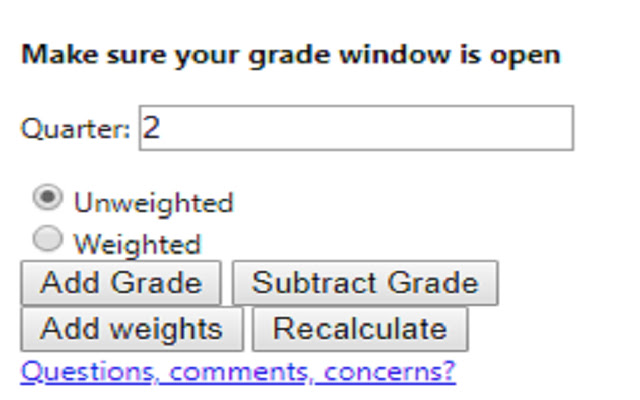
Extensie Screenshots

Download het CRX-bestand van de extensie Grade Calculator for Blackboard Learn
Download Grade Calculator for Blackboard Learn-extensiebestanden in crx-indeling, installeer Chrome-extensies handmatig in de browser of deel de crx-bestanden met vrienden om Chrome-extensies eenvoudig te installeren.
Instructies voor het Gebruik van de Extensie
                        **MAJOR UPDATE**
I MADE AN ACTUAL GUI!! This is now an actually usable chrome extension and something I'm actually kind of proud of. I hope everyone finds it useful!

Thanks,
Rohan

This extension is meant to help you figure out what your total grade would be after an assignment is entered into the grade book.

Feedback Form:
https://goo.gl/forms/1fpCghIIhv49VfTr1
Basisinformatie over de Extensie
| Naam |  Grade Calculator for Blackboard Learn Grade Calculator for Blackboard Learn |
| ID | eohcolhmjdncdmicjibnnjfocokolonj |
| Officiële URL | https://chrome.google.com/webstore/detail/grade-calculator-for-blac/eohcolhmjdncdmicjibnnjfocokolonj |
| Beschrijving | Find out what your grade would be with certain assignments added. |
| Bestandsgrootte | 71.73 KB |
| Aantal Installaties | 435 |
| Huidige Versie | 4.0.0 |
| Laatst Bijgewerkt | 2019-11-25 |
| Publicatiedatum | 2019-11-21 |
| Beoordeling | 5.00/5 Totaal 3 Beoordelingen |
| Ontwikkelaar | Rohan Mathur |
| Betalingswijze | free |
| Help Pagina-URL | https://goo.gl/forms/1fpCghIIhv49VfTr1 |
| Ondersteunde Talen | en |
| manifest.json | |
{
    "update_url": "https:\/\/clients2.google.com\/service\/update2\/crx",
    "name": "Grade Calculator for Blackboard Learn",
    "version": "4.0.0",
    "manifest_version": 2,
    "description": "Find out what your grade would be with certain assignments added.",
    "browser_action": {
        "default_icon": "icon.png",
        "default_popup": "index.html"
    },
    "icons": {
        "16": "icon.png",
        "48": "icon.png",
        "128": "icon.png"
    },
    "permissions": [
        "tabs",
        "activeTab"
    ]
} | |