AwesomeBar
Searches your bookmarks just like the Firefox AwesomeBar.
Wat is AwesomeBar?
AwesomeBar is een Chrome-extensie ontwikkeld door http://www.websqueak.co.uk, en de belangrijkste functie is "Searches your bookmarks just like the Firefox AwesomeBar.".
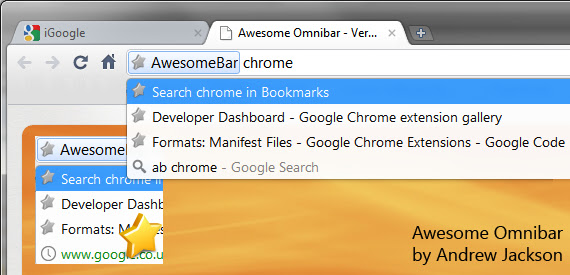
Extensie Screenshots


Download het CRX-bestand van de extensie AwesomeBar
Download AwesomeBar-extensiebestanden in crx-indeling, installeer Chrome-extensies handmatig in de browser of deel de crx-bestanden met vrienden om Chrome-extensies eenvoudig te installeren.
Instructies voor het Gebruik van de Extensie
                        Provides Firefox AwesomeBar functionality as a Chrome Extension.
Searches your bookmarks and orders in the same manner to the Firefox Awesomebar. To use the extension, type 'ab' in the Omnibar followed by your bookmark search text.

What's New in Version 2.0
Refactored entire search algorthim to mirror algorithm used by Firefox.

Version 1.3
Fixed searching to prioritize the capital letters at start of words in your favourites.

Version 1.2
Improved searching to prioritize the capital letters at start of words in your favourites to give a more accurate seach result.
Coming Soon : History and Feeling Lucky searching..

Version 1.1
Improvements in fuzzy logic searching.
Basisinformatie over de Extensie
| Naam |  AwesomeBar AwesomeBar |
| ID | epfjibmdcelinmbfeimnfeeggpebleje |
| Officiële URL | https://chrome.google.com/webstore/detail/awesomebar/epfjibmdcelinmbfeimnfeeggpebleje |
| Beschrijving | Searches your bookmarks just like the Firefox AwesomeBar. |
| Bestandsgrootte | 193 KB |
| Aantal Installaties | 235 |
| Huidige Versie | 2.0 |
| Laatst Bijgewerkt | 2013-07-03 |
| Publicatiedatum | 2013-07-03 |
| Beoordeling | 2.77/5 Totaal 35 Beoordelingen |
| Ontwikkelaar | http://www.websqueak.co.uk |
| Betalingswijze | free |
| Ondersteunde Talen | en |
| manifest.json | |
{
    "update_url": "https:\/\/clients2.google.com\/service\/update2\/crx",
    "manifest_version": 2,
    "name": "AwesomeBar",
    "version": "2.0",
    "description": "Searches your bookmarks just like the Firefox AwesomeBar.",
    "icons": {
        "128": "icon128.png",
        "16": "icon16.png",
        "48": "icon48.png"
    },
    "omnibox": {
        "keyword": "ab"
    },
    "background": {
        "persistent": false,
        "scripts": [
            "search.js",
            "background.js"
        ]
    },
    "options_page": "options.html",
    "permissions": [
        "bookmarks",
        "tabs"
    ]
} | |