Screengrab!
Screengrab! Saves or upload webpages as images.
Wat is Screengrab!?
Screengrab! is een Chrome-extensie ontwikkeld door http://www.s3blog.org, en de belangrijkste functie is "Screengrab! Saves or upload webpages as images.".
Extensie Screenshots


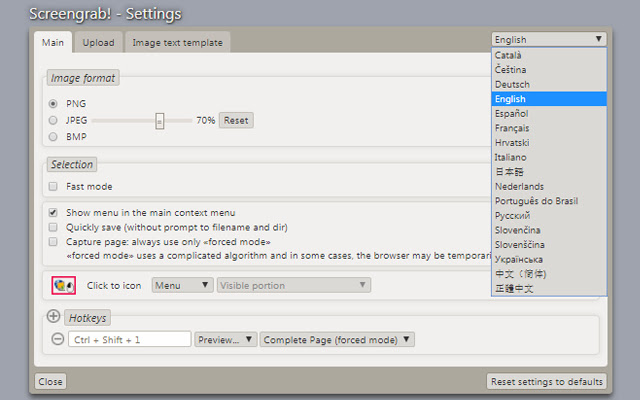
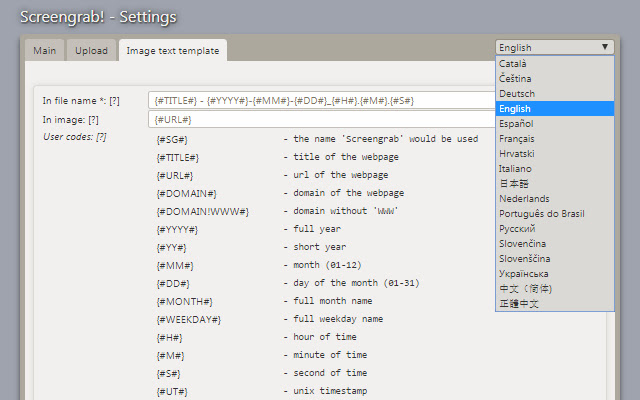

Download het CRX-bestand van de extensie Screengrab!
Download Screengrab!-extensiebestanden in crx-indeling, installeer Chrome-extensies handmatig in de browser of deel de crx-bestanden met vrienden om Chrome-extensies eenvoudig te installeren.
Instructies voor het Gebruik van de Extensie
                        Screengrab! saves entire webpages as images. Just right-click on the page you want to grab and look in the "Screengrab" menu.
It will capture what you can see in the window, the entire page, just a selection, a particular frame... basically it saves webpages as images - either to a file, or to the clipboard, or upload to internet.

The following little keywords are at the request of those who can't remember the name ScreenGrab and want searches to work. It takes screen shots, screenshots, capture, screen capture, - that is, shots (captures), of web pages.
Basisinformatie over de Extensie
| Naam |  Screengrab! Screengrab! |
| ID | fccdiabakoglkihagkjmaomipdeegbpk |
| Officiële URL | https://chrome.google.com/webstore/detail/screengrab/fccdiabakoglkihagkjmaomipdeegbpk |
| Beschrijving | Screengrab! Saves or upload webpages as images. |
| Bestandsgrootte | 150 KB |
| Aantal Installaties | 49,735 |
| Huidige Versie | 2.16 |
| Laatst Bijgewerkt | 2018-09-11 |
| Publicatiedatum | 2018-09-11 |
| Beoordeling | 3.93/5 Totaal 153 Beoordelingen |
| Ontwikkelaar | http://www.s3blog.org |
| [email protected] | |
| Betalingswijze | free |
| Extensiewebsite | http://www.s3blog.org/screengrab.html |
| URL van de Privacybeleid Pagina | http://www.s3blog.org/screengrab/privacy.html |
| Ondersteunde Talen | de,en,fr,nl,ca,es,hr,it,pt-BR,sk,sl,cs,ru,uk,zh-CN,zh-TW,ja,ko |
| manifest.json | |
{
"update_url": "https:\/\/clients2.google.com\/service\/update2\/crx",
"manifest_version": 2,
"name": "__MSG_extension_name__",
"short_name": "__MSG_extension_name__",
"description": "__MSG_extension_description__",
"author": "Oleksandr Popov",
"version": "2.16",
"minimum_chrome_version": "45",
"offline_enabled": true,
"key": "MIIBIjANBgkqhkiG9w0BAQEFAAOCAQ8AMIIBCgKCAQEAmmV5M83FM4s8UFkmfQ7ojL5C7A7nIxMbSE9IMr968dDFdPtt9Wf54JikZA1MLXS6CU7RneOLdvgqLVYDXVVG47PcXJ1u2bHtCVSGS6mkq\/SZ5k875T5zCwHRFODTTYeQ8cE8u0zI9xmB+teyOfbuctE\/XV7skk7z\/uAAk0dM2MR+egGykoJq3HALhryxWrV+u\/LkN3Ct7HwDploy7QXLvJE6EZo4gHZ9GuIr1L6D5rtFYiTe1GPR5ID6dhx3tthjJRBeAHF9iBgZTV+TEs7zoLPsgp2JORXI3B0BltLlsXlWHQvzvB\/CrHikE2MqILWoIkPVF0UZ\/3xtfm8Ht9XN9QIDAQAB",
"default_locale": "en",
"browser_action": {
"default_icon": {
"16": "skin\/screengrab_24_icon.png"
},
"default_popup": "content\/popup.html"
},
"background": {
"page": "content\/background.html"
},
"applications": {
"gecko": {
"id": "{02450914-cdd9-410f-b1da-db004e18c671}",
"strict_min_version": "55.0"
}
},
"options_ui": {
"page": "content\/options.html",
"chrome_style": false,
"open_in_tab": true
},
"permissions": [
"activeTab",
"contextMenus",
"storage",
"tabs",
"notifications",
"unlimitedStorage",
"clipboardWrite",
"webRequest",
"webRequestBlocking",
"pageCapture",
" | |