AudioReport
AudioReport is the first and only extension that makes ACX Dashboards easy to read.
Wat is AudioReport?
AudioReport is een Chrome-extensie ontwikkeld door BJF Software, en de belangrijkste functie is "AudioReport is the first and only extension that makes ACX Dashboards easy to read.".
Extensie Screenshots
Download het CRX-bestand van de extensie AudioReport
Download AudioReport-extensiebestanden in crx-indeling, installeer Chrome-extensies handmatig in de browser of deel de crx-bestanden met vrienden om Chrome-extensies eenvoudig te installeren.
Instructies voor het Gebruik van de Extensie
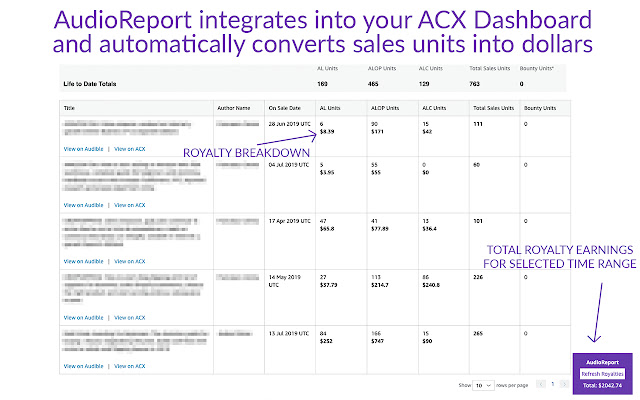
                        AudioReport is the final fix for your ACX Dashboard. AudioReport helps you understand what matters the most: money.
The ACX Dashboard only shows sales, but it's almost impossible to convert raw sales into dollars.

AudioReport does that for you, directly interacting with your own ACX Sales Dashboard!
Basisinformatie over de Extensie
| Naam |  AudioReport AudioReport |
| ID | fkjhnicmkggodcfcflnijbglhambpkjn |
| Officiële URL | https://chrome.google.com/webstore/detail/audioreport/fkjhnicmkggodcfcflnijbglhambpkjn |
| Beschrijving | AudioReport is the first and only extension that makes ACX Dashboards easy to read. |
| Bestandsgrootte | 182 KB |
| Aantal Installaties | 250 |
| Huidige Versie | 1.1.5 |
| Laatst Bijgewerkt | 2020-03-23 |
| Publicatiedatum | 2020-03-23 |
| Beoordeling | 3.00/5 Totaal 8 Beoordelingen |
| Ontwikkelaar | BJF Software |
| [email protected] | |
| Betalingswijze | in_app |
| Extensiewebsite | http://acxreport.com |
| URL van de Privacybeleid Pagina | http://bnbtrackreport.com/privacy-policy |
| Ondersteunde Talen | en |
| manifest.json | |
{
    "update_url": "https:\/\/clients2.google.com\/service\/update2\/crx",
    "name": "AudioReport",
    "version": "1.1.5",
    "manifest_version": 2,
    "description": "AudioReport is the first and only extension that makes ACX Dashboards easy to read.",
    "homepage_url": "https:\/\/www.acx.com\/sales\/dashboard\/sales",
    "icons": {
        "16": "icons\/icon16.png",
        "48": "icons\/icon48.png",
        "128": "icons\/icon128.png"
    },
    "default_locale": "en",
    "background": {
        "scripts": [
            "src\/bg\/background.js",
            "src\/bg\/buy.js"
        ],
        "persistent": true
    },
    "page_action": {
        "default_icon": "icons\/icon19.png",
        "default_title": "page action demo",
        "default_popup": "src\/page_action\/page_action.html"
    },
    "permissions": [
        "*:\/\/www.acx.com\/*",
        "*:\/\/acx.com\/*",
        "*:\/\/acxreport.com\/*",
        "*:\/\/www.acxreport.com\/*"
    ],
    "content_scripts": [
        {
            "matches": [
                "https:\/\/www.acx.com\/sales\/dashboard\/*",
                "https:\/\/www.acx.com\/sales\/dashboard"
            ],
            "js": [
                "js\/jquery\/jquery.min.js",
                "src\/inject\/inject.js"
            ],
            "css": [
                "css\/style.css"
            ]
        }
    ]
} | |