Print TFS Work Items
This extension allows you to print TFS Work Items right from your Chrome
Wat is Print TFS Work Items?
Print TFS Work Items is een Chrome-extensie ontwikkeld door nikosananikov, en de belangrijkste functie is "This extension allows you to print TFS Work Items right from your Chrome".
Extensie Screenshots
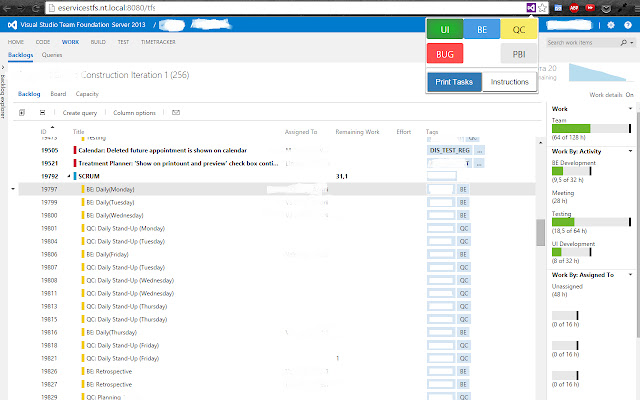
Download het CRX-bestand van de extensie Print TFS Work Items
Download Print TFS Work Items-extensiebestanden in crx-indeling, installeer Chrome-extensies handmatig in de browser of deel de crx-bestanden met vrienden om Chrome-extensies eenvoudig te installeren.
Instructies voor het Gebruik van de Extensie
                        The easiest way to print your Work Items from TFS. Though there are some rules (yet):
Your UI, BE, QC tasks should have corresponding tags ('UI', 'BE', 'QC') and you have to sort your backlog table columns in next order: 'ID' -> 'Title -> 'Assigned To' -> 'Remaining Work' -> 'Effort' -> 'Tags'. That's all. Go to TFS, click extension icon, select type of WI you want to get and click 'Print'.
Fixed compatibility issues; added Back To TFS button; improved printed tasks UX.
Basisinformatie over de Extensie
| Naam |  Print TFS Work Items Print TFS Work Items |
| ID | focfnfefaagmhgijdfkbhjjkpoepmfhl |
| Officiële URL | https://chrome.google.com/webstore/detail/print-tfs-work-items/focfnfefaagmhgijdfkbhjjkpoepmfhl |
| Beschrijving | This extension allows you to print TFS Work Items right from your Chrome |
| Bestandsgrootte | 204 KB |
| Aantal Installaties | 270 |
| Huidige Versie | 1.95 |
| Laatst Bijgewerkt | 2015-10-30 |
| Publicatiedatum | 2015-10-30 |
| Beoordeling | 4.43/5 Totaal 7 Beoordelingen |
| Ontwikkelaar | nikosananikov |
| Betalingswijze | free |
| Ondersteunde Talen | en |
| manifest.json | |
{
    "update_url": "https:\/\/clients2.google.com\/service\/update2\/crx",
    "manifest_version": 2,
    "name": "Print TFS Work Items",
    "description": "This extension allows you to print TFS Work Items right from your Chrome",
    "version": "1.95",
    "page_action": {
        "default_icon": "icon.png",
        "default_popup": "popup.html",
        "default_title": "Print your tasks!"
    },
    "icons": {
        "48": "icon.png",
        "128": "icon.png"
    },
    "background": {
        "scripts": [
            "background.js"
        ],
        "persistent": false
    },
    "permissions": [
        "activeTab",
        "tabs",
        "declarativeContent"
    ],
    "content_scripts": [
        {
            "matches": [
                "*:\/\/*\/*"
            ],
            "js": [
                "print.js",
                "jquery-2.1.3.min.js"
            ],
            "css": [
                "progress.css"
            ]
        }
    ]
} | |