Camel New Tab
See Jeffrey the Camel on your New Tab page. And a bunch of other animals.
Wat is Camel New Tab?
Camel New Tab is een Chrome-extensie ontwikkeld door Jeffrey the Camel, en de belangrijkste functie is "See Jeffrey the Camel on your New Tab page. And a bunch of other animals.".
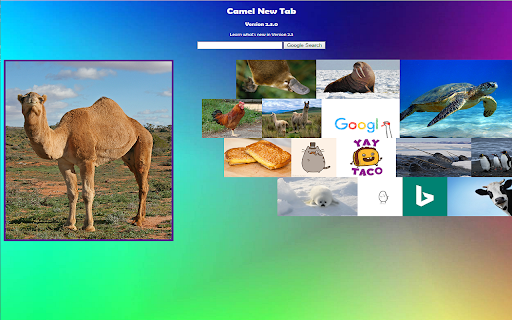
Extensie Screenshots
Download het CRX-bestand van de extensie Camel New Tab
Download Camel New Tab-extensiebestanden in crx-indeling, installeer Chrome-extensies handmatig in de browser of deel de crx-bestanden met vrienden om Chrome-extensies eenvoudig te installeren.
Instructies voor het Gebruik van de Extensie
Camel New Tab is a revolutionary Chrome new tab extension that will change the way you think about browsing the internet. Instead of a regular new tab page, experience a vivid, bold new tab page with engaging backgrounds, helpful links, a Bible verse of the day, games, and most importantly, YOU CAN SEE A CAMEL PICTURE!!!! Basisinformatie over de Extensie
| Naam |  Camel New Tab Camel New Tab |
| ID | hbomebggkjmaacfdjlleanbokcjlmiaf |
| Officiële URL | https://chromewebstore.google.com/detail/camel-new-tab/hbomebggkjmaacfdjlleanbokcjlmiaf |
| Beschrijving | See Jeffrey the Camel on your New Tab page. And a bunch of other animals. |
| Bestandsgrootte | 14.8 MB |
| Aantal Installaties | 18 |
| Huidige Versie | 2.4.0 |
| Laatst Bijgewerkt | 2017-03-08 |
| Publicatiedatum | 2017-03-07 |
| Beoordeling | 5.00/5 Totaal 4 Beoordelingen |
| Ontwikkelaar | Jeffrey the Camel |
| Betalingswijze | free |
| Extensiewebsite | http://camelnewtab.weebly.com |
| Help Pagina-URL | http://camelnewtab.weebly.com |
| Ondersteunde Talen | en-US |
| manifest.json | |
{
    "update_url": "https:\/\/clients2.google.com\/service\/update2\/crx",
    "name": "Camel New Tab",
    "description": "See Jeffrey the Camel on your New Tab page. And a bunch of other animals.",
    "version": "2.4.0",
    "author": "Jeffrey the Camel",
    "manifest_version": 2,
    "permissions": [
        "storage"
    ],
    "icons": {
        "128": "Style\/Assets\/Icon_Camel.png"
    },
    "background": {
        "scripts": [
            "JavaScript\/firstRun.js"
        ],
        "persistent": false
    },
    "chrome_url_overrides": {
        "newtab": "redirect.html"
    },
    "options_ui": {
        "page": "options.html",
        "chrome_style": true
    },
    "browser_action": {
        "default_popup": "menu.html"
    }
} | |