ERP Auto Login - IITKGP
Auto Login to erp.iitkgp.ac.in for IITKGPians by IITKGPian
Wat is ERP Auto Login - IITKGP?
ERP Auto Login - IITKGP is een Chrome-extensie ontwikkeld door Siddhartha Sarkar, en de belangrijkste functie is "Auto Login to erp.iitkgp.ac.in for IITKGPians by IITKGPian".
Extensie Screenshots
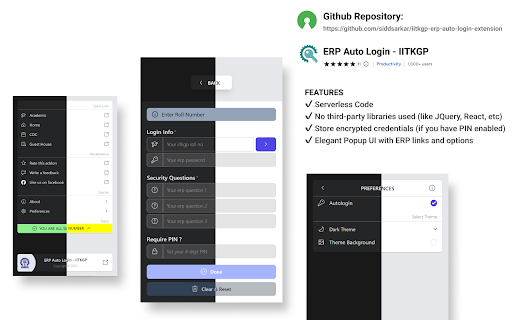
Download het CRX-bestand van de extensie ERP Auto Login - IITKGP
Download ERP Auto Login - IITKGP-extensiebestanden in crx-indeling, installeer Chrome-extensies handmatig in de browser of deel de crx-bestanden met vrienden om Chrome-extensies eenvoudig te installeren.
Instructies voor het Gebruik van de Extensie
                        **NOW SUPPORTS OTP

PURPOSE
- Sign you in to https://erp.iitkgp.ac.in website automatically as we all know how we log in.

NEW
- Use 4 digit PIN to encrypt your credentials(if you donot wish to set pin your credentials will be stored as plain text), you will be asked for PIN on every login.
Note: if you donot set a pin you will be logged in automatically everytime.

FEATURES
✔ Serverless Code
✔ No third-party libraries used (like JQuery, React, etc)
✔ Store encrypted credentials (if you have PIN enabled)
✔ Elegant Popup UI with ERP links and options

IS IT SAFE?
- Its Open Source check out source code here: https://github.com/siddsarkar/iitkgp-erp-auto-login-extension feel free to contribute or create an issue

NOTE
- This extension is server less and never uses your personal data. It stays safe in your browser itself.
- This add-on stores your data using the storage.local API from chrome.

HOW TO USE
- Click on Add to Chrome
- Open the extension popup by clicking the extension icon on the toolbar.
- Set your preferences of auto login: open popup > preferences > autologin
- Open the https://erp.iitkgp.ac.in website and you'll be logged in automatically if you are not already logged in or else you'll directly be redirected to your ERP.

For IITKGP'ian by IITKGP'ian. ❤️

UPDATES
[9.1.2]
- Prefill data (manually send OTP now)
[9.1.1]
- Update extension to prompt for otp
[ 9.1.0 ]
- added alternate pin dialog (hides while typing)
- minor fixes and improvements
[ 9.0.0 ]
 - added support to set default landing page after login (beta)
Basisinformatie over de Extensie
| Naam |  ERP Auto Login - IITKGP ERP Auto Login - IITKGP |
| ID | hianmedhblomknonbbmalncjjffdligl |
| Officiële URL | https://chromewebstore.google.com/detail/erp-auto-login-iitkgp/hianmedhblomknonbbmalncjjffdligl |
| Beschrijving | Auto Login to erp.iitkgp.ac.in for IITKGPians by IITKGPian |
| Bestandsgrootte | 352 KB |
| Aantal Installaties | 2,878 |
| Huidige Versie | 9.1.2 |
| Laatst Bijgewerkt | 2023-07-16 |
| Publicatiedatum | 2021-03-25 |
| Beoordeling | 4.78/5 Totaal 18 Beoordelingen |
| Ontwikkelaar | Siddhartha Sarkar |
| [email protected] | |
| Betalingswijze | free |
| URL van de Privacybeleid Pagina | https://siddsarkar.github.io/privacy-policy |
| Ondersteunde Talen | en |
| manifest.json | |
{
    "update_url": "https:\/\/clients2.google.com\/service\/update2\/crx",
    "manifest_version": 3,
    "version": "9.1.2",
    "author": "Siddhartha Sarkar",
    "key": "MIIBIjANBgkqhkiG9w0BAQEFAAOCAQ8AMIIBCgKCAQEAhQCWJFPZQVDgDUHS++BTiIhSJ9TDDSVA2vmPAyATd7ewwtPSzTv1cJXEhQWhUTeB0DbxCR2VGLP1Gkrw5IJ2l9H6VZYL+hLuG4VFkjjR9qOd0aUxpcI6vLYLb7\/H8a2q7FpzrtorpH8RSz8xHqtxx+tzndSrYy7BDp3+hs78hPuZmvzKxrUnaa1cVPgMjkDJjSRW7DilZjYfVGKGAtBY2eX+CTiAb9HooPBo\/sliAGylFTjCvs4c2U+i6wvc4\/PxsC\/j5voo1mToIzoRdeKElCDklJOXHt9qUePabtLHtv9TKI1uCz7bFIjgBILF6mn5hng6OEQNogf4EnexVFfGYQIDAQAB",
    "name": "ERP Auto Login - IITKGP",
    "description": "Auto Login to erp.iitkgp.ac.in for IITKGPians by IITKGPian",
    "homepage_url": "https:\/\/github.com\/siddsarkar\/iitkgp-erp-auto-login-extension",
    "icons": {
        "256": "assets\/images\/ext_icon.png"
    },
    "action": {
        "default_icon": "assets\/images\/ext_icon.png",
        "default_title": "ERP Auto Login",
        "default_popup": "pages\/Popup\/index.html",
        "theme_icons": [
            {
                "light": "assets\/images\/ext_icon.png",
                "dark": "assets\/images\/ext_icon_dark.png",
                "size": 256
            }
        ]
    },
    "permissions": [
        "storage"
    ],
    "host_permissions": [
        "*:\/\/erp.iitkgp.ac.in\/*"
    ],
    "content_scripts": [
        {
            "matches": [
                "*:\/\/erp.iitkgp.ac.in\/SSOAdministration\/login.htm*"
            ],
            "js": [
                "content.js"
            ]
        }
    ],
    "web_accessible_resources": [
        {
            "resources": [
                "assets\/images\/ext_icon.png"
            ],
            "matches": [
                "*:\/\/erp.iitkgp.ac.in\/*"
            ],
            "use_dynamic_url": true
        }
    ]
} | |