Highlight to Hilite.me
This extension allows the user to highlight code to send to hilite.me
Wat is Highlight to Hilite.me?
Highlight to Hilite.me is een Chrome-extensie ontwikkeld door http://terryseidler.com, en de belangrijkste functie is "This extension allows the user to highlight code to send to hilite.me".
Extensie Screenshots

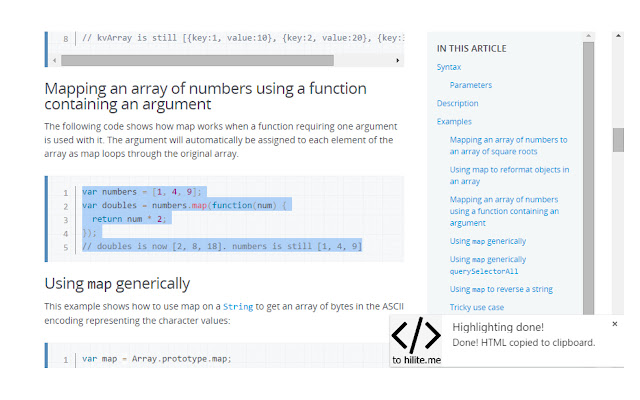


Download het CRX-bestand van de extensie Highlight to Hilite.me
Download Highlight to Hilite.me-extensiebestanden in crx-indeling, installeer Chrome-extensies handmatig in de browser of deel de crx-bestanden met vrienden om Chrome-extensies eenvoudig te installeren.
Instructies voor het Gebruik van de Extensie
                        Ever found some nice code you wanted to copy to a blog post? This extension lets you select that code, right click it and run it through the hilite.me API to generate proper code highlighted HTML.

The selected code will be copied to your clipboard, ready for use in one of your blog posts!
Basisinformatie over de Extensie
| Naam |  Highlight to Hilite.me Highlight to Hilite.me |
| ID | iaenhklkflbfmpcafgalelagbdileikn |
| Officiële URL | https://chrome.google.com/webstore/detail/highlight-to-hiliteme/iaenhklkflbfmpcafgalelagbdileikn |
| Beschrijving | This extension allows the user to highlight code to send to hilite.me |
| Bestandsgrootte | 15.82 KB |
| Aantal Installaties | 76 |
| Huidige Versie | 0.1 |
| Laatst Bijgewerkt | 2016-03-10 |
| Publicatiedatum | 2016-03-10 |
| Beoordeling | 5.00/5 Totaal 1 Beoordelingen |
| Ontwikkelaar | http://terryseidler.com |
| [email protected] | |
| Betalingswijze | free |
| Extensiewebsite | https://github.com/tseidler/extension-chrome-hightlight-code |
| Help Pagina-URL | https://github.com/tseidler/extension-chrome-hightlight-code/issues |
| Ondersteunde Talen | en |
| manifest.json | |
{
"update_url": "https:\/\/clients2.google.com\/service\/update2\/crx",
"manifest_version": 2,
"name": "Highlight to Hilite.me",
"description": "This extension allows the user to highlight code to send to hilite.me",
"version": "0.1",
"icons": {
"16": "icons\/icon16.png",
"48": "icons\/icon48.png",
"128": "icons\/icon128.png"
},
"options_page": "options\/options.html",
"browser_action": {
"default_icon": {
"19": "icons\/icon19.png",
"38": "icons\/icon38.png"
},
"default_popup": "options\/options.html"
},
"permissions": [
"clipboardWrite",
"contextMenus",
"storage",
"notifications",
"http:\/\/hilite.me\/"
],
"background": {
"scripts": [
"main.js"
],
"persistent": false
},
"content_scripts": [
{
"matches": [
" | |