Fabric Explorer
This Extension allows you to explore the Office UI Fabric live on a webpage - adding and removing Fabric classes from an element…
Wat is Fabric Explorer?
Fabric Explorer is een Chrome-extensie ontwikkeld door sector43 Software, en de belangrijkste functie is "This Extension allows you to explore the Office UI Fabric live on a webpage - adding and removing Fabric classes from an element…".
Extensie Screenshots
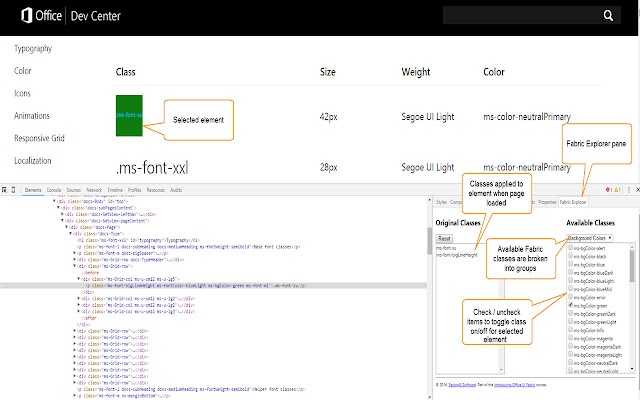
Download het CRX-bestand van de extensie Fabric Explorer
Download Fabric Explorer-extensiebestanden in crx-indeling, installeer Chrome-extensies handmatig in de browser of deel de crx-bestanden met vrienden om Chrome-extensies eenvoudig te installeren.
Instructies voor het Gebruik van de Extensie
This Extension allows you to explore the Office UI Fabric live on a webpage - adding and removing Fabric classes from an element and immediately seeing the effect on the page. Useful for learning about Fabric, as well as interactively designing user interfaces that utilize Fabric. Basisinformatie over de Extensie
| Naam |  Fabric Explorer Fabric Explorer |
| ID | iealmcjmkenoicmjpcebflbpcendnjnm |
| Officiële URL | https://chrome.google.com/webstore/detail/fabric-explorer/iealmcjmkenoicmjpcebflbpcendnjnm |
| Beschrijving | This Extension allows you to explore the Office UI Fabric live on a webpage - adding and removing Fabric classes from an element… |
| Bestandsgrootte | 55.37 KB |
| Aantal Installaties | 454 |
| Huidige Versie | 2.0.1 |
| Laatst Bijgewerkt | 2016-11-10 |
| Publicatiedatum | 2016-11-10 |
| Beoordeling | 2.75/5 Totaal 4 Beoordelingen |
| Ontwikkelaar | sector43 Software |
| Betalingswijze | free |
| Extensiewebsite | http://www.sector43.com/fabric-explorer/ |
| Ondersteunde Talen | en-US |
| manifest.json | |
{
"update_url": "https:\/\/clients2.google.com\/service\/update2\/crx",
"manifest_version": 2,
"name": "Fabric Explorer",
"version": "2.0.1",
"permissions": [
"tabs",
" | |