Tab Reminder Extension
Remind or Schedule to open your browser tab.
Wat is Tab Reminder Extension?
Tab Reminder Extension is een Chrome-extensie ontwikkeld door Renaissance Beauty, en de belangrijkste functie is "Remind or Schedule to open your browser tab.".
Extensie Screenshots

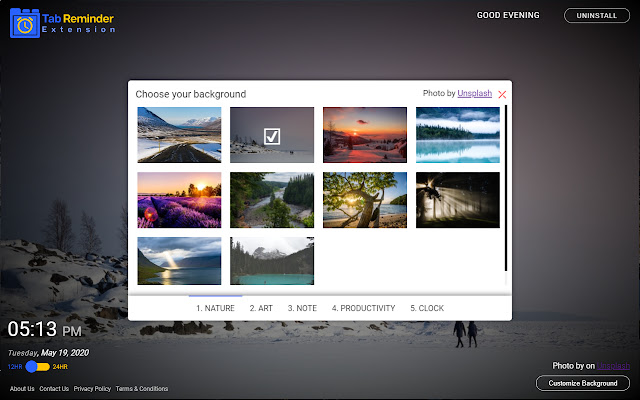
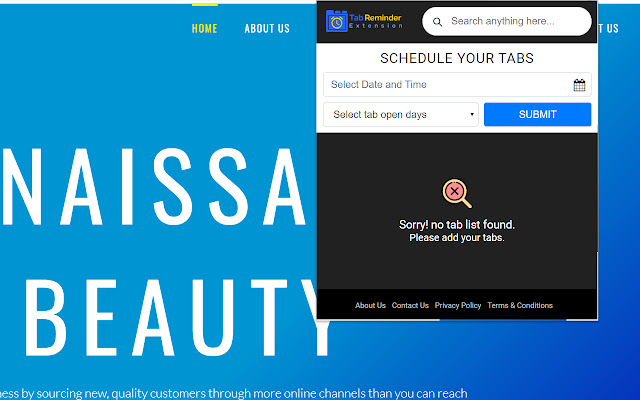
Download het CRX-bestand van de extensie Tab Reminder Extension
Download Tab Reminder Extension-extensiebestanden in crx-indeling, installeer Chrome-extensies handmatig in de browser of deel de crx-bestanden met vrienden om Chrome-extensies eenvoudig te installeren.
Instructies voor het Gebruik van de Extensie
                        The Tab Reminder Extension gives you an easy way to schedule your browser to open on a specific time and gives you an easy way to change your Chrome Browser new tab default to look attractive and pleasing to the eye...

This is a free add-on for Chrome Browser where the primary target is to schedule your browser to open on a daily, weekly, monthly basis quickly and easily. Also, set a background from our selective Tabs images gallery powered by Unsplash in your Chrome Browser default new tab. We are actually changing your Chrome browser default new tab page.

Also as an added feature, we are giving you an easy way to search your desired information, images, video, and more through  Google search.

There is also a Digital Clock in new tabs where you can check your current location time in 12 hour/ 24-hour format according to your preference.


The Extension requires the following permissions:

1.Storage: The extension requires this permission to store background images, time format, etc. in chrome.storage.local to personalize the experience and deliver the right content.
2.Tabs: The extension requires this permission in order to allow New tabs to display the extension with custom search, background images, date and time, and a Thank you message of successful install or uninstall.
3.Notifications: The extension requires this permission in order to show installation and extension removal notifications on your desktop.


By clicking "Add to Chrome", I accept and agree to install "Tabs Remind" Chrome extension and setting Chrome™ New Tab to that provided by the service and the Privacy (https://www.renaissancebeautyllc.com/privacy_policy) and Terms of Use (https://www.renaissancebeautyllc.com/terms_and_conditions).
Basisinformatie over de Extensie
| Naam |  Tab Reminder Extension Tab Reminder Extension |
| ID | ielikfjodameonacmgkhnppicadonfbo |
| Officiële URL | https://chrome.google.com/webstore/detail/tab-reminder-extension/ielikfjodameonacmgkhnppicadonfbo |
| Beschrijving | Remind or Schedule to open your browser tab. |
| Bestandsgrootte | 1.39 MB |
| Aantal Installaties | 30 |
| Huidige Versie | 2.2 |
| Laatst Bijgewerkt | 2020-09-25 |
| Publicatiedatum | 2020-05-19 |
| Beoordeling | 2.00/5 Totaal 1 Beoordelingen |
| Ontwikkelaar | Renaissance Beauty |
| [email protected] | |
| Betalingswijze | free |
| URL van de Privacybeleid Pagina | https://www.renaissancebeautyllc.com/privacy_policy |
| Ondersteunde Talen | en-US |
| manifest.json | |
{
    "update_url": "https:\/\/clients2.google.com\/service\/update2\/crx",
    "manifest_version": 2,
    "name": "Tab Reminder Extension",
    "description": "Remind or Schedule to open your browser tab.",
    "homepage_url": "https:\/\/www.tabreminderextension.com\/",
    "permissions": [
        "storage",
        "notifications",
        "tabs",
        "https:\/\/www.renaissancebeautyllc.com\/tabsreminds\/*"
    ],
    "background": {
        "persistent": false,
        "scripts": [
            "js\/background.js"
        ]
    },
    "version": "2.2",
    "browser_action": {
        "default_popup": "popup.html",
        "default_icon": {
            "16": "images\/bd-16.png",
            "32": "images\/bd-32.png",
            "48": "images\/bd-48.png",
            "128": "images\/bd-128.png"
        }
    },
    "icons": {
        "16": "images\/bd-16.png",
        "32": "images\/bd-32.png",
        "48": "images\/bd-48.png",
        "128": "images\/bd-128.png"
    },
    "chrome_url_overrides": {
        "newtab": "landing.html"
    },
    "web_accessible_resources": [
        "images\/*.*"
    ],
    "content_security_policy": "script-src 'self' https:\/\/www.renaissancebeautyllc.com\/tabsreminds\/custom.js https:\/\/www.renaissancebeautyllc.com\/tabsreminds\/background.js; object-src 'self' ;style-src 'self' 'unsafe-inline' *;media-src *;"
} | |