UCLA Automated Login
Tired of entering your UCLA logon ID and username every single time? Install the UCLA Automated Login! By clicking the icon after…
Wat is UCLA Automated Login?
UCLA Automated Login is een Chrome-extensie ontwikkeld door Stanley Hsu, en de belangrijkste functie is "Tired of entering your UCLA logon ID and username every single time? Install the UCLA Automated Login! By clicking the icon after…".
Extensie Screenshots
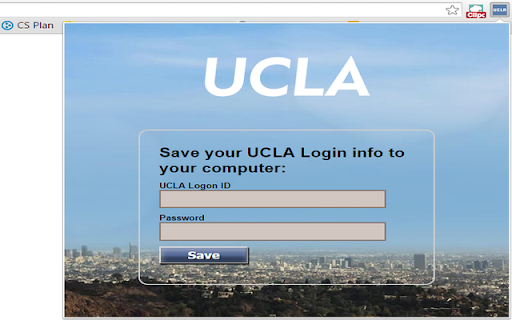
Download het CRX-bestand van de extensie UCLA Automated Login
Download UCLA Automated Login-extensiebestanden in crx-indeling, installeer Chrome-extensies handmatig in de browser of deel de crx-bestanden met vrienden om Chrome-extensies eenvoudig te installeren.
Instructies voor het Gebruik van de Extensie
                        Tired of entering your UCLA logon ID and username every single time?
Install the UCLA Automated Login!

By clicking the icon after installing and entering the logon info, you will never have to manually enter them again.

This extension allows you to automatically log in to all the newly updated UCLA authentication pages.
Basisinformatie over de Extensie
| Naam |  UCLA Automated Login UCLA Automated Login |
| ID | inelalkinoinjgbfjfmkfiagmfefpeic |
| Officiële URL | https://chromewebstore.google.com/detail/ucla-automated-login/inelalkinoinjgbfjfmkfiagmfefpeic |
| Beschrijving | Tired of entering your UCLA logon ID and username every single time? Install the UCLA Automated Login! By clicking the icon after… |
| Bestandsgrootte | 150 KB |
| Aantal Installaties | 13 |
| Huidige Versie | 2.0.1 |
| Laatst Bijgewerkt | 2015-11-10 |
| Publicatiedatum | 2015-11-10 |
| Beoordeling | 5.00/5 Totaal 3 Beoordelingen |
| Ontwikkelaar | Stanley Hsu |
| Betalingswijze | free |
| Ondersteunde Talen | en |
| manifest.json | |
{
    "update_url": "http:\/\/clients2.google.com\/service\/update2\/crx",
    "name": "UCLA Automated Login",
    "version": "2.0.1",
    "manifest_version": 2,
    "icons": {
        "16": "images\/icon16.png",
        "48": "images\/icon48.png",
        "128": "images\/ucla128.png"
    },
    "background": {
        "page": "background.html"
    },
    "permissions": [
        "tabs",
        "https:\/\/*\/*"
    ],
    "options_page": "optionPage.html",
    "browser_action": {
        "default_icon": "images\/icon16.png",
        "default_title": "UCLA Automated Login",
        "default_popup": "options.html"
    }
} | |