TabZ
This extension is for people who have too many tabs open and need something to help them manage their browser.
Wat is TabZ?
TabZ is een Chrome-extensie ontwikkeld door Andrew Batbouta, en de belangrijkste functie is "This extension is for people who have too many tabs open and need something to help them manage their browser.".
Extensie Screenshots
Download het CRX-bestand van de extensie TabZ
Download TabZ-extensiebestanden in crx-indeling, installeer Chrome-extensies handmatig in de browser of deel de crx-bestanden met vrienden om Chrome-extensies eenvoudig te installeren.
Instructies voor het Gebruik van de Extensie
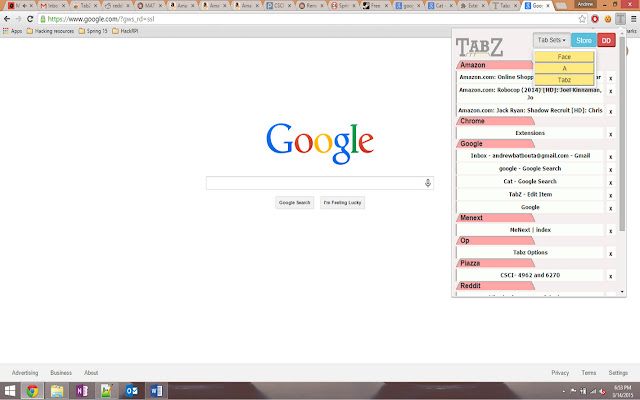
                        This is a chrome extension to help manage too many tabs being open. This will provide users a popup window with all the users tabs open in an easy to read manner. This extension will organize your tabs in the window in alphabetical order and categorized in a logical manner. You can then just click on the name of your page to change your current page to that, or even close the pages.

This extension was also built with Matt Poegel.
Basisinformatie over de Extensie
| Naam |  TabZ TabZ |
| ID | inneckpdjbcjkpijhomijlmddbailhcd |
| Officiële URL | https://chrome.google.com/webstore/detail/tabz/inneckpdjbcjkpijhomijlmddbailhcd |
| Beschrijving | This extension is for people who have too many tabs open and need something to help them manage their browser. |
| Bestandsgrootte | 428 KB |
| Aantal Installaties | 32 |
| Huidige Versie | 2.1.1 |
| Laatst Bijgewerkt | 2015-03-14 |
| Publicatiedatum | 2015-03-14 |
| Beoordeling | 5.00/5 Totaal 3 Beoordelingen |
| Ontwikkelaar | Andrew Batbouta |
| Betalingswijze | free |
| Ondersteunde Talen | en-US |
| manifest.json | |
{
    "update_url": "https:\/\/clients2.google.com\/service\/update2\/crx",
    "name": "TabZ",
    "manifest_version": 2,
    "version": "2.1.1",
    "content_scripts": [
        {
            "matches": [
                "http:\/\/www.google.com\/*"
            ],
            "css": [
                "stylesheets\/style.css",
                "stylesheets\/options_style.css"
            ],
            "js": [
                "javascript\/jquery-1.11.0.js",
                "javascript\/script.js",
                "javascript\/options_script.js"
            ]
        }
    ],
    "description": "This extension is for people who have too many tabs open and need something to help them manage their browser.",
    "browser_action": {
        "default_icon": "images\/icon16.png",
        "default_title": "Tabz",
        "default_popup": "popup.html"
    },
    "icons": {
        "16": "images\/icon16.png",
        "48": "images\/icon48.png"
    },
    "options_page": "options.html",
    "permissions": [
        "tabs",
        "tabCapture",
        "storage"
    ],
    "commands": {
        "_execute_browser_action": {
            "suggested_key": {
                "windows": "Ctrl+Shift+K",
                "mac": "Command+Shift+Y",
                "chromeos": "Ctrl+Shift+U",
                "linux": "Ctrl+Shift+J"
            }
        }
    }
} | |