Apex Finder
This extension find an apex Class/Trigger/Page.
Wat is Apex Finder?
Apex Finder is een Chrome-extensie ontwikkeld door Naresh Yadav , Dushyant Sonwar, en de belangrijkste functie is "This extension find an apex Class/Trigger/Page.".
Extensie Screenshots


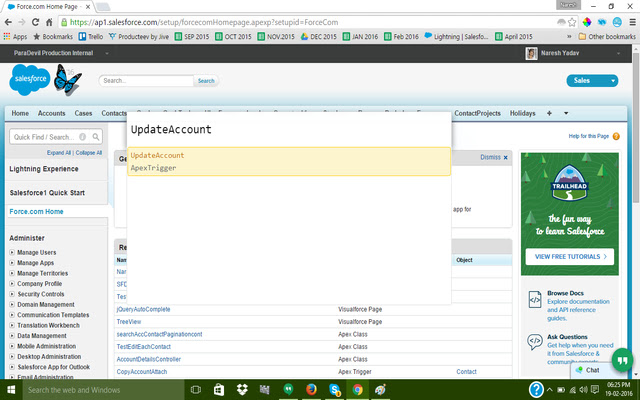
Download het CRX-bestand van de extensie Apex Finder
Download Apex Finder-extensiebestanden in crx-indeling, installeer Chrome-extensies handmatig in de browser of deel de crx-bestanden met vrienden om Chrome-extensies eenvoudig te installeren.
Instructies voor het Gebruik van de Extensie
                        This extension is a small attempt to help sf developers to find apex class,trigger quickly.
Many time we have to search our apex class for work and salesforce native list view of apex class does not give us ability to find classes .
This situation gets even worse if there are many packages installed in the org.
This extension search and open an apex class, apex trigger and VF page in the salesforce.com. No need to go using quick search in the salesforce.

How to use.

1) Login to your salesforce/force.com org.
2) After login press CTRL+ENTER key together from keyboard.
3) Type class or trigger or VF page name in the textbox.
4) Select your choice and there you go.
5) If you want to close the textbox than press ESC key from keyboard.

Please Give it a try !!!
And provide us your feedback at : [email protected]
Basisinformatie over de Extensie
| Naam |  Apex Finder Apex Finder |
| ID | ioilpjglnidiadffhdpeiakbkkhbflpe |
| Officiële URL | https://chrome.google.com/webstore/detail/apex-finder/ioilpjglnidiadffhdpeiakbkkhbflpe |
| Beschrijving | This extension find an apex Class/Trigger/Page. |
| Bestandsgrootte | 317 KB |
| Aantal Installaties | 133 |
| Huidige Versie | 1.4 |
| Laatst Bijgewerkt | 2016-04-27 |
| Publicatiedatum | 2016-04-27 |
| Beoordeling | 5.00/5 Totaal 13 Beoordelingen |
| Ontwikkelaar | Naresh Yadav , Dushyant Sonwar |
| Betalingswijze | free |
| Ondersteunde Talen | en |
| manifest.json | |
{
    "update_url": "https:\/\/clients2.google.com\/service\/update2\/crx",
    "manifest_version": 2,
    "name": "Apex Finder",
    "description": "This extension find an apex Class\/Trigger\/Page.",
    "version": "1.4",
    "browser_action": {
        "default_icon": "icon.png",
        "default_popup": "popup.html"
    },
    "background": {
        "scripts": [
            "jquery.min.js",
            "jquery-ui-1.8.16.custom.min.js",
            "background.js"
        ],
        "css": [
            "jquery-ui-1.8.16.custom.css",
            "popup.css"
        ],
        "persistent": true
    },
    "icons": {
        "128": "ApexFinder.png"
    },
    "web_accessible_resources": [
        "jquery.min.js",
        "jquery-ui-1.8.16.custom.min.js",
        "background.js",
        "content.js",
        "jquery-ui-1.8.16.custom.css",
        "popup.html",
        "ApexFinder.png",
        "content.html",
        "popup.css"
    ],
    "content_scripts": [
        {
            "matches": [
                "https:\/\/*.force.com\/*",
                "https:\/\/*.salesforce.com\/*",
                "https:\/\/*.cloudforce.com\/*"
            ],
            "css": [
                "jquery-ui-1.8.16.custom.css",
                "popup.css"
            ],
            "js": [
                "jquery.min.js",
                "jquery-ui-1.8.16.custom.min.js",
                "background.js"
            ],
            "run_at": "document_end"
        }
    ],
    "permissions": [
        "activeTab",
        "https:\/\/*.force.com\/*",
        "storage"
    ]
} | |