Trakt Spoiler Preventer
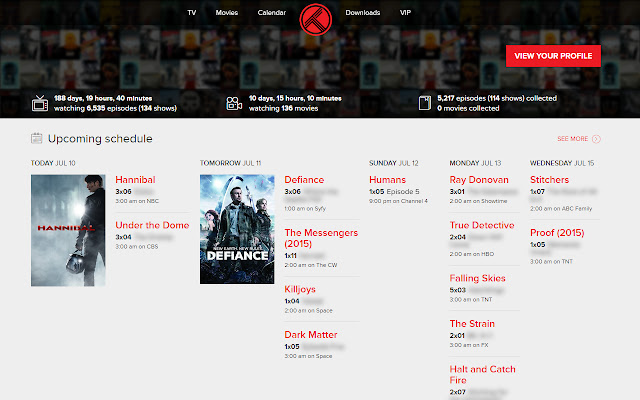
Trakt.tv but without the spoilers. Titles, screenshots and comments are all able to be obscured by this extension.
Wat is Trakt Spoiler Preventer?
Trakt Spoiler Preventer is een Chrome-extensie ontwikkeld door Jordan Bird, en de belangrijkste functie is "Trakt.tv but without the spoilers. Titles, screenshots and comments are all able to be obscured by this extension.".
Extensie Screenshots


Download het CRX-bestand van de extensie Trakt Spoiler Preventer
Download Trakt Spoiler Preventer-extensiebestanden in crx-indeling, installeer Chrome-extensies handmatig in de browser of deel de crx-bestanden met vrienden om Chrome-extensies eenvoudig te installeren.
Instructies voor het Gebruik van de Extensie
                        This extension aims to prevent as many spoilers as possible on Trakt.tv with very customisable options.

Key Features
- Episode names can be obscured while preserving the show name, season and episode number.
- Show, Season, Episode and Movie descriptions can be obscured.
- Show, Season and Episode screenshots can be obscured.
- Comments can be obscured.
- Chrome Popup to make using Trakt.tv even easier!
- Open a trakt page from IMDB.
- Vast amount of options to personalise how your Trakt.tv is spoiler prevented.

This is not an official application from Trakt.tv, as such all support requests, questions and feedback should be directed to me.

Contact me: http://www.jordanbird.co.uk/contact/

--------------------------------------------------
Upcoming Changes
- Hover over screenshots to reveal.
- Improved search from popup.

--------------------------------------------------
Recent Changes
1.1.1
- Fixed description spoiler prevention due to site markup change.
1.1
- Open Trakt page from IMDB.
- Go to Calendar added to popup.
- Go to Last Checked in Item added to popup.
- Go to Next Episode of Last Checked in item added to popup.
- Options added to customise popup.
- Other user profiles are now spoiler prevented.
1.0.3
- Fixed a dashboard and profile page bug introduced by the previous update.
1.0.2
- Extension updated to support the new 'On Deck to Watch' Dashboard section.
1.0.1
- Fixed screenshots and check in box not being spoiler prevented due to a template change.
1.0
- Extension released.
Basisinformatie over de Extensie
| Naam |  Trakt Spoiler Preventer Trakt Spoiler Preventer |
| ID | iopphobanmgainpbkfhegempeonoglpf |
| Officiële URL | https://chrome.google.com/webstore/detail/trakt-spoiler-preventer/iopphobanmgainpbkfhegempeonoglpf |
| Beschrijving | Trakt.tv but without the spoilers. Titles, screenshots and comments are all able to be obscured by this extension. |
| Bestandsgrootte | 290 KB |
| Aantal Installaties | 56 |
| Huidige Versie | 1.1.1 |
| Laatst Bijgewerkt | 2015-09-04 |
| Publicatiedatum | 2015-09-04 |
| Beoordeling | 5.00/5 Totaal 5 Beoordelingen |
| Ontwikkelaar | Jordan Bird |
| Betalingswijze | free |
| Help Pagina-URL | http://www.jordanbird.co.uk/contact/ |
| Ondersteunde Talen | en-GB |
| manifest.json | |
{
    "update_url": "https:\/\/clients2.google.com\/service\/update2\/crx",
    "manifest_version": 2,
    "name": "Trakt Spoiler Preventer",
    "short_name": "Trakt SP",
    "description": "Trakt.tv but without the spoilers. Titles, screenshots and comments are all able to be obscured by this extension.",
    "version": "1.1.1",
    "author": "Jordan Bird",
    "options_page": "options.html",
    "browser_action": {
        "default_popup": "popup.html",
        "default_title": "Trakt Spoiler Preventer"
    },
    "icons": {
        "16": "icon16.png",
        "19": "icon19.png",
        "32": "icon32.png",
        "48": "icon48.png",
        "128": "icon128.png"
    },
    "content_scripts": [
        {
            "matches": [
                "*:\/\/trakt.tv\/*"
            ],
            "all_frames": true,
            "js": [
                "jquery.min.js",
                "scanner.js"
            ],
            "css": [
                "traktSpoilerPreventerOverride.css"
            ]
        },
        {
            "matches": [
                "*:\/\/www.imdb.com\/*"
            ],
            "all_frames": true,
            "js": [
                "jquery.min.js",
                "imdb.js"
            ],
            "css": [
                "imdbOverride.css"
            ]
        }
    ],
    "permissions": [
        "storage",
        "activeTab",
        "tabs",
        "webNavigation"
    ],
    "web_accessible_resources": [
        "icon32.png"
    ]
} | |