Add Art
Replacing ads with art.
Wat is Add Art?
Add Art is een Chrome-extensie ontwikkeld door Add-Art, en de belangrijkste functie is "Replacing ads with art.".
Extensie Screenshots
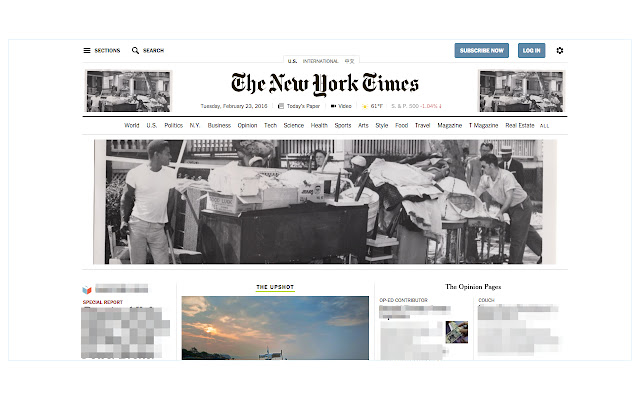

Download het CRX-bestand van de extensie Add Art
Download Add Art-extensiebestanden in crx-indeling, installeer Chrome-extensies handmatig in de browser of deel de crx-bestanden met vrienden om Chrome-extensies eenvoudig te installeren.
Instructies voor het Gebruik van de Extensie
                        Replace web ads with visual essays by artists.

Update 10/12/2016: Now you can disable add-art for specific sites!
Basisinformatie over de Extensie
| Naam |  Add Art Add Art |
| ID | jplogjalofjlkendelkacpekloflkfeg |
| Officiële URL | https://chrome.google.com/webstore/detail/add-art/jplogjalofjlkendelkacpekloflkfeg |
| Beschrijving | Replacing ads with art. |
| Bestandsgrootte | 439 KB |
| Aantal Installaties | 329 |
| Huidige Versie | 2.4.3 |
| Laatst Bijgewerkt | 2018-05-18 |
| Publicatiedatum | 2018-05-18 |
| Beoordeling | 3.42/5 Totaal 12 Beoordelingen |
| Ontwikkelaar | Add-Art |
| Betalingswijze | free |
| Extensiewebsite | http://add-art.org |
| Ondersteunde Talen | en-US |
| manifest.json | |
{
    "update_url": "https:\/\/clients2.google.com\/service\/update2\/crx",
    "manifest_version": 2,
    "name": "Add Art",
    "description": "Replacing ads with art.",
    "author": "@owise1,Corey Tegeler",
    "version": "2.4.3",
    "homepage_url": "http:\/\/add-art.org\/",
    "icons": {
        "16": "images\/icon-16.png",
        "32": "images\/icon-32.png",
        "64": "images\/icon-64.png"
    },
    "browser_action": {
        "default_icon": "images\/icon-64.png",
        "default_popup": "interface.html",
        "default_title": "Add Art!"
    },
    "permissions": [
        "storage",
        "tabs",
        "unlimitedStorage",
        "webNavigation",
        "notifications",
        "webRequest",
        "http:\/\/*\/*",
        "https:\/\/*\/*"
    ],
    "web_accessible_resources": [
        "images\/*"
    ],
    "content_scripts": [
        {
            "matches": [
                "http:\/\/*\/*",
                "https:\/\/*\/*"
            ],
            "js": [
                "js\/lib\/jquery-3.2.1.min.js",
                "js\/lib\/q.js",
                "js\/lib\/ramda.min.js",
                "js\/artAdder.js",
                "js\/document_end.js"
            ],
            "run_at": "document_end",
            "all_frames": true
        }
    ],
    "background": {
        "page": "background.html"
    }
} | |