CHL-Tab
Follow the Champions Hockey League with the CHL-Tab extension.
Wat is CHL-Tab?
CHL-Tab is een Chrome-extensie ontwikkeld door chltab.ext, en de belangrijkste functie is "Follow the Champions Hockey League with the CHL-Tab extension.".
Extensie Screenshots
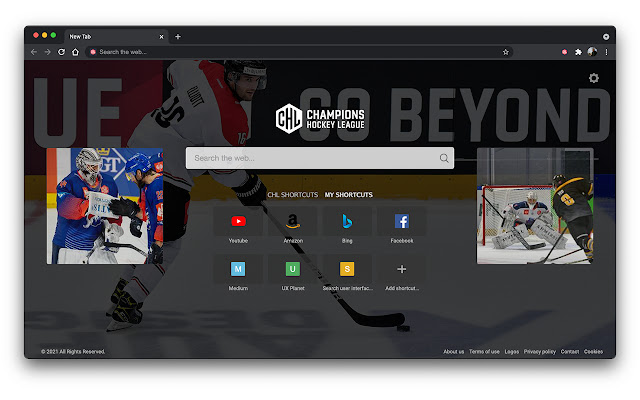


Download het CRX-bestand van de extensie CHL-Tab
Download CHL-Tab-extensiebestanden in crx-indeling, installeer Chrome-extensies handmatig in de browser of deel de crx-bestanden met vrienden om Chrome-extensies eenvoudig te installeren.
Instructies voor het Gebruik van de Extensie
                        Follow your favorite hockey team like a true Champion!
The Champions Hockey League extension- CHL-Tab.com - is dedicated to the league’s fans - offering a personalized online destination, enabling fans to:
• Follow the action on the team’s social streams
• Stay up to date with news, scores, and special updates
• Personalize the experience further with favorite shortcuts
• Enjoy a rich search experience powered by Bing

The extension sets your default search provider to Bing.
By clicking “ADD TO CHROME”, you accept and agree to install the Champions Hockey League extension (CHL-Tab.com) Chrome Extension, set the Chrome™ New Tab to chl-tab.com, and to the Terms of Use, and Privacy Policy.

For easy access, we recommend pinning the extension to your browser toolbar.

The extension requests the following permissions:
- Set your new tab page search to chl-tab.com
- Can read and change your data on sites:
   https://*.chl-tab.com/*


Terms of Use:  https://www.chl-tab.com/terms-of-use
Privacy Policy:  https://www.chl-tab.com/privacy-policy


You may uninstall the extension at any time.
To remove our extension from Google Chrome:

1) Click on the three vertical dots icon in the upper right-hand corner of your Chrome browser.
2) Go to "Settings.”
3) In the left menu that appears, click on "Extensions.”
4) From the list of installed Extensions, locate the extension you would like to uninstall.
5) To remove the extension, click on the "Remove" button, which is to the right of "Details" button (for the extension you wish to uninstall).
6) Close your browser completely and reopen it. The extension should now be removed from your browser.

For assistance from our customer service team, please email us at [email protected]
Basisinformatie over de Extensie
| Naam |  CHL-Tab CHL-Tab |
| ID | jppdklgoeflagghajknipogabjoofjpk |
| Officiële URL | https://chrome.google.com/webstore/detail/chl-tab/jppdklgoeflagghajknipogabjoofjpk |
| Beschrijving | Follow the Champions Hockey League with the CHL-Tab extension. |
| Bestandsgrootte | 1.32 MB |
| Aantal Installaties | 104 |
| Huidige Versie | 0.0.4 |
| Laatst Bijgewerkt | 2021-10-29 |
| Publicatiedatum | 2021-10-29 |
| Beoordeling | 5.00/5 Totaal 1 Beoordelingen |
| Ontwikkelaar | chltab.ext |
| [email protected] | |
| Betalingswijze | free |
| Extensiewebsite | https://www.chl-tab.com/ |
| Help Pagina-URL | https://www.chl-tab.com/contact |
| URL van de Privacybeleid Pagina | https://www.chl-tab.com/privacy-policy |
| Ondersteunde Talen | en |
| manifest.json | |
{
    "background": {
        "scripts": [
            "js\/browser-polyfill.js",
            "js\/util.js"
        ]
    },
    "content_scripts": [
        {
            "matches": [
                "https:\/\/*.chl-tab.com\/*"
            ],
            "js": [
                "js\/beacon-script.js"
            ]
        }
    ],
    "manifest_version": 2,
    "icons": {
        "16": "icons\/16.png",
        "32": "icons\/32.png",
        "48": "icons\/48.png",
        "64": "icons\/64.png",
        "128": "icons\/128.png"
    },
    "description": "__MSG_appDesc__",
    "name": "__MSG_appStoreName__",
    "default_locale": "en",
    "permissions": [
        "https:\/\/*.chl-tab.com\/*"
    ],
    "chrome_url_overrides": {
        "newtab": "new-tab\/new-tab.html"
    },
    "update_url": "https:\/\/clients2.google.com\/service\/update2\/crx",
    "version": "0.0.4"
} | |