Translating with Papago
An extension that utilizes Naver's Papago translation engine.
Wat is Translating with Papago?
Translating with Papago is een Chrome-extensie ontwikkeld door perrylohmann, en de belangrijkste functie is "An extension that utilizes Naver's Papago translation engine.".
Extensie Screenshots


Download het CRX-bestand van de extensie Translating with Papago
Download Translating with Papago-extensiebestanden in crx-indeling, installeer Chrome-extensies handmatig in de browser of deel de crx-bestanden met vrienden om Chrome-extensies eenvoudig te installeren.
Instructies voor het Gebruik van de Extensie
                        This extension uses Naver's Papago translation service to translate text through the toolbar popup or directly on web pages.

When highlighting text on web pages, clicking the icon that appears will instantly show you it's translation. If you don't like this functionality, there are settings for restricting when this icon displays while you are web browsing.

Alternatively, you can use the toolbar popup to quickly translate text. 13 languages are supported through Papago's AI translation service, along with automatic language detection.

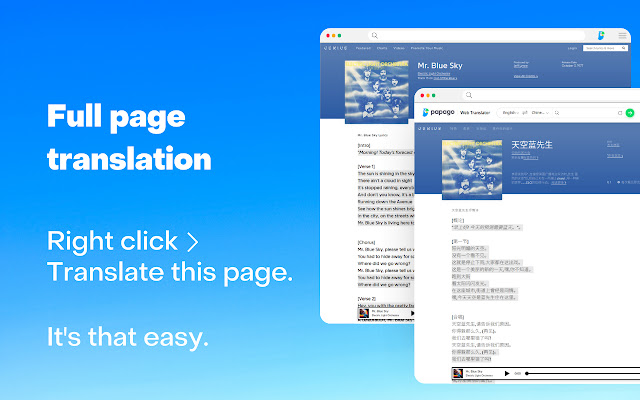
Translating entire web pages is also possible, just by clicking "Translate this page" within the context menu.
Basisinformatie over de Extensie
| Naam |  Translating with Papago Translating with Papago |
| ID | kjlcghnjglnjdagnpdhphkbljflodhda |
| Officiële URL | https://chrome.google.com/webstore/detail/translating-with-papago/kjlcghnjglnjdagnpdhphkbljflodhda |
| Beschrijving | An extension that utilizes Naver's Papago translation engine. |
| Bestandsgrootte | 90.13 KB |
| Aantal Installaties | 10,310 |
| Huidige Versie | 1.0.0 |
| Laatst Bijgewerkt | 2022-11-03 |
| Publicatiedatum | 2022-11-03 |
| Beoordeling | 2.63/5 Totaal 16 Beoordelingen |
| Ontwikkelaar | perrylohmann |
| [email protected] | |
| Betalingswijze | free |
| Ondersteunde Talen | en,es,ko |
| manifest.json | |
{
"update_url": "https:\/\/clients2.google.com\/service\/update2\/crx",
"author": "Joe Lohmann",
"background": {
"service_worker": "background\/background.js",
"type": "module"
},
"action": {
"default_icon": {
"512": "icons\/512.png",
"128": "icons\/128.png",
"64": "icons\/64.png",
"48": "icons\/48.png",
"38": "icons\/38.png",
"32": "icons\/32.png",
"19": "icons\/19.png",
"16": "icons\/16.png"
},
"default_title": "Papago Translator",
"default_popup": "popup\/popup.html"
},
"content_scripts": [
{
"all_frames": true,
"matches": [
" | |