G Map Market statistics
Obtain the business development scale of the region that the user cares about
Wat is G Map Market statistics?
G Map Market statistics is een Chrome-extensie ontwikkeld door hu378934289, en de belangrijkste functie is "Obtain the business development scale of the region that the user cares about".
Extensie Screenshots

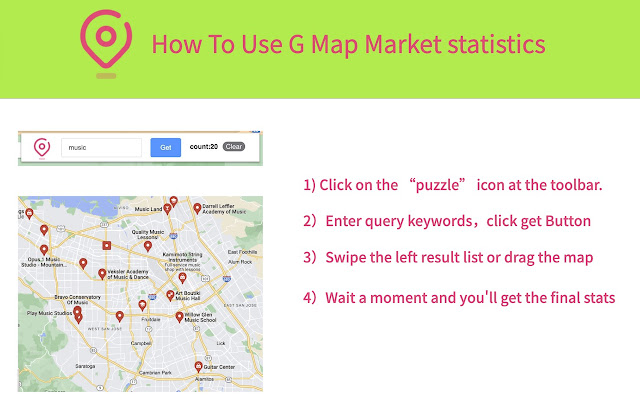
Download het CRX-bestand van de extensie G Map Market statistics
Download G Map Market statistics-extensiebestanden in crx-indeling, installeer Chrome-extensies handmatig in de browser of deel de crx-bestanden met vrienden om Chrome-extensies eenvoudig te installeren.
Instructies voor het Gebruik van de Extensie
                        Get business status from GMap. GMapMarketStatus is a small,free and useful tool to count leads.

WHAT is this Tool?

A smart tool for business leads, Quickly count the amount of data on a result pages.

FOR WHOM AND WHY

If your business caters to various business users, this tool can be useful for you.
For example, the following customers Restaurants, bars, grocery stores, garages, hairdressers, small clothing shops, art galleries, and so on?

In normal operations,You need to browse a lot of web data to understand the development of a certain business in a region.With the current tool, you can quickly understand the business scale of this region through keyword query, which greatly saves your time.


FEATURES

Using this tool, you can:
* Quickly understand the development scale of a business in a specified area, such as the catering industry.

The app is not magic. But tools are small and useful. Without this software, you can do it manually or hire a virtual assistant to do this job.

Please note: This tool is currently completely free. Hope this tool can help you.

NOW TO USE

1) Click on the “puzzle” icon at the toolbar. Find GMapMarketStatus icon and pin to the toolbar for quick access.
2) Enter the query keyword in the input box, click "Get" button,The tool will jump to Google Maps and query results based on keywords.
3) Use the mouse to drag the location to be queried on the map.
4) Wait a moment,See the number of results increasing over the toolbar icon.
5) Then you will know the development scale of the business represented by the keyword in this region.

ISSUES

If you find that the numbers change slowly, please wait a moment, the tool takes a little time to process.
Basisinformatie over de Extensie
| Naam |  G Map Market statistics G Map Market statistics |
| ID | knclggmgnkpkcgdekkckkclhpoahndai |
| Officiële URL | https://chrome.google.com/webstore/detail/g-map-market-statistics/knclggmgnkpkcgdekkckkclhpoahndai |
| Beschrijving | Obtain the business development scale of the region that the user cares about |
| Bestandsgrootte | 730 KB |
| Aantal Installaties | 611 |
| Huidige Versie | 1.0.6 |
| Laatst Bijgewerkt | 2023-03-29 |
| Publicatiedatum | 2023-02-14 |
| Beoordeling | 5.00/5 Totaal 4 Beoordelingen |
| Ontwikkelaar | hu378934289 |
| [email protected] | |
| Betalingswijze | free |
| Extensiewebsite | https://gmplus.io/ |
| URL van de Privacybeleid Pagina | https://gmplus.io/gmplus-private-policy |
| Ondersteunde Talen | id,ms,de,en,en-GB,en-US,fil,fr,nl,no,vi,tr,ca,da,et,es,es-419,hr,it,lv,lt,hu,pl,pt-BR,pt-PT,ro,sk,sl,fi,sv,cs,el,sr,bg,ru,uk,mr,hi,bn,gu,ta,te,ml,th,zh-CN,zh-TW,ja,ko |
| manifest.json | |
{
"update_url": "https:\/\/clients2.google.com\/service\/update2\/crx",
"background": {
"service_worker": "background.js"
},
"action": {
"default_icon": {
"128": "icons\/icon-128.png"
},
"default_popup": "popup.html",
"default_title": "__MSG_name__"
},
"icons": {
"128": "icons\/icon-128.png"
},
"default_locale": "en",
"manifest_version": 3,
"name": "__MSG_name__",
"description": "__MSG_description__",
"permissions": [
"storage",
"unlimitedStorage",
"webRequest"
],
"host_permissions": [
" | |