DoWebScraper
Turn structured HTML into a CSV or a TXT file.
Wat is DoWebScraper?
DoWebScraper is een Chrome-extensie ontwikkeld door http://quotinue.com, en de belangrijkste functie is "Turn structured HTML into a CSV or a TXT file.".
Extensie Screenshots
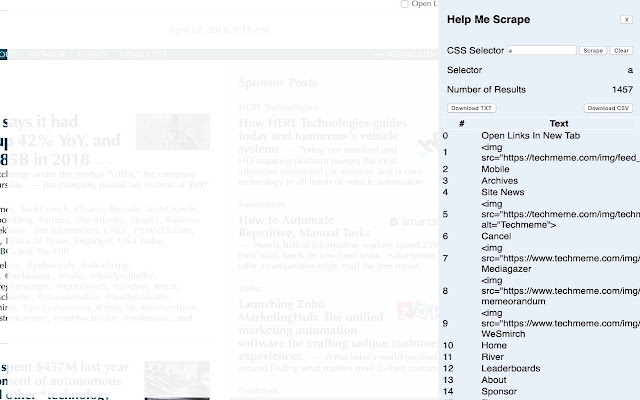
Download het CRX-bestand van de extensie DoWebScraper
Download DoWebScraper-extensiebestanden in crx-indeling, installeer Chrome-extensies handmatig in de browser of deel de crx-bestanden met vrienden om Chrome-extensies eenvoudig te installeren.
Instructies voor het Gebruik van de Extensie
                        Dead simple web scraper for data. You drop in a CSS selector and you get a table of data that you can download to a text or CSV file. I was looking for a dead simple scraper that just did what it was supposed to do without annoying me. None existed anymore so I decided to make my own. Do not expect fancy features but feel free to email me with new ideas.

1.0.3 improves the layout of the app itself and adds a "Clear" function.
Basisinformatie over de Extensie
| Naam |  DoWebScraper DoWebScraper |
| ID | knkolhdlegaanmhhlbknpelfmjlbfmkk |
| Officiële URL | https://chrome.google.com/webstore/detail/dowebscraper/knkolhdlegaanmhhlbknpelfmjlbfmkk |
| Beschrijving | Turn structured HTML into a CSV or a TXT file. |
| Bestandsgrootte | 32.72 KB |
| Aantal Installaties | 843 |
| Huidige Versie | 1.0.3 |
| Laatst Bijgewerkt | 2019-04-12 |
| Publicatiedatum | 2019-04-12 |
| Ontwikkelaar | http://quotinue.com |
| [email protected] | |
| Betalingswijze | free |
| Extensiewebsite | https://www.quotinue.com/introducing-dowebscraper/ |
| Ondersteunde Talen | en-US |
| manifest.json | |
{
    "update_url": "https:\/\/clients2.google.com\/service\/update2\/crx",
    "manifest_version": 2,
    "name": "DoWebScraper",
    "description": "Turn structured HTML into a CSV or a TXT file.",
    "version": "1.0.3",
    "browser_action": {
        "default_icon": "ScraperLogo.png",
        "default_title": "DoWebScraper"
    },
    "background": {
        "scripts": [
            "mybackground.js"
        ]
    },
    "web_accessible_resources": [
        "page.html"
    ],
    "permissions": [
        "tabs",
        "activeTab",
        "pageCapture"
    ],
    "icons": {
        "16": "logo16.png",
        "48": "logo48.png",
        "128": "logo128.png"
    }
} | |