百度去广告
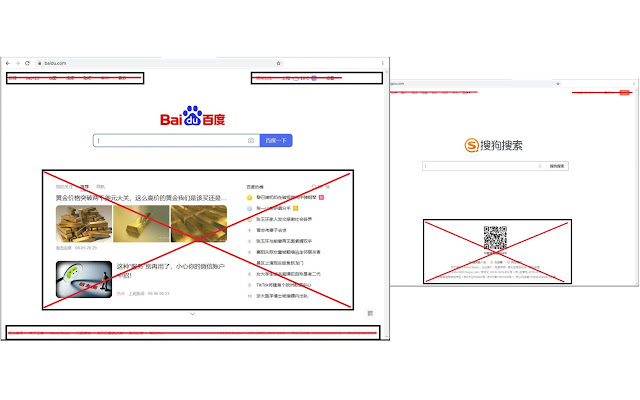
去除广告,开启纯净搜索
Wat is 百度去广告?
百度去广告 is een Chrome-extensie ontwikkeld door yaoyaox023, en de belangrijkste functie is "去除广告,开启纯净搜索".
Extensie Screenshots


Download het CRX-bestand van de extensie 百度去广告
Download 百度去广告-extensiebestanden in crx-indeling, installeer Chrome-extensies handmatig in de browser of deel de crx-bestanden met vrienden om Chrome-extensies eenvoudig te installeren.
Instructies voor het Gebruik van de Extensie
                        去除广告,开启纯净搜索。

目前支持平台(域名)包括:
- 百度搜索:baidu.com
- 百度贴吧:tieba.baidu.com
- 百度知道:zhidao.baidu.com
- 百度文库:wenku.baidu.com
- 搜狗搜索:sogou.com
- 搜狗微信搜索:weixin.sogou.com

支持的搜索平台后续会不断增加。
由于各个搜索引擎网站不断更新,本插件广告屏蔽效果可能会失效,本插件会不断更新,去屏蔽新出现的广告。

有任何问题、建议等可以直接留言。

更新记录:

20201127
v1.0.0.0
- 完善广告删除逻辑
- 完善状态存储逻辑

20200806
v0.0.0.6
主要是增加对搜狗搜索、搜狗微信搜索、百度贴吧、百度知道、百度文库页面广告屏蔽支持,具体包括:
- 增加搜狗搜索、搜狗微信搜索页面广告拦截
 - 屏蔽百度贴吧顶部栏广告
- 屏蔽百度贴吧信息流广告
- 屏蔽百度知道页面顶部栏,侧边栏(百度热榜)广告
- 屏蔽百度文库顶部栏、侧边栏、底部栏广告
- 屏蔽百度文库信息流广告


20200731
v0.0.0.5
- 增加屏蔽搜索结果页底部栏
- 增加屏蔽页面滑动过程中新出现广告
- 修改切换屏蔽效果功能时页面布局错乱的 bug
- 增加切换屏蔽效果提示 badge,on 表示打开屏蔽功能,off 表示关闭

20200714
v0.0.0.4
- 新增点击插件图标,切换屏蔽效果的功能

20200630
v0.0.0.3
- 去除搜索框页面的新增广告元素
- 去除搜索框页面底部 footer
- 去除搜索结果页面底部 footer

20200522
v0.0.0.2
- 去除主百度图标
- 去除主百度图标下方广告;

v0.0.0.1
- 搜索框页面,去除顶部标签栏;
- 搜索框页面,去除我的关注、推荐、导航栏;
- 搜索框页面,去除百度热榜;
- 搜索内容页面,去除广告条目
- 搜索内容页面,去除右侧百度热榜;
Basisinformatie over de Extensie
| Naam |  百度去广告 百度去广告 |
| ID | kokicnjmlbneodpmggommgkjfghhbnij |
| Officiële URL | https://chrome.google.com/webstore/detail/%E7%99%BE%E5%BA%A6%E5%8E%BB%E5%B9%BF%E5%91%8A/kokicnjmlbneodpmggommgkjfghhbnij |
| Beschrijving | 去除广告,开启纯净搜索 |
| Bestandsgrootte | 37.3 KB |
| Aantal Installaties | 24,055 |
| Huidige Versie | 1.0.0.0 |
| Laatst Bijgewerkt | 2020-11-27 |
| Publicatiedatum | 2020-06-30 |
| Beoordeling | 4.63/5 Totaal 49 Beoordelingen |
| Ontwikkelaar | yaoyaox023 |
| [email protected] | |
| Betalingswijze | free |
| Ondersteunde Talen | zh-CN |
| manifest.json | |
{
    "update_url": "https:\/\/clients2.google.com\/service\/update2\/crx",
    "manifest_version": 2,
    "name": "\u767e\u5ea6\u53bb\u5e7f\u544a",
    "version": "1.0.0.0",
    "description": "\u53bb\u9664\u5e7f\u544a\uff0c\u5f00\u542f\u7eaf\u51c0\u641c\u7d22",
    "permissions": [
        "https:\/\/www.baidu.com\/*",
        "http:\/\/www.baidu.com\/*",
        "https:\/\/www.sogou.com\/*",
        "http:\/\/www.sogou.com\/*",
        "https:\/\/weixin.sogou.com\/*",
        "http:\/\/weixin.sogou.com\/*",
        "https:\/\/tieba.baidu.com\/*",
        "http:\/\/tieba.baidu.com\/*",
        "https:\/\/zhidao.baidu.com\/*",
        "http:\/\/zhidao.baidu.com\/*",
        "https:\/\/wenku.baidu.com\/*",
        "http:\/\/wenku.baidu.com\/*",
        "storage"
    ],
    "browser_action": {
        "default_icon": "favicon_io\/favicon-16x16.png"
    },
    "background": {
        "scripts": [
            "background.js"
        ],
        "persistent": false
    },
    "content_scripts": [
        {
            "matches": [
                "https:\/\/www.baidu.com\/*",
                "http:\/\/www.baidu.com\/*",
                "https:\/\/www.sogou.com\/*",
                "http:\/\/www.sogou.com\/*",
                "https:\/\/weixin.sogou.com\/*",
                "http:\/\/weixin.sogou.com\/*",
                "https:\/\/tieba.baidu.com\/*",
                "http:\/\/tieba.baidu.com\/*",
                "https:\/\/zhidao.baidu.com\/*",
                "http:\/\/zhidao.baidu.com\/*",
                "https:\/\/wenku.baidu.com\/*",
                "http:\/\/wenku.baidu.com\/*"
            ],
            "js": [
                "content.js"
            ],
            "css": [
                "content.css"
            ],
            "run_at": "document_end"
        }
    ],
    "icons": {
        "16": "favicon_io\/favicon-16x16.png",
        "32": "favicon_io\/favicon-32x32.png",
        "48": "favicon_io\/favicon-48x48.png",
        "128": "favicon_io\/favicon-128x128.png"
    }
} | |