Bitcoin Address Lookup
Get instant balance of any bitcoin address on any webpage. Hold the left alt-key and click or select the address to get balance.
Wat is Bitcoin Address Lookup?
Bitcoin Address Lookup is een Chrome-extensie ontwikkeld door Eduard Karpa, en de belangrijkste functie is "Get instant balance of any bitcoin address on any webpage. Hold the left alt-key and click or select the address to get balance.".
Extensie Screenshots
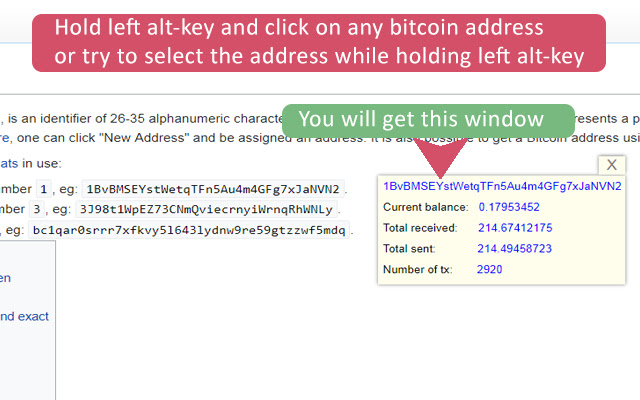
Download het CRX-bestand van de extensie Bitcoin Address Lookup
Download Bitcoin Address Lookup-extensiebestanden in crx-indeling, installeer Chrome-extensies handmatig in de browser of deel de crx-bestanden met vrienden om Chrome-extensies eenvoudig te installeren.
Instructies voor het Gebruik van de Extensie
Get instant balance of any bitcoin address on any web-page. Hold the left alt-key and click or select the address to get balance You will get current balance of the address and total number received and sent bitcoins. Basisinformatie over de Extensie
| Naam |  Bitcoin Address Lookup Bitcoin Address Lookup |
| ID | lllihajjkapokmiogohflioedecpkedc |
| Officiële URL | https://chrome.google.com/webstore/detail/bitcoin-address-lookup/lllihajjkapokmiogohflioedecpkedc |
| Beschrijving | Get instant balance of any bitcoin address on any webpage. Hold the left alt-key and click or select the address to get balance. |
| Bestandsgrootte | 291 KB |
| Aantal Installaties | 171 |
| Huidige Versie | 1.0.0.2 |
| Laatst Bijgewerkt | 2018-11-29 |
| Publicatiedatum | 2018-11-29 |
| Beoordeling | 4.50/5 Totaal 2 Beoordelingen |
| Ontwikkelaar | Eduard Karpa |
| [email protected] | |
| Betalingswijze | free |
| Ondersteunde Talen | en |
| manifest.json | |
{
    "update_url": "https:\/\/clients2.google.com\/service\/update2\/crx",
    "manifest_version": 2,
    "name": "Bitcoin Address Lookup",
    "version": "1.0.0.2",
    "description": "Get instant balance of any bitcoin address on any webpage. Hold the left alt-key and click or select the address to get balance.",
    "icons": {
        "16": "\/images\/icon16.png",
        "32": "\/images\/icon32.png",
        "64": "\/images\/icon64.png",
        "128": "\/images\/icon128.png"
    },
    "background": {
        "scripts": [
            "script\/background.js"
        ],
        "persistent": false
    },
    "content_scripts": [
        {
            "matches": [
                "http:\/\/*\/*",
                "https:\/\/*\/*"
            ],
            "css": [
                "css\/content.css"
            ],
            "js": [
                "script\/contentScript.js"
            ]
        }
    ],
    "permissions": [
        "storage",
        "http:\/\/*\/*",
        "https:\/\/*\/*",
        "contentSettings"
    ]
} | |