Photo Rules
This extension draws guide lines on images. It is usefull to study photo composition.
Wat is Photo Rules?
Photo Rules is een Chrome-extensie ontwikkeld door Paolodemo, en de belangrijkste functie is "This extension draws guide lines on images. It is usefull to study photo composition.".
Extensie Screenshots
Download het CRX-bestand van de extensie Photo Rules
Download Photo Rules-extensiebestanden in crx-indeling, installeer Chrome-extensies handmatig in de browser of deel de crx-bestanden met vrienden om Chrome-extensies eenvoudig te installeren.
Instructies voor het Gebruik van de Extensie
                        Update 0.6: Minor bugfix
Update 0.5: Added banner
            fixed functionality in Flickr (only in single photo view)
Update 0.4: fixed jquery min.map error
Update 0.3: added Triangles

---------------------------------------------------------------

This extension draws guide lines on images. It is usefull to study photo composition.
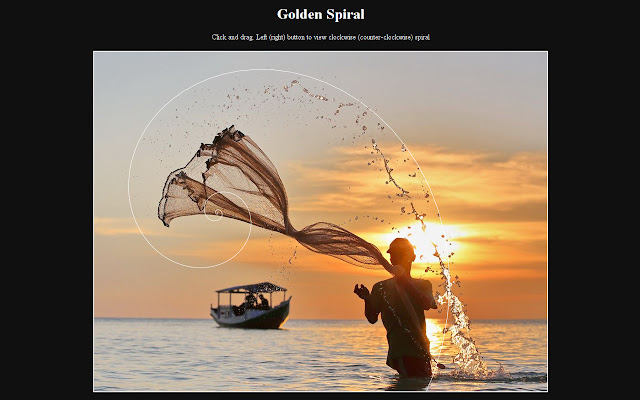
Usage: click before on the button in the toolbar and then on the image you want to study. A new tab will be opened containing the image with the following guides:
Center lines
Triangles
Rule of Thirds
Rule of Fifths
Diagonal lines
Golden section
Golden spiral
Basisinformatie over de Extensie
| Naam |  Photo Rules Photo Rules |
| ID | llomjalehmbhidabdjdbiadoeeioabbb |
| Officiële URL | https://chrome.google.com/webstore/detail/photo-rules/llomjalehmbhidabdjdbiadoeeioabbb |
| Beschrijving | This extension draws guide lines on images. It is usefull to study photo composition. |
| Bestandsgrootte | 839 KB |
| Aantal Installaties | 201 |
| Huidige Versie | 0.6 |
| Laatst Bijgewerkt | 2014-11-13 |
| Publicatiedatum | 2014-11-13 |
| Beoordeling | 4.14/5 Totaal 7 Beoordelingen |
| Ontwikkelaar | Paolodemo |
| [email protected] | |
| Betalingswijze | free |
| Ondersteunde Talen | en |
| manifest.json | |
{
    "update_url": "https:\/\/clients2.google.com\/service\/update2\/crx",
    "manifest_version": 2,
    "name": "Photo Rules",
    "description": "This extension draws guide lines on images. It is usefull to study photo composition.",
    "version": "0.6",
    "web_accessible_resources": [
        "js\/jquery-2.0.3.min.map"
    ],
    "icons": {
        "16": "images\/photo16.png",
        "48": "images\/photo48.png",
        "128": "images\/photo128.png"
    },
    "browser_action": {
        "default_icon": {
            "16": "images\/photo16.png",
            "19": "images\/photo19.png",
            "38": "images\/photo38.png",
            "48": "images\/photo48.png",
            "128": "images\/photo128.png"
        },
        "default_title": "Photo Rules"
    },
    "background": {
        "scripts": [
            "background.js"
        ]
    },
    "content_scripts": [
        {
            "matches": [
                "*:\/\/*\/*",
                "file:\/\/\/*"
            ],
            "js": [
                "js\/jquery-2.0.3.min.js",
                "js\/jquery.svg.min.js",
                "js\/jquery.mousewheel.js",
                "draw_rule.js"
            ],
            "all_frames": true
        }
    ],
    "content_security_policy": "script-src 'self' https:\/\/ssl.google-analytics.com; object-src 'self'",
    "permissions": [
        "tabs"
    ]
} | |