UMich Med New Tab
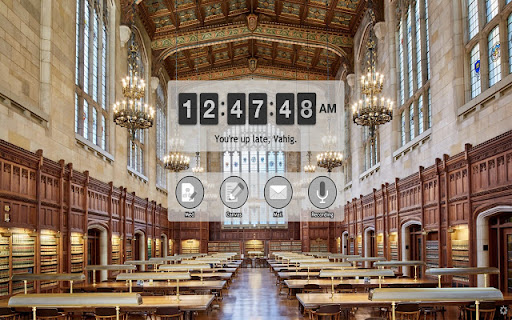
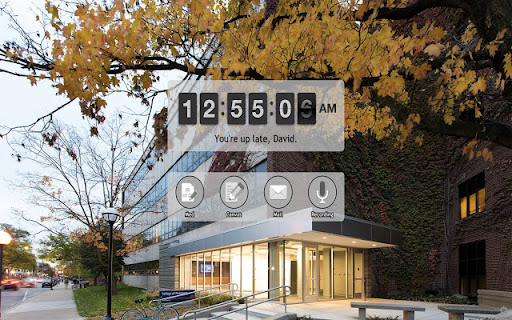
New tabs will open UMich medical student portal page, providing convenient links for students.
Wat is UMich Med New Tab?
UMich Med New Tab is een Chrome-extensie ontwikkeld door David Garry, en de belangrijkste functie is "New tabs will open UMich medical student portal page, providing convenient links for students.".
Extensie Screenshots

Download het CRX-bestand van de extensie UMich Med New Tab
Download UMich Med New Tab-extensiebestanden in crx-indeling, installeer Chrome-extensies handmatig in de browser of deel de crx-bestanden met vrienden om Chrome-extensies eenvoudig te installeren.
Instructies voor het Gebruik van de Extensie
                        New tabs will open UMich medical student portal page, providing convenient links for students.

▶ Support for 1st and 2nd year student portals
▶ Backgrounds are images of the University of Michigan.
▶ Open the settings page using the small gear icon on the bottom right of a new tab to change your name, language, and other display settings.

2022 Update: New email link
Basisinformatie over de Extensie
| Naam |  UMich Med New Tab UMich Med New Tab |
| ID | mcjemcajgnihpaciojkgpjcjdgikhfnl |
| Officiële URL | https://chromewebstore.google.com/detail/umich-med-new-tab/mcjemcajgnihpaciojkgpjcjdgikhfnl |
| Beschrijving | New tabs will open UMich medical student portal page, providing convenient links for students. |
| Bestandsgrootte | 4 MB |
| Aantal Installaties | 63 |
| Huidige Versie | 1.0.1.0 |
| Laatst Bijgewerkt | 2022-01-25 |
| Publicatiedatum | 2019-08-06 |
| Beoordeling | 5.00/5 Totaal 3 Beoordelingen |
| Ontwikkelaar | David Garry |
| [email protected] | |
| Betalingswijze | free |
| Help Pagina-URL | https://forms.gle/NQsxvGEGtPCpU6an6 |
| Ondersteunde Talen | en |
| manifest.json | |
{
    "update_url": "https:\/\/clients2.google.com\/service\/update2\/crx",
    "manifest_version": 2,
    "name": "UMich Med New Tab",
    "version": "1.0.1.0",
    "description": "New tabs will open UMich medical student portal page, providing convenient links for students.",
    "options_page": "options.html",
    "icons": {
        "16": "images\/m.png"
    },
    "chrome_url_overrides": {
        "newtab": "index.html"
    },
    "permissions": [
        "storage"
    ]
} | |