Plucker
Pluck data from HTML tables.
Wat is Plucker?
Plucker is een Chrome-extensie ontwikkeld door ArlingtonCoder, en de belangrijkste functie is "Pluck data from HTML tables.".
Extensie Screenshots
Download het CRX-bestand van de extensie Plucker
Download Plucker-extensiebestanden in crx-indeling, installeer Chrome-extensies handmatig in de browser of deel de crx-bestanden met vrienden om Chrome-extensies eenvoudig te installeren.
Instructies voor het Gebruik van de Extensie
                        Plucker is a targeted screen-scraping utility for Chrome browsers.  It requires no setup whatsoever and is used for plucking data out of a table-driven presentation from a web page.

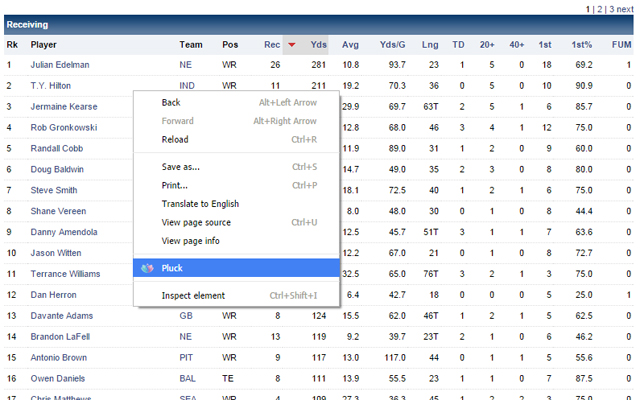
The screenshot to the left is a very obvious "table" of data.  Once Plucker is installed, right-click anywhere in the table and choose "Pluck."  That's it -- you can now right-click the table again and choose Plucker/Download to download your data as a CSV, which will open right up in any spreadsheet package.

For tables with multiple pages of data, right-click/Pluck the first page of data, as normal, then simply page through the rest of the pages, giving Plucker a second or two to pluck the data from each one.  Once you get to the last page, Plucker will have plucked all the data from all pages.
Basisinformatie over de Extensie
| Naam |  Plucker Plucker |
| ID | meeedeecefnlccpmgfeoadnjibegfege |
| Officiële URL | https://chrome.google.com/webstore/detail/plucker/meeedeecefnlccpmgfeoadnjibegfege |
| Beschrijving | Pluck data from HTML tables. |
| Bestandsgrootte | 69.74 KB |
| Aantal Installaties | 690 |
| Huidige Versie | 1.0.1 |
| Laatst Bijgewerkt | 2015-03-24 |
| Publicatiedatum | 2015-03-24 |
| Beoordeling | 4.40/5 Totaal 10 Beoordelingen |
| Ontwikkelaar | ArlingtonCoder |
| Betalingswijze | free |
| Ondersteunde Talen | en-US |
| manifest.json | |
{
"update_url": "https:\/\/clients2.google.com\/service\/update2\/crx",
"name": "Plucker",
"short_name": "Plucker",
"description": "Pluck data from HTML tables.",
"version": "1.0.1",
"manifest_version": 2,
"permissions": [
"contextMenus",
"storage",
"tabs"
],
"options_page": "options.html",
"background": {
"persistent": true,
"scripts": [
"background.js",
"jquery-1.7.min.js"
]
},
"content_security_policy": "script-src 'self' 'unsafe-eval'; object-src 'self'",
"icons": {
"16": "Plucker16.png",
"32": "Plucker32.png",
"48": "Plucker48.png",
"128": "Plucker128.png"
},
"page_action": {
"default_title": "Pluck",
"default_icon": "Plucker16.png"
},
"content_scripts": [
{
"matches": [
" | |