Tel Aviv University Login Auto-Complete
Tel Aviv University Login Auto-Complete
Wat is Tel Aviv University Login Auto-Complete?
Tel Aviv University Login Auto-Complete is een Chrome-extensie ontwikkeld door yoazmenda, en de belangrijkste functie is "Tel Aviv University Login Auto-Complete".
Extensie Screenshots
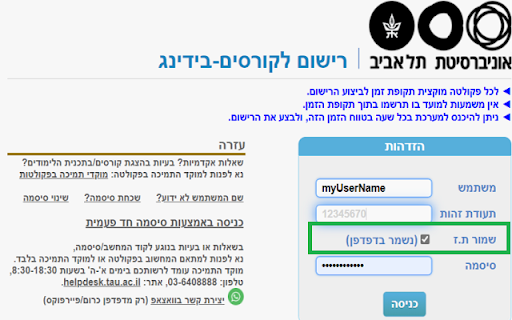

Download het CRX-bestand van de extensie Tel Aviv University Login Auto-Complete
Download Tel Aviv University Login Auto-Complete-extensiebestanden in crx-indeling, installeer Chrome-extensies handmatig in de browser of deel de crx-bestanden met vrienden om Chrome-extensies eenvoudig te installeren.
Instructies voor het Gebruik van de Extensie
                        Tired of manually typing your ID every time you want to log in?
Use this extension to auto fill your ID for you in the login screen.

Security:
(1) *Only* local storage is used ,and nothing is ever sent outside of your computer.
(2) The extension has no access to any other website besides TAU login screen.
Basisinformatie over de Extensie
| Naam |  Tel Aviv University Login Auto-Complete Tel Aviv University Login Auto-Complete |
| ID | mfejllcneidanomhkmafhmiajgmdnigo |
| Officiële URL | https://chromewebstore.google.com/detail/tel-aviv-university-login/mfejllcneidanomhkmafhmiajgmdnigo |
| Beschrijving | Tel Aviv University Login Auto-Complete |
| Bestandsgrootte | 54.04 KB |
| Aantal Installaties | 240 |
| Huidige Versie | 0.2 |
| Laatst Bijgewerkt | 2020-11-17 |
| Publicatiedatum | 2020-11-16 |
| Beoordeling | 5.00/5 Totaal 2 Beoordelingen |
| Ontwikkelaar | yoazmenda |
| [email protected] | |
| Betalingswijze | free |
| Ondersteunde Talen | en |
| manifest.json | |
{
    "update_url": "https:\/\/clients2.google.com\/service\/update2\/crx",
    "name": "Tel Aviv University Login Auto-Complete",
    "version": "0.2",
    "description": "Tel Aviv University Login Auto-Complete",
    "permissions": [
        "storage"
    ],
    "content_scripts": [
        {
            "js": [
                "nidp.js"
            ],
            "all_frames": true,
            "run_at": "document_end",
            "matches": [
                "https:\/\/nidp.tau.ac.il\/nidp*"
            ]
        },
        {
            "js": [
                "ims.js"
            ],
            "all_frames": true,
            "run_at": "document_end",
            "matches": [
                "https:\/\/www.ims.tau.ac.il\/*"
            ]
        }
    ],
    "icons": {
        "16": "images\/icon16.png",
        "32": "images\/icon32.png",
        "48": "images\/icon48.png",
        "128": "images\/icon128.png"
    },
    "manifest_version": 2
} | |